concept ResourceBundle in category java

This is an excerpt from Manning's book Struts 2 in Action.
The text tag is used to display language-specific text, such as English or Spanish, based on a key lookup into a set of text resources. This tag retrieves a message value from the ResourceBundles exposed through the framework’s own internationalization mechanisms. We’ll explain this in greater detail in chapter 11. For now, we’ll just note the usage of the tag; it takes a name attribute that specifies the key under which the message retrieval should occur. The framework’s default Locale determination will determine the Locale under which the key will be resolved. Consult chapter 11 for full details on where to place properties files to make their resources available to this tag.
No surprises here. It’s just the same, but with Spanish! Once we’ve created these files, we just need to put them into the package directory structure next to the action class itself. With these two files in place, the framework automatically instantiates the PortfolioHomePage ResourceBundle every time a request comes in for the PortfolioHomePage action. Furthermore, the framework will have automatically determined the user’s locale based upon information sent from the browser, and created the ResourceBundle accordingly. Now, let’s see how we can pull messages out of those bundles. The following snippet from the PortfolioHomePage.jsp page shows the most common way of retrieving localized text, the Struts 2 text tag:
<h4><s:text name="homepage.greeting"/></h4>
<hr>
<h5><s:text name="site.entrance.text"/></h5>
<h5><a href="<s:url action='VisitorHomePage'/>">
     <s:text name="visitor"/>
   </a></h5>
<h5><a href="<s:url action='ArtistHomePage'/>"><s:text name="user"/></a>
</h5>
<hr>
As you can see, the Struts 2 text tag is simple. It’s similar to the Struts 2 property tag, but it takes a ResourceBundle key instead of an OGNL expression. Let’s analyze what’s happening in this front-end markup. First of all, this JSP snippet is the same code that created the screen capture shown in figure 11.2. In the previous versions of the Struts 2 Portfolio, we’ve simply hard-coded the welcome message directly into the JSP. Now, we’ve replaced that locale-sensitive message with a Struts 2 text tag that retrieves a ResourceBundle message based on the key passed in to the name attribute. If we’re executing in the presence of a Spanish locale, this key resolves to the corresponding message from the PortfolioHomePage_es.properties file. Otherwise, it resolves to the default English message. And that’s about all there is to it.
The com.opensymphony.xwork2.TextProvider interface exposes an overloaded method getText(). The many versions of this method have at their heart the retrieval of a message value based on a key. In other words, the TextProvider is the guy who takes your key and tracks down an associated message text from the ResourceBundles that it knows about. This guy pretty much handles all of the i18n duties of the framework. While you can always implement your own TextProvider, a default implementation is provided by the framework. The helper class ActionSupport, which we’ve been using throughout the book, provides this default implementation. Thus, as long as you have your action classes extend ActionSupport, you automatically get the built-in i18n support we discuss in this chapter.
As you already know, when the framework begins processing a request, one of the first things that it does is create the action object and push it onto the ValueStack. If your action extends ActionSupport, as ours do, you’ve automatically pushed a TextProvider onto the ValueStack as well. Very convenient. The default implementation of the TextProvider loads the ResourceBundles that have names matching the current action, as well as several others; we’ll explore the full process by which all the resource bundles are located in the next section. Figure 11.3 shows our TextProvider sitting on the ValueStack ready to serve messages from our PortfolioHomePage ResourceBundle.
Figure 11.3. Our PortfolioHomePage action extends ActionSupport and thus carries a default implementation of the TextProvider onto the ValueStack.
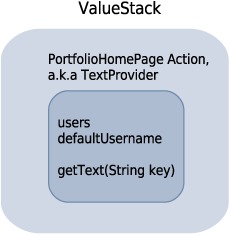
With our TextProvider on the ValueStack, our ResourceBundle messages are available to every part of the framework. The Struts 2 text tag, as seen in the following snippet, looks for a TextProvider on the ValueStack and asks that provider to retrieve the message based on the key you provide it:
<s:text name="homepage.greeting"/>Since the TextProvider is on the ValueStack, we can also access its getText() method with OGNL. This allows us to pull ResourceBundle messages into many places, including other Struts 2 tags. In order to do this, we take advantage of OGNL’s ability to call methods on objects. The following use of the Struts 2 property tag is absolutely equivalent to the previous Struts 2 text tag:
The Java support for i18n centers around two classes from the java.util package, ResourceBundle and Locale. In this section, we explain the roles these two classes play in i18n. The first step in i18n-ing an application is identifying all locale-sensitive text on the application’s pages. If you look at an unlocalized application, like our current Struts 2 Portfolio, you’ll find these message texts hard-coded in our JSP pages. If we’re to achieve any level of i18n, we have to move these texts out of the JSP page and into some sort of Java ResourceBundle. We’ll be doing this in a few moments.
But the ResourceBundle isn’t just a container for our texts. The ResourceBundle is a locale-sensitive object. Let’s clarify this concept briefly. The resources that are most commonly found in these bundles are message texts. If your internationalized homepage has a greeting, you’d need to have a version of that greeting for each locale you want your application to support. If your application supports Turkish and English users, then your ResourceBundle needs to contain the English and Turkish equivalents of this greeting, “Hello” and “Merhaba.” If these two greetings are contained by a locale-sensitive resource bundle, then that bundle will be aware of which locale is in play and will return the appropriate version of the “greeting” text when asked for it.