concept web application in category java

This is an excerpt from Manning's book Spring Roo in Action.
If you’re like us and have written a lot of web application code, you probably expect to spend a significant amount of time to configure a web application. Because you want to get started, you may just want to dive right in, install Spring MVC by hand, and write some code against these entities.
Here’s a nice customization for you—Jetty has a setting, scanIntervalSeconds, that will scan for changes to the Maven project, and reload the web application automatically. You can edit the Maven pom.xml file in the root of your project, and change the jetty-maven-plugin to take advantage of this feature:
roo> addon list

65 found, sorted by rank; T = trusted developer; R = Roo 1.2 compatible
ID T R DESCRIPTION ----------------------------------------------------
01 Y Y 3.0.5.RELEASE
02 - Y 1.0.0.0001 This bundle wraps the standard Maven artifact:
       google-collections-1.0.0.
...
08 - Y 0.7.0 JasperReport support for Spring MVC based projects. With
       JasperReport support you give to the project the feature of
       create...
...
42 Y Y 1.2.0.M1 Offers GIT integration in the project. Each
       successfully executed command will be automatically committed to
       a local GIT...
...
57 - - 1.0.0 The Executable WAR Addon configures the Maven project
       to makes it possible to create web applications that can be
       run from the command
...

This is an excerpt from Manning's book Portlets in Action.
Web applications generally target a part of the business process and not the complete business. For example, there would be separate web applications for customer management, inventory, order processing, and so on. These web applications give a disjointed view of the business, because the inventory application doesn’t know about orders placed, and the customer management application doesn’t know about the inventory status.
Think of a portlet bridge as a wrapper around your existing web application that’s responsible for converting portlet requests to something that your web application can understand and converting responses from the web application to something that your portlet environment can understand. Rewriting a web application as a portlet may be undesirable in many scenarios, mainly due to the learning curve associated with portlets, extra development and testing effort, and duplication of business logic. Rewriting an existing web application as a portlet may only be desirable if an appropriate portlet bridge doesn’t exist, or if the portlet bridge doesn’t support important portlet features, like using portlet events and public render parameters for inter-portlet communication.
In this chapter, we’ll first look at the concept of portlet bridges and how they expose a web application as a portlet. We’ll then move on to look at some specific portlet bridges, like Liferay Portal’s built-in iFrame portlet, PortletFaces Bridge for JavaServer Faces (JSF) web applications, and the Wicket framework’s WicketPortlet class, which acts as a portlet bridge for Wicket web applications. We’ll look at how a Book Catalog web application developed using JSF or Wicket is exposed using these portlet bridges. We’ll also look at how you can use a standard directory structure to keep artifacts specific to web and portlet applications separate.
A portlet bridge is a component that sits between the portlet environment and a web application. It’s responsible for bridging the differences between the portlet environment and the environment in which the web application is designed to execute.
A portlet bridge abstracts the web application environment from the portlet environment and vice versa, which makes it possible to develop web applications without knowledge of portlet technology. You can use an appropriate portlet bridge at a later date to expose it as a portlet.
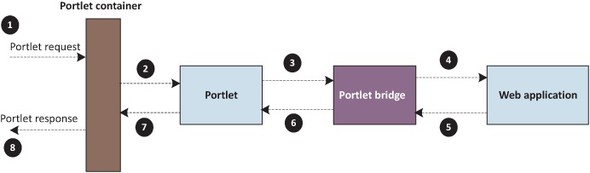
Figure 14.1 shows the flow of a portlet request and response when a portlet bridge is used to adapt a web application to the portlet environment.

This is an excerpt from Manning's book AspectJ in Action, Second Edition.
Dynamic languages have recently gained popularity, and rightly so. A dynamic language, when combined with a framework that takes advantage of the underlying language, can provide powerful solutions for a set of problems. For example, Ruby combined with Rails, or Groovy combined with Grails, provides simpler solutions for certain kinds of web applications. Most dynamic languages offer a meta-programming facility that lets you modify the structure and behavior of a program during its execution. The meta-programming facility may modularize crosscutting concerns. For example, you can modify an existing method’s implementation to wrap it with code that performs the crosscutting functionality before or after dispatching the original method.
GlassFish 2.0+ web applications (which use Tomcat and therefore match Tomcat in the required application-level changes)

This is an excerpt from Manning's book Struts 2 in Action.
While many Java developers today may have worked on web applications for most of their careers, it’s always beneficial to revisit the foundations of the domain in which one is working. A solid understanding of the context in which a framework such as Struts 2 is situated provides an intuitive understanding of the architectural decisions made by the framework. Also, establishing a common vocabulary for our discussions will make everything easier throughout the book.
A web application is simply, or not so simply, an application that runs over the Web. With rapid improvements in Internet speed, connectivity, and client/server technologies, the Web has become an increasingly powerful platform for building all classes of applications, from standard business-oriented enterprise solutions to personal software. The latest iterations of web applications must be as full featured and easy to use as traditional desktop applications. Yet, in spite of the increasing variety in applications built on the web platform, the core workflow of these applications remains markedly consistent, a perfect opportunity for reuse. Frameworks such as Struts 2 strive to release the developer from the mundane concerns of the domain by providing a reusable architectural solution to the core web application workflows.
Before you deploy servlets, you must first package them according to the standards. The basic unit of servlet packaging is known as a web application. Though it sounds like a general term, a web application is a specific thing in servlet terminology. The Servlet Specification defines a web application as “a collection of servlets, HTML pages, classes, and other resources.” Typically, a web application will require several servlets to service its clients’ requests. A web application’s servlets and resources are packaged together in a specific directory structure and zipped up in an archive file with a .war extension. A WAR file is a specialized version of the Java JAR file. The letters stand for web application archive. When we discuss chapter 2’s HelloWorld application, we’ll see exactly how to lay out a Struts 2 application to these standards.
Once you’ve packaged the web application, you need to deploy it. Web applications are deployed in servlet containers. A servlet is a special kind of application known as a managed life cycle application. This means that you don’t directly execute a servlet. You deploy it in a container and that container manages its execution by invoking the various servlet life cycle methods. When a servlet container receives a request, it must first decide which of the servlets that it manages should handle the request. When the container determines which servlet should process a request, it invokes that servlet’s service() method, handing it both a request and response object. There are other life cycle methods, but the service() method is responsible for the actual work.
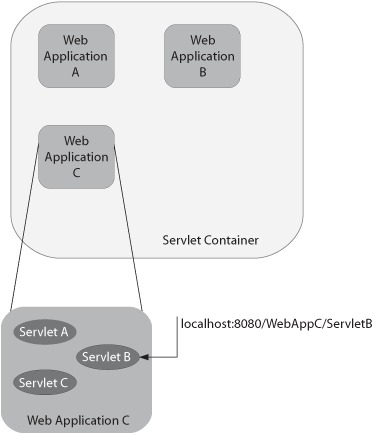
Figure 1.2 shows the relationship between the key players of the Servlet API: servlets, web applications, and the servlet container.
Now that we’ve oriented ourselves to the domain in which web applications operate, we can talk about how a framework can alleviate the work of building them. To build powerful web applications, most developers need all the help they can get. Unless you want to spend hours upon hours solving the tasks outlined in the previous section by hand, you must use a framework, and there are a lot of them. Let’s start with a fundamental question.