concept async in category javascript

This is an excerpt from Manning's book The Joy of JavaScript.
At a glance, you will notice the embellishments added to the function definition (async) and to each asynchronous call (await). This feature is available after Node 8 LTS. The intention behind this feature is that your code continues to be written as if all I/O calls blocked, when in fact they are all asynchronous and the event loop is not sacrificed waiting for data. We could have written this code using promises or (less desirably) using callbacks. In any case, it won’t look as streamlined as this. It’s important to keep in mind that this syntactic sugar is just masking the fact that it’s using promises behind the scenes. Hence, calling:
At this point, you’ve learned how to construct a promises, form chains, and combine multiples of them. But if promises make asynchronous programming so much easier, why not elevate them from being an API to become actual programming language syntax. Let’s shift our discussion to the async/await feature.

This is an excerpt from Manning's book Third-Party JavaScript.
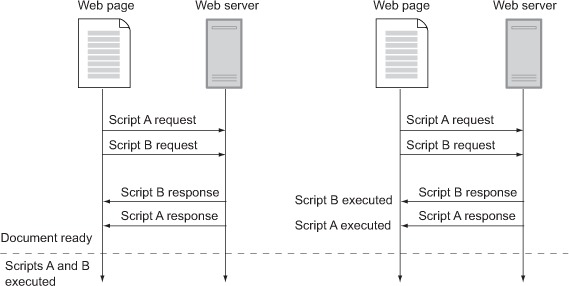
The second attribute, async, is a more recent feature of HTML5, and behaves slightly differently than defer. Again, it indicates that the downloaded file won’t call document.write and can be downloaded as the page is being processed. But unlike defer, which executes the file only after the page is completely parsed, scripts loaded with the async attribute are executed as soon as they’re downloaded—whether the page is finished processing or not. This means that async scripts can potentially execute sooner than scripts loaded using defer (see figure 2.3).
<script async
   src="http://camerastork.com/widget.js?product=1234"></script>
Though both async and defer are helpful attributes that prevent your script from blocking the publisher’s page, we feel that async is the better choice for third-party scripts. Because async scripts can execute before the page is finished processing, they enable your script files to initialize and run your application as soon as possible. Deferred scripts, on the other hand, could spend a long time waiting for the browser to finish processing the page.
Alas, like many HTML5 features, the downside to the async attribute is that it isn’t supported by every browser. You’ll find that only “modern” browsers like Firefox 3.6+, Chrome, Safari, and Internet Explorer 10 recognize it. That leaves plenty of old, but still actively used, browsers that don’t support the async attribute. But we’re not out of luck: there’s another way to load scripts asynchronously that’s backward compatible with such older browsers.