concept breakpoint in category javascript

This is an excerpt from Manning's book Third-Party JavaScript.
Let’s go back to your Camera Stork bug: users can’t publish reviews on a particular publisher’s website and you don’t have any clues as to what could be causing this. Let’s presume that you’ve managed to replicate this behavior on the publisher’s website. You can now run unminified and unobfuscated code, so you’ll probably want to set a breakpoint—a special statement telling the debugger where to pause its execution—near code that you suspect is causing the bug. There’s no single rule that tells where to place your breakpoints; you’ll have to make an educated guess. With the Camera Stork bug we’re investigating, it makes sense to place a breakpoint at some point between where the user review is submitted and where it’s sent to the server.
Because you have absolutely no idea what’s causing the failure, it’s a good strategy to pause at the beginning of the function and see what happens. There are two ways to place a breakpoint: using the debugger’s UI or placing the special debugger keyword inside your JavaScript code. When using the latter, you need to insert it just before the line on which you’d like to pause the execution:
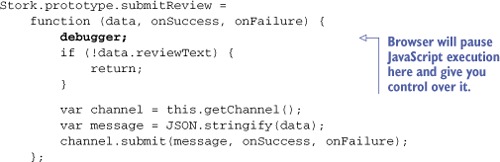
Now you have to inspect whether your input data is correct—because if it isn’t, you’ll have to go back and put a breakpoint earlier in the code. In this case, the data happens to be valid, so you’ll have to dig deeper into this function in order to find the source of the bug. You’ll use the debugger to step through the code until the line where the message variable is created.