concept document in category javascript

This is an excerpt from Manning's book Secrets of the JavaScript Ninja, Second Edition.
The primary global object that the browser exposes to the JavaScript engine is the window object, which represents the window in which a page is contained. The window object is the global object through which all other global objects, global variables (even user-defined ones), and browser APIs are accessible. One of the most important properties of the global window object is the document, which represents the DOM of the current page. By using this object, the JavaScript code can alter the DOM of the page to any degree, by modifying or removing existing elements, and even by creating and inserting new ones.
In this section, we’ll look at an efficient way to insert HTML into a document at any location, given that HTML as a string. We present this particular technique because it’s frequently used to create highly dynamic web pages in which the user interface is modified as a response to user actions or data incoming from the server. This is particularly useful for the following scenarios:
After we have the DOM nodes, it’s time to insert them into the document. A couple of steps are required, and we’ll work through them in this section.
Because we have an array of elements that we need to insert—potentially into any number of locations within the document—we want to try to keep the number of operations performed to a minimum. We can do this by using DOM fragments. DOM fragments are part of the W3C DOM specification and are supported in all browsers. This useful facility gives us a container to hold a collection of DOM nodes.

This is an excerpt from Manning's book Third-Party JavaScript.
There’s a way to pass parameters to your script as part of the URL without sending the product ID to the server. Instead of including the product ID in the URL’s query string, you can pass it as part of the URL’s fragment identifier. The fragment identifier is the last part of the URL, and includes everything that comes after the hash (#) character. It’s traditionally used to identify a portion of a document, and unlike the query string, isn’t sent to the server by the browser.
Listing 3.9. Applying style rules to a document’s body element
function applyStyles(document, styles) { var body = document.getElementsByTagName('body')[0]; for (var property in styles) { if (!styles.hasOwnProperty(property)) return; body.style[property] = styles[property]; } } applyStyles(iframe.contentWindow.document, getBasicStyles(container));
But how do you safely render to the page if the document isn’t ready? There’s one way: by inserting either before or into a known, closed element that has already been processed by the browser. Ideally this element is defined by publishers before your script include snippet—that way, it’s guaranteed to exist in the DOM before your script even executes.
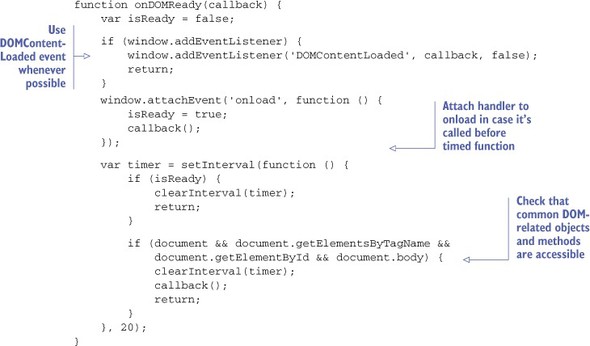
You should never boldly assume that this element is always available. There’s always the possibility that it’s added incorrectly by the publisher after the script include snippet, or even at the bottom of their HTML source. In that case, you’ll have to fall back to waiting for the document ready event. A utility function for determining when the document is safe to manipulate is shown next.
Note that Firefox, Opera, Chrome, and Safari support an event called DOMContent-Loaded that fires when the document is ready. For those browsers that don’t support this event, this function implements a series of fallback tests to determine when it’s ready.
By skipping the document ready event as much as possible, you cut in line ahead of most scripts and are often capable of rendering much sooner. This gives your application the illusion of being faster, since you’ll (probably) never end up being the last widget loading on the publisher’s page.