concept message in category javascript
This is an excerpt from Manning's book Node.js in Practice.
There’s also an official IRC chat room: #node.js on irc.freenode.net. It’s extremely busy though, so be prepared for a lot of messages. Informative discussions do happen in #node.js, so some patience may be rewarded!
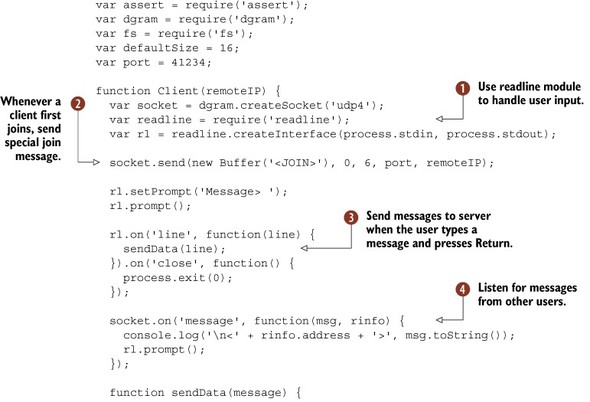
Before sending any data, we need to make sure the file has been opened and is ready for reading, so the readable event is subscribed to
. The callback for this event executes the sendData function. This will be called repeatedly for each chunk of the file—files are read in small chunks at a time using inStream.read
, because UDP packets can be silently dropped if they’re too large. The socket.send method is used to push the data to the server
. The message object returned when reading the file is an instance of Buffer, and it can be passed straight to socket.send.
TCP connections are different from UDP, and this is apparent in the design of Node’s networking API. TCP connections are represented as a stream of bidirectional events, so sending a message back to the sender is straightforward—once a client has connected you can write messages to it at any time using client.write. UDP, on the other hand, is connectionless—messages are received without an active connection to the client.
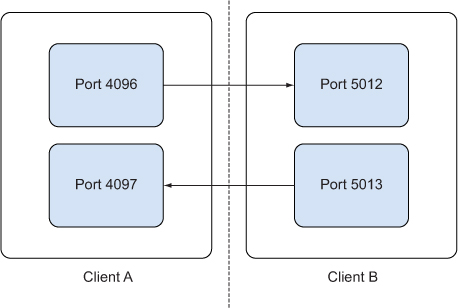
There are some protocol-level similarities that enable you to respond to messages from clients, however. Both TCP and UDP connections use source and destination ports. Given a suitable network setup, it’s possible to open a connection back to the client based on this information. In Node the rinfo object that’s included with every message event contains the relevant details. Figure 7.5 shows how messages flow between two clients using this scheme.
Figure 7.5. Even though UDP isn’t full-duplex, it’s possible to create connections in two directions given a port number at both sides.
Listing 7.5 presents a client-server program that allows clients to connect to a central server over UDP and message each other. The server keeps details of each client in an array, so it can refer to each one uniquely. By storing the client’s address and port, you can even run multiple clients on the same machine—it’s safe to run this program several times on the same computer.
function fail(actual, expected, message, operator, stackStartFunction) {
  throw new assert.AssertionError({
    message: message,
    actual: actual,
    expected: expected,
    operator: operator,
    stackStartFunction: stackStartFunction
  });
}

This is an excerpt from Manning's book Third-Party JavaScript.
Listing 5.1. JavaScript code listening to the message window event
function receiver(ev) { console.log("We've got a message!"); console.log("* Message:", ev.data); console.log("* Origin:", ev.origin); console.log("* Source:", ev.source); } if (window.addEventListener) { window.addEventListener("message", receiver, false); } else { window.attachEvent("onmessage", receiver); }If you’re familiar with JavaScript events—and we hope you are—this snippet should be trivial. Note that the listener function will receive every message that’s sent to the host window; any JavaScript code that can target this window can send it a message, including untrusted parties. The browser doesn’t verify the source of the message, so it’s up to you to check the origin property and decide whether the message is legitimate or not. As a rule of thumb, you should always check the origin property by comparing it to a list of your trusted hosts to make sure that you trust the message’s sender.
It’s also a good idea to check the message itself, just to be certain that it doesn’t contain any values you don’t expect. If for some strange reason you’re thinking about blindly evaluating the message using the eval function, ask your neighbor to punch you and think again. Blindly evaluating the message using eval is like giving any script on the page—including potentially malicious ones—a JavaScript console running on your domain with permission to do whatever they want. Not a good idea.
The code in listing 5.2 implements the diagram we showed you in figure 5.1. The receiver listens to all messages but recognizes only those that originate from camerastork.com. If the message from camerastork.com contains a string "hello", the receiver sends back a message with a string "world". Note that messages between window objects are all done on the client—they don’t perform any network requests and are blazingly fast.
As you can see from the examples, the window.postMessage API is simple and it solves just one problem—the problem of exchanging messages between windows. Everything else—from simple origin checks to the complex relationships between messages—is outside of the window.postMessage specification and must be handled by you. We’ll show you how to build a simple request/response system later in this chapter. But now let’s talk about something that most often kills all the excitement about shiny, new HTML or JavaScript features. Let’s talk about browser compatibility. (Spoiler: it’s not that bad.)
