concept production in category javascript

This is an excerpt from Manning's book Data Wrangling with JavaScript.
Many books only deal with data analysis, which Wikipedia describes as the process of working with and inspecting data to support decision-making. I view data analysis as a subset of the data-wrangling process. A data analyst might not care about databases, REST APIs, streaming data, real-time analysis, preparing code and data for use in production, and the like. For a data wrangler, these are often essential to the job.
Listing 9.7 Grouping and summarizing daily weather data by month (listing-9.7.js)
const dataForge = require('data-forge');
const renderMonthlyBarChart = require('./toolkit/charts.js').renderMonthlyBarChart;    #1
const average = require('./toolkit/statistics.js').average;    #2

const dataFrame = dataForge
 .readFileSync("./data/nyc-weather.csv")    #3
    .parseCSV()
 .parseInts("Year")    #4
 .where(row => row.Year === 2016)    #5
 .parseFloats(["MinTemp", "MaxTemp"])    #6
 .generateSeries({    #7
 AvgTemp: row => (row.MinTemp + row.MaxTemp) / 2,    #7
 })    #7
 .parseInts("Month")    #8
 .groupBy(row => row.Month)    #9
 .select(group => {    #10
        return {
            Month: group.first().Month,
 MinTemp: group.deflate(row => row.MinTemp).min(),    #11
 MaxTemp: group.deflate(row => row.MaxTemp).max(),    #12
 AvgTemp: average(group    #13
 .deflate(row => row.AvgTemp)    #13
 .toArray()    #13
 )    #13
        };
    })
 .inflate();    #14

console.log(dataFrame.toString());    #15

renderMonthlyBarChart(    #16
 dataFrame,    #16
 "AvgTemp",    #16
 "./output/nyc-monthly-weather.png"    #16
 )    #16
 .catch(err => {    #17
        console.error(err);
    });

#1   Let's assume we already have functions to render charts; I'll show you how to create functions similar to these in chapters 10 and 11.
#2   Reuses the average function we created earlier
#3   I'm using synchronous file reading to make the code easier to read; in production I’d use the async version.
#4   Parses the Year column from the CSV file
#5   Filters records; we’re only interested in 2016.
#6   Parses more columns we’re interested in
#7   Generates a column for average daily temperature
#8   Parses the Month column
#9   Groups data records by the Month column
#10   For each month, group generates a new record that summarizes the month.
#11   Extracts MinTemp values for the month and gets the minimum
#12   Extracts MaxTemp values for the month and gets the maximum
#13   Computes the average temperature for the month
#14   Converts back to a DataFrame because groupBy returns a series
#15   Prints our data to the console to double-check it
#16   Renders the NYC monthly weather chart
#17   Chart rendering is asynchronous, so we use a callback to handle any error that might occur.
We might have an automated report that’s sent to hundreds of users who need that information on a daily basis. Can it do that consistently without failing over? When our emergency warning system triggers and the SMS alert is sent to emergency responders, how do we ensure the system can do that without issue? These are the kinds of issues we must ponder when moving to production.
Getting to production requires an update to our workflow. The workflow shown in figure 14.1 is different to what you might remember from chapter 1 of this book. It now shows that the end result of development is the production deployment of the application. That’s to say that the code for the app is eventually moved from development to its production environment.
Figure 14.1 Development workflow and when you should start thinking about production
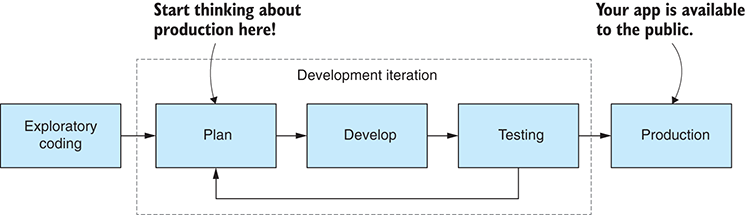
Figure 14.1 indicates that we need to start thinking about production way back in our planning stage. Thinking more about architecture and design, not to mention testing, early on in development can save us much pain later when we’ll inevitably run into issues relating to reliability, security, and performance.
I wouldn’t be surprised if you come away from this chapter feeling a little overwhelmed. Getting to production is a difficult affair, and you have so much to consider. But if you should take away one thing from this chapter, it’s not that production is complicated (although it is), and it’s not that getting to production involves solving many problems (although it does).
If you remember one thing, please remember this: the problems that come with production are good problems to have. That’s because these are the problems that come with success. If your app isn’t successful, you won’t have these problems.
Now you have something of a handle on many of the facets of bringing your data pipeline to production. This is indeed a big and complex area, and when you come to production, you’ll surely encounter your own unique problems. I could write a whole book on this subject, but hopefully you have enough for now to start on your own road to production and the completion of your product, whatever that may be. Good luck, my friend. Please enjoy the journey and always be learning new things.

This is an excerpt from Manning's book Node.js in Practice.
This technique outlines how to use Node with PaaS providers, and has tips on how to configure and maintain applications in production. The focus is on the practical aspects of deployment and maintenance, rather than pricing or business models.

This is an excerpt from Manning's book Single Page Web Applications: JavaScript end-to-end.
After a few well-intended attempts, we’ve learned to approach framework libraries with caution. We’ve found they can add complexity to an SPA rather than making development better, faster, or easier to understand. That doesn’t mean we should never use framework libraries—they have their place. But our example SPAs (and quite a few in production) work fine with just jQuery, some plugins, and a few specialized tools like TaffyDb. Often, simpler is better.
Obviously, changing the names of files every time we push to production isn’t desirable. Fortunately, changing parameters passed in to the file will bust the cache. This is typically done by appending a version number or some integer that our build system increments with every deployment. There are many ways to accomplish this, but the one we prefer is to have a separate file that has our incrementing value in it and append that number onto the end of our filename. Because the index page is static, we can set up our deployment tool to generate the finished HTML file and include the version number on the end of our includes. Let’s take a look at listing 9.3 for an example of what the cache buster would look like in the finished HTML.

This is an excerpt from Manning's book Third-Party JavaScript.
Now, we haven’t spoken much about performance yet in this book, but a well-accepted rule of web application performance is to limit the number of HTTP requests your code makes. Even though we’ve advocated separating your JavaScript into logically separate files and loading them individually to aid development, they can always be concatenated into a single library file when deployed into production. Not so with CSS. Because it’s a different file type, it can’t be bundled with your JavaScript into a single file. Or can it?
Finally, you must remember that—at their core—third-party JavaScript applications are still ordinary web applications. So in addition to problems specific to third-party scripts, you still have to deal with all the issues affecting normal web application development: old browsers with poor debugging tools, plugins that change the browser’s default behavior, and of course Heisenbugs that are only reproducible in production and not when you’re pointing a debugger at them.
When faced with a bug in production, it’s clear that you’ll want your unminified development code before debugging a publisher’s live website. Well look at two solutions for making that happen: rewriting proxies and feature switches. Both techniques have their pros and cons, and which technique you’ll use depends on the situation at hand. Let’s start with rewriting proxies.