concept content in category jboss
This is an excerpt from Manning's book JBoss in Action: Configuring the JBoss Application Server.
Let’s delve into the contents of each of these directories.
The first thing you need is some data to display within the CMS portlet. The software download for the book contains some simple files you can use for this purpose. Because some of the files are binary, it’s difficult to provide listings for them in the book. But the content is simple, and you can make your own if you like.
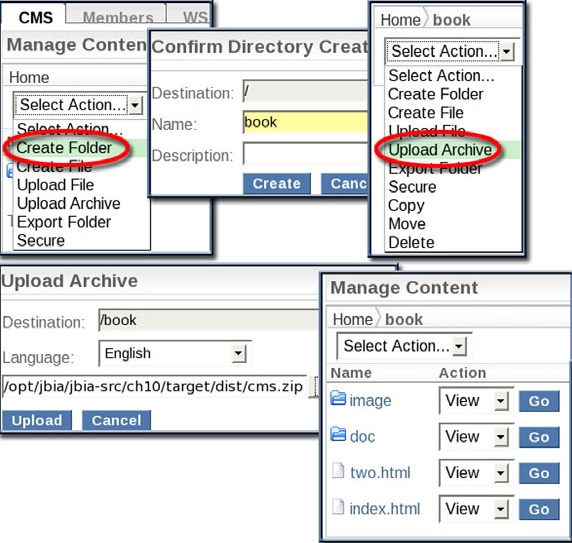
Log into the portal as admin, go to the Admin portal, and go to the CMS page. The CMS page contains the CMS Administration portlet, which you can use to manage the CMS content. Initially, the content consists of a single folder named default. A dropdown list box presents the possible actions you can perform, including creating a new folder and uploading a file.
You need to create another folder and add the content to that folder. To do this, you complete the following steps: