concept default in category jboss

This is an excerpt from Manning's book JBoss in Action: Configuring the JBoss Application Server.
If you use the installer, you inherently create your own customized configuration, albeit one that you’ll likely configure further after the installation process is complete. As we discussed earlier, while you’re going through the installer, you can select a name for your customized configuration. We recommend changing the name to something other than default to communicate the fact that the configuration that you’ve created isn’t the default server configuration.
If you’ve manually installed JBoss AS using the binary distribution, you can create your own configuration by making a copy of one of the prepackaged configuration directories under the server directory. For example, you could copy the default directory (and all of its contents recursively) to a directory called custom, as shown in figure 1.7.
Figure 1.7. To create a custom configuration, start by copying one of the prepackaged configurations under the server directory.
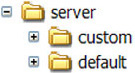
This copy can then be modified by changing configuration files or adding and removing applications and services that you may or may not need. Using one of the prepackaged configurations is the quickest way to get up and running, but they have settings that may not be desired in a production environment. For example, a secured management console might slow you down in a development environment, so security is disabled by default; but, you should secure or disable the management consoles when you go into production.
maxThreads —The maximum number of processing threads that can run concurrently. Because the server can’t create any more threads, this parameter ultimately limits the number of concurrent users. If all threads are being used, it’s up to the individual connector to provide queuing. If left unspecified, the default is 200 threads. acceptCount or backlog —Defines the length of a queue. When all request processing threads are busy, the connector starts queuing the requests. The HTTP connector uses the acceptCount attribute, and the AJP connector uses the backlog attribute. If the queue is full, the connector refuses the request. If left unspecified, the default is to queue 10 requests.
As we discussed in chapter 2, you copy your application directory to the deploy directory to deploy it into JBoss AS. In a standard binary installation, a web application called ROOT.war is in the deploy directory of the default configuration. If you start the application server and go to http://localhost:8080, you’ll see the root web application.
JBoss AS comes prepackaged with JBoss Web Server in both the default and the all configurations. The JBoss Web Server deployer lives in the jbossweb.sar subdirectory of server/xxx/deploy. The server/xxx/deployers jbossweb. deployer directory contains the necessary JAR files to deploy web applications. The following are some of the key files and directories: