concept portal in category jboss

This is an excerpt from Manning's book JBoss in Action: Configuring the JBoss Application Server.
As with all technology, portal technology has its own set of terms, and any discussion of portals requires that you first understand those terms. Figure 10.1 illustrates the relationships between the various objects that make up portal technology.
In the previous chapter, you developed a simple Image portlet and deployed it to the portal. In this chapter, we describe various configuration topics including security and the CMS.
If you’re new to portals and portlets and haven’t read through chapter 10, “The JBoss Portal and portlets,” we urge you to do so now. In that chapter, we define many terms and present many portal concepts that aren’t repeated here.
We use the Image portlet from chapter 10 to illustrate several of the topics in this chapter. These topics include configuring the appearance of the portlet window, working with multiple portlet instances, and securing the portal and portlets. Along the way, we also cover the CMS that comes with the Portal. We conclude the chapter by developing and deploying a customized portal. This final topic makes use of many of the capabilities that you’ll learn in this chapter, and helps you personalize the portal for your use.
Figure 11.9. Portal access control example. Users in Role1 have full access to the portal, but other users not in that role might not have access.
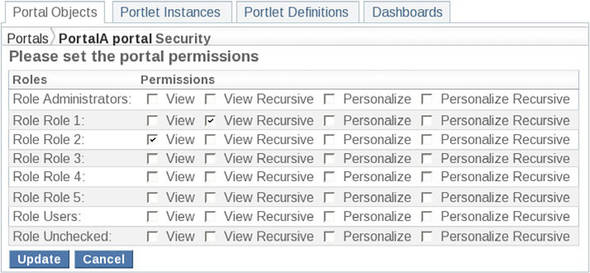
Table 11.2 defines the full access rights for the portal (note that the first row matches the rights illustrated in figure 11.9) and its pages. An empty cell denotes that no access control is specified for that combination. For this example, we ignore the User, Admin, and Unchecked roles.
Before we get to the contents of the *-object.xml file, let’s look at the portal, as shipped, to learn how the default portal is defined. If you look for *-object.xml files, you’ll find them in several locations, as identified in table 11.4.
Table 11.4. Locations and usage of the *-object.xml files that ship with the portal
Location
What this file defines
jboss-portal.sar/conf/data/default-object.xml
Defines the four portals: Default, Template, Dashboard, and Admin. For Default portal, defines the default (Home) page with its three portlet windows. For Admin portal, defines the default and Members pages.
jboss-portal.sar/portal-cms.sar/portal-cms.war/?WEB-INF/default-object.xml
Adds the CMS page to the Admin portal.
jboss-portal.sar/portal-wsrp.sar/?portal-wsrp-admin.war/WEB-INF/wsrp-object.xml
Adds the WSRP page to the Admin portal.
jboss-portal.sar/samples/portal-news-samples.war/EB-INF/efault-object.xml
Adds the News page to the Default portal.
jboss-portal.sar/samples/portal-weather-samples.war/ WEB-INF/default-object.xml
Adds the Weather page to the Default portal.
As you can see, the jboss-portal.sar/conf/data/default-object.xml file defines the basic layout for the portals, and the other *-object.xml files add to that basic definition. Knowing this, we can devise a plan to define our custom portal. We’ll leave the Admin, Template, and Dashboard portals intact, modifying only the layout for the Default portal. The Default portal will declare both pages with one portlet on each page. The image-object.xml file for the Image portlet will add the Image portlet window to the second page. We also must delete the default-object.xml file for the News and Weather portlets, or those pages will show up again.