concept server configuration in category jboss

This is an excerpt from Manning's book JBoss in Action: Configuring the JBoss Application Server.
When you start JBoss AS, you’re always starting a server configuration. A server configuration is a directory structure under the application server’s server directory that contains code, libraries, and configuration files for a set of services and applications that run when the server starts.
JBoss AS provides you with server configurations that you can use as starting points. You want to pick a server configuration that’s closest to your needs and then add, remove, and configure services as necessary. Some of the features that ship with the standard installation are less used and more often removed. We talk about how to remove these services in chapter 15 when we talk about slimming, or reducing the size of, the server.
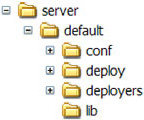
No files exist directly in the server folder, but the directory has one or more subdirectories. Each subdirectory contains what is called a server configuration. When you start JBoss AS, you start a particular server configuration. Each configuration contains a set of services and applications that are started when the server starts.