concept service in category jboss
This is an excerpt from Manning's book JBoss in Action: Configuring the JBoss Application Server.
JBoss AS is a Java Enterprise Edition 5 (Java EE 5)–compliant application server. A Java application server standardizes the application development architecture. It does this by defining several component models—standards that developers can use to develop components. These components can be deployed into an application server using a standard deployment model. When the components are running in the server, the server provides a set of services that are made available to the components.
The application component models include standards such as Enterprise Java-Beans (EJBs), Java Server Pages (JSP), and servlets. Some examples of Java EE services that are available to these components include remoting, security, transaction management, persistence, messaging, resource pooling, concurrency control, naming and directory services, and deployment.
An application server is a place to run your Java code. What do we mean by this? Without an application server, you’d write your application code and start your application using a main method. Somewhere in your application you’d need to start all the various services that you might need to access (for example, a database connection pool; a transaction manager; clustering services; security services). The left side of figure 1.1 shows an example of the code you’d have to write to start all the services that you reference.
Figure 1.1. The left side shows an application that runs outside of an application server. The right side shows an application that plugs into the application server.
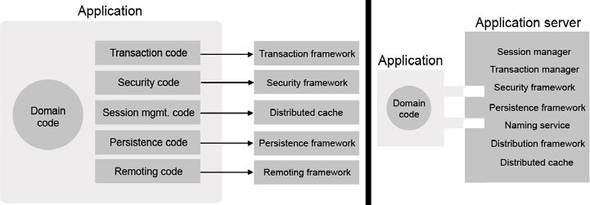
The left side of the figure shows an application with domain code and code that integrates into various frameworks that provide services to the domain code. In this style, you write code to integrate with the various services and, perhaps, the services themselves.
The right side of the figure shows how things work in an application server environment. With an application server, you write your application code using a standard component model, package it into a standard archive format, and then deploy the archive into the application server, which starts your application and all services that your application needs to access. Because you’re working within a standardized framework, the services are typically made available to your code transparently. You only have to provide metadata—in the form of annotations or Extensible Markup Language (XML)—to hook the services into your components; no code is typically necessary.
Programming with the Java EE standard and using an application server can drastically reduce the amount of integration code and configuration that you’d otherwise need. In addition, it often prevents you from having to write application services from scratch. Java EE 5 defines many components and services; a list can be found on the Sun website, http://java.sun.com/javaee/technologies/.
But we didn’t cover everything about taking JBoss AS into a production environment in the other chapters. In this chapter, we focus on several other things important to consider for production applications, such as selecting a platform, running JBoss AS as a service, and running multiple JBoss AS instances on the same machine. We also talk about how to remove unneeded services, secure the management applications, change the default data source, and precompile JSPs.
The downloaded files in the bin directory include a readme file that describes how to install the service. It’s simple—run the following command from the bin directory:
service installThis command installs a service whose short name is JBAS50SVC, and long name is JBoss Application Server 5.0. The service is set up to start automatically when the system is booted. You can use the typical Windows mechanisms, such as the Services control panel, the net command and the Get-Service cmdlet in the Windows PowerShell, to manage the service. For example, to start the service using the net command, enter the following at a command line:
net start jbas50svcTo stop the service using the Get-Service cmdlet, open a PowerShell window and enter
(get-service jbas50svc).stop()This is all fine and good, but what if you want to run multiple application servers as services? Glad you asked.
The first three changes provide the service short name
, long name
, and description
. The values of the variables are arbitrary, so you can use any values you like. Be careful to use a valid name for the service and make sure that it isn’t the same as an existing service. The next three lines are new. The application server is started and stopped in two locations, so it makes sense to define the start
and stop
options only once. In this example, the binding address (-b YYY) and the server URL (-S XXX) are undefined; you can set them based on your environment. The JAVA_HOME variable
is declared to ensure that the application server is started with the desired JVM. Setting JAVA_HOME isn’t necessary if it’s already defined among the system environment variables.
The command that installs the service identifies the service_accounting.bat file as the script to run to manage the service
. The commands to start
and stop
the application server use the environment variables defined earlier. Note that they also redirect standard output and error to log files specific to the service.
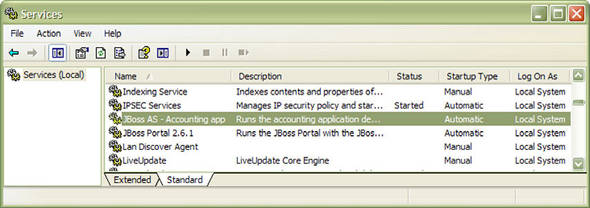
When both of the services have been installed, you can see them in the Services control panel, as illustrated in figure 15.3.
Note that the services initially aren’t running, but they’re configured with the automatic startup type so that they’ll start when the system is booted. You can start them now if you like. You’ve probably noticed that the services are using the local system account, which isn’t a good idea if you want to keep your system secure. Let’s look at how to change that next.
The application server comes with scripts that you can use to easily register your own service within Linux. For our example, we show you how to set up the service on Red Hat Fedora, but the same principles should apply equally to most Linux variants.
Services are defined in Linux by adding a script file to the /etc/init.d directory. These scripts must support commands to start, stop, and restart the service. The application server comes with three such scripts, named jboss_init_*.sh, in the bin directory. Because you’re working with Fedora, use the jboss_init_redhat.sh script.