concept theme in category jboss
This is an excerpt from Manning's book JBoss in Action: Configuring the JBoss Application Server.
You’ve now completed the first step on your journey and should understand the basic concepts behind configuring and managing the application server. In the chapters that follow, as we go over various services and components provided by the application server, we continually return to the theme of management and configuration, pointing out specific configuration files and their settings.
At this time: nothing. Granting or refusing personalization access has no effect on what the user can do. The user can edit portlet preferences, change the theme, and manipulate the dashboard regardless of whether she has personalization access or view access.
We have a confession to make: we lied. For the sixth requirement regarding the portal’s theme, we stated that we’d create a custom theme. Unfortunately, neither of us has a single artistic bone in our body, and we wouldn’t want to foist a ghastly theme on you. Additionally, creating a theme is a major undertaking, and there’s that simplicity requirement. We decided to modify an existing theme.
To do this, we made a copy of the Renaissance theme, which is the default theme for the Portal, and edited the theme using Photoshop. We used Photoshop to convert the muted blue used by Renaissance into the brownish-orange used on the cover of the book. We then got the color adjustment values from Photoshop (hue: -160, saturation: +39, lightness: +8, in case you’re interested) and applied those adjustments to all the graphics files. We replaced the existing Favorites icon with one that contains part of the swordsman from the cover of the book. Finally, we also made the same color adjustments to the colors present in the stylesheet. You can observe the results of our efforts in the source code for the book.
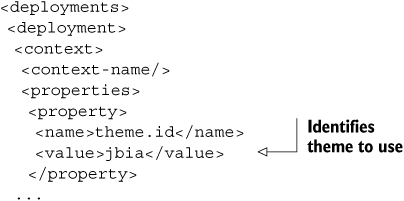
Now the customization of the theme is complete. To apply the theme to the custom portal, modify the theme.id property in the jboss-portal.sar/conf/data/default-object.xml, as shown in listing 11.12 .
If you want to learn more about portal themes and how to create them, the Reference Guide contains a lengthy chapter on that topic. With the instructions that we gave you on customizing a theme, the contents of the theme chapter in the Reference Guide, and a little bit of creativity and artistic talent, you should be able to create your own themes.