concept Windows in category jboss

This is an excerpt from Manning's book JBoss in Action: Configuring the JBoss Application Server.
The startup time on JBoss 5.0.0 CR1 was about 54 seconds on a dual-core Intel machine with 2 gigs of RAM that was running Windows. The startup time for JBoss 4.2 was less than 20 seconds. We anticipate that the startup time will improve significantly with either the GA version of JBoss AS 5 or one of the first minor releases that comes out shortly after.
You can evaluate these JVMs and draw your own conclusions; but, if performance isn’t a concern, we recommend defaulting to the Sun HotSpot JVM because it’s the most widely used, tested, and supported. The HotSpot JVM is available for Linux, Windows XP, Windows 2000, Windows NT, and Solaris. It also has support for 64-bit platforms.
$JAVA_HOME/bin/java -version (on Unix)
%JAVA_HOME\bin\java -version (on Windows)
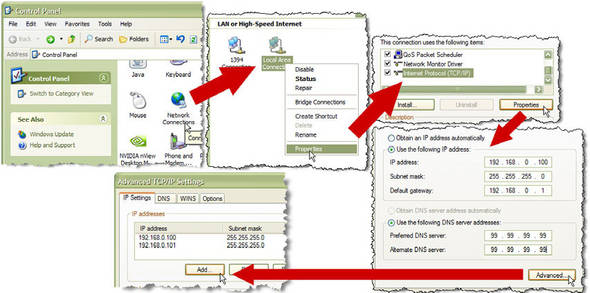
You can define virtual IP addresses in Windows using the Advanced TPC/IP Settings dialogbox. To get to this dialog box, select Network Connections from the Control Panel, right-click the desired connection (each network card will have its own connection), select the Internet Protocol (TCP/IP) item (it might be called Internet Protocol Version 4 (TCP/IPv4) or Internet Protocol Version 6 (TCP/IPv6)) in the list of items used by that connection, and click the Properties button. On the Internet Protocol Properties dialog box, choose the Use The Following IP Address option, and then click the Advanced button. On the Advanced TCP/IP Settings dialog box, you can add additional IP addresses for the network card. We recommend that you use an IP address on the same subnet and that you first ensure that no one else on that subnet is using the same IP address. The progression through the various dialog boxes is illustrated in figure 15.1.
Windows defines a specific API that must be implemented by an application that wishes to run as a service. Unfortunately, none of the Java executables implement that API. Fortunately, that fact isn’t a problem because Java SE defines a standard API, the Java Native Interface (JNI), that establishes how Java code and C/C++ code interact. You’re probably familiar with using JNI to access C functions from Java code, but you can also use JNI to enable C applications to host the JVM.