concept datum in category kafka

This is an excerpt from Manning's book Kafka in Action.
As many companies are facing a world full of data being produced from every angle, they are often presented with the fact that legacy systems might not be the best option moving forward. One of the foundational pieces of new data infrastructures that has taken over the IT landscape has been Apache Kafka. While Kafka, who is quoted above, was addressing something far different than IT infrastructures, the wording applies to the situation we find ourselves in today with the emergence of his namesake Apache Kafka. Kafka is changing the standard for data platforms. It is leading the way to move from Batch and ETL workflows to the near real-time data feeds. Batch processing, which was once the standard workhorse of enterprise data processing, might not be something to turn back to after seeing the powerful feature set that Kafka provides. In fact, it might not be able to handle the growing snowball of data rolling toward enterprises of all sizes unless something new is approached. With so much data, systems can get easily inundated with data. Legacy systems might be faced with nightly processing windows that run into the next day. To keep up with this ever constant stream of data, some with evolving data, processing this stream of information as it happens is a way to keep up-to-date and current on the state of the system.
If you were first introduced to Kafka through work in the Big Data space, it is a strong possibility that you might have used Flume in relation to your cluster. If you have ever heard the term "Flafka", you have definitely used this Kafka and Flume integration. Flume can provide an easier path for getting data into a cluster and would rather interact with configuration instead of custom code. If you wanted to ingest data into your Hadoop cluster and already have support from a vendor like Cloudera on these various pieces, Flume is a solid option to get data into your Kafka cluster.
Figure 8.1 shows an example of how a Flume agent is running on a node as its own process. It watches the files local to that server and then uses the configuration for the agent that you provided to send data to a sink destination.
Figure 8.1. Flume Agent
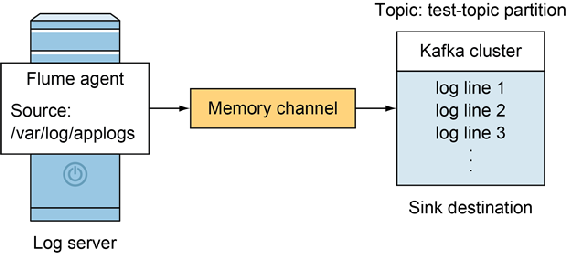
Let’s take a look again at integrating log files (our source of data) using a Flume agent into a Kafka topic (our data sink). Listing 8.1 shows a sample configuration file that would be used to set up a local Flume agent to watch a directory for changes. The changes would be placed in a Kafka topic titled
test-topic. To imagine this example with a comparison, it is like using acatcommand on a file in a directory to read a file and sending the result to a specific Kafka topic.
One of the other distinct items to think about is the distance you have between your applications consumers and the data in your cluster. Data being local to your applications should help with the amount of time it would take to pull data from the other side of the country if you only had a single cluster as your source. Let’s look at a couple of common cluster setups [3].
This is an excerpt from Manning's book Kafka Streams in Action: Real-time apps and microservices with the Kafka Streams API.
How to distribute data across a cluster to achieve scale in processing
We’ll also define what the state needs to look like and what the requirements are for using state when we discuss state stores in Kafka Streams. Finally, we’ll weigh the importance of timestamps and look at how they can help you work with stateful operations, such as ensuring you only work with events occurring within a given time frame or helping you work with data arriving out of order.
Listing 9.2. Kafka Streams source topic populated with data from Connect
Serde<StockTransaction> stockTransactionSerde =
 StreamsSerdes.StockTransactionSerde();                            #1
StreamsBuilder builder = new StreamsBuilder();
builder.stream("dbTxnTRANSACTIONS",
 Consumed.with(stringSerde,stockTransactionSerde))                 #2
       .peek((k, v)->
 LOG.info("transactions from database key {}value {}", k, v));     #3