concept document in category liferay

This is an excerpt from Manning's book Liferay in Action: The Official Guide to Liferay Portal Development.
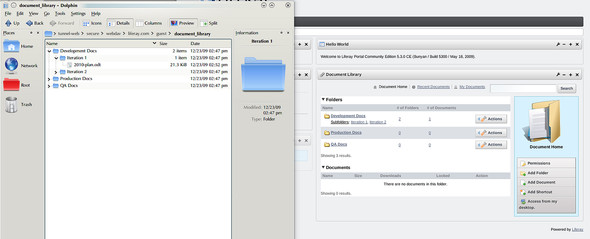
One of the portlets you can add to a page in Liferay is Document Library. This application provides a facility for sharing documents with your entire team. It keeps a complete version history of all your documents and is integrated with Liferay’s permissions system. This integration allows you to grant access to shared documents or prevent some of your users from accessing sensitive documents. And if your users need an easier way to access the documents than the web interface provides, Document Library supports WebDAV, allowing documents to be uploaded and downloaded through their operating system’s native interface. Figure 1.8 shows both of these interfaces.
Figure 1.8. Accessing the same folders in Document Library in the operating system via WebDAV or using the browser interface
Documents are one thing, but what about communication? Liferay’s portlets allow for communication in context, so your users can keep all the relevant information in the right place. Document Library allows your users to create discussion threads next to the documents they need to talk about. Wiki does the same thing. And applications are provided for both chat and email, so that currently logged-on users can communicate in real time no matter what their physical distance is from one another.
When Liferay first started working with documents, it was out of a necessity to have a way to store files in a file system type of structure on the Web. These files would be displayed in a Document Library portlet that gave users the ability to upload and share documents. Early versions of Liferay had only the Liferay repository as a design goal, so the initial API reflects this design.