concept Anaconda in category machine learning
This is an excerpt from Manning's book Machine Learning Bookcamp.
For local development, Anaconda is a perfect tool: it has almost all the libraries we may ever need. This, however, has also a downside: it takes 4 GB when unpacked, which is too large. For production, we prefer to have only the libraries we actually need.
A.1 Installing Python and Anaconda
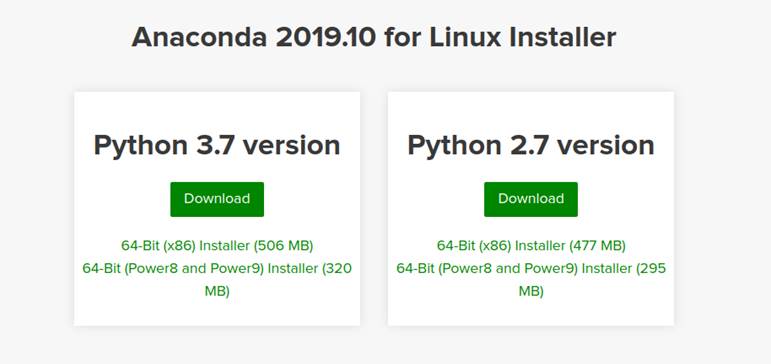
For the projects in this book, we will use Anaconda, a Python distribution that comes with most of the required machine learning packages that you'll need to use: NumPy, SciPy, Scikit-Learn, Pandas, and many more.
Figure A.1 Downloading the Linux Installer for Anaconda
This is an excerpt from Manning's book Introducing Data Science: Big data, machine learning, and more, using Python tools.
If everything went well, we now have an Elasticsearch index by the name “gastronomical” populated by thousands of recipes. Notice we allowed for duplicates of the same recipe by not assigning the name of the recipe to be the document key. If, for instance, a recipe is called “lasagna” then this can be a salmon lasagna, beef lasagna, chicken lasagna, or any other type. No single recipe is selected as the prototype lasagna; they are all uploaded to Elasticsearch under the same name: “lasagna”. This is a choice, so feel free to decide otherwise. It will have a significant impact, as we’ll see later on. The door is now open for a systematic upload to our local graph database. Make sure your local graph database instance is turned on when applying the following code. Our username for this database is the default Neo4j and the password is Neo4ja; make sure to adjust this for your local setup. For this we’ll also require a Neo4j-specific Python library called py2neo. If you haven’t already, now would be the time to install it to your virtual environment using pip install py2neo or conda install py2neo when using Anaconda. Again, be advised this code will crash your browser when run directly in Ipython or Jupiter. The code in this listing can be found in “Data Preparation Part 2.py”.
Appendix D. Setting up Anaconda with a virtual environment
Anaconda is a Python code package that’s especially useful for data science. The default installation will have many tools a data scientist might use. In our book we’ll use the 32-bit version because it often remains more stable with many Python packages (especially the SQL ones).
While we recommend using Anaconda, this is in no way required. In this appendix, we’ll cover installing and setting up Anaconda. Instructions for Linux and Windows installations are included, followed by environment setup instructions. If you know a thing or two about using Python packages, feel free to do it your own way. For instance, you could use virtualenv and pip libraries.