concept browser in category meteor

This is an excerpt from Manning's book Meteor in Action.
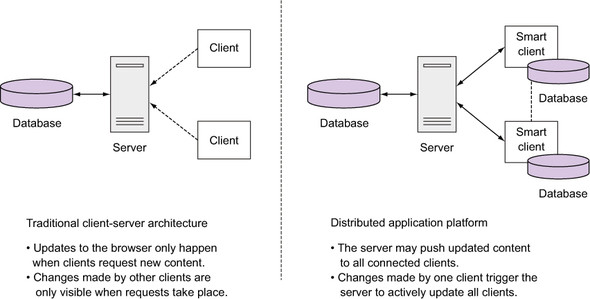
Moving the processing from a single server to multiple clients involves moving into the direction of distributed computing platforms. In such distributed environments, data needs to be sent in both directions. In Meteor, the browser is a smart client. Connections aren’t stateless anymore; the server may send data to the client whenever there are updates to subscribed content. Figure 1.5 shows the various architectures. To allow bidirectional communication between server and client, Meteor uses WebSockets. A standardized protocol named Distributed Data Protocol (DDP) is used to exchange messages. DDP is simple to use and can be used with many other programming languages like PHP or Java as well.
As a consequence of moving applications to the browser, all clients essentially become nodes of an application cluster. This introduces new challenges already familiar from distributed server farms, most importantly synchronizing data between all nodes. Meteor takes care of this by means of its reactive nature.
Unless you’re writing a server-only application, every web application written in Meteor should have at least one template. Displaying content in a browser without using a template isn’t possible. This section discusses the foundations of working with templates.
Something you also want to prevent in many circumstances is the browser’s default event handling. For example, if you click a normal link (<a href="url">Go To</a>), the browser would open the URL specified in the <a> element’s href attribute and reload the page. Of course, in an application you build with Meteor you don’t want the browser to reload the page at any time. To prevent this, you can call event.preventDefault() (see listing 3.20) and the browser’s default behavior is prevented.
