concept method in category meteor

This is an excerpt from Manning's book Meteor in Action.
Meteor applications communicate over both HTTP and WebSockets (see figure 1.7). The initial page request and all static files such as images, fonts, styles, and JavaScript files are transferred over HTTP. The applications running on client and server rely on the DDP protocol to exchange data. SockJS provides the necessary infrastructure. The client calls methods on the server using remote procedure calls. The client is calling a function over the network. The server sends back its responses as JavaScript Object Notation (JSON) objects. Furthermore, each client may subscribe to certain data publications. The Livequery component takes care of pushing out any changes to a subscribed dataset over DDP as well. The reactive Tracker library watches for those changes and triggers DOM updates in the UI layer via Blaze.
In chapter 6 we discussed allow/deny rules for securing write operations to the database. Methods, Meteor’s remote procedure calls, are a powerful alternative to these simple rules. Methods may run on the server or the client. You’ll use them to secure all write operations to the database by properly validating all content received from the client. Their use isn’t limited to database operations, though—they can also be used for other actions like sending emails.
The place to put methods depends on what you want to do. If you put a method inside the server folder you can still call it from the client, but the method is processed only on the server and not on the client. If the method is shared between the server and the client, the process is similar to the Collection.insert() functionality. This means a method call is processed on the client immediately. Then if all goes well it’s also processed on the server, and if something goes wrong here, the function is reverted on the client. This way, you gain the latency compensation with methods too.
If a method is executed on the client, it’s running as a simulation. You can check by using this.isSimulation() inside a method context to determine whether the code is used to trigger a remote method or runs as a stub. It returns true if the method is running on the client, but simulations can also be used on the server.
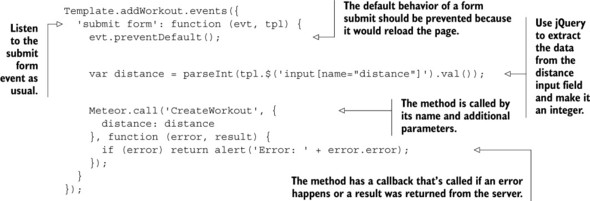
You now want users to be able to add workouts themselves by adding a simple form. If the form is submitted, you want to extract the data from the form and use it in a method call. In the method, you want to make sure that the data is allowed and valid and that it comes from a logged-in user—a guest shouldn’t be able to add workouts. Finally, you create a new workout in the method.
Meteor.call() takes one mandatory argument: the method name. Additionally, you can add as many arguments as you like and they’ll be available in the method. The last argument you provide is a callback function to deal with the results returned by the method (see listing 7.11). The callback itself takes two arguments: error and result. The value for error remains undefined as long as the method finishes as expected. result contains the return value of the method—in this case, the document ID for the newly inserted workout.
A method always has a name and can have as many parameters as you like. This way, you can use a method to send data from the client to the server. Next, you must define the method; its purpose is to create a workout. Let’s put it into a new file in a methods folder. It should be available on the client and the server as well, which allows you to take advantage of latency compensation (see the following listing).
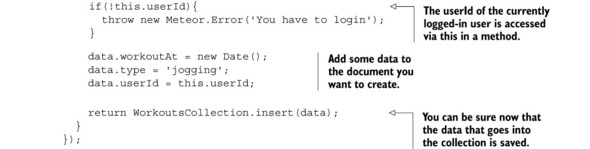
If you look at the method, you’ll see that the data parameter is what’s finally passed to the WorkoutsCollection.insert method. Because of this, it’s really important to make sure that you know exactly what’s inside the data object that’s coming from the client. If you didn’t make any security checks, a user could add any data inside your WorkoutsCollection collection. We’ll use the check() function again and look at it in a little more detail.
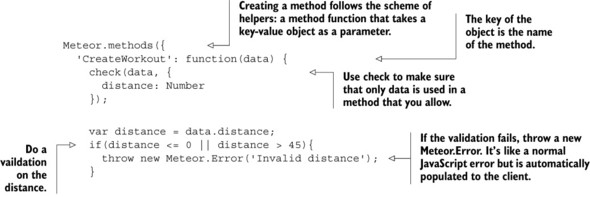
Each argument sent to a method should be checked before processing it. The more form fields are used, the harder it is to keep track of whether every user input has been checked yet. Meteor ships with a package called audit-argument-checks, which checks that every argument was indeed checked before it was used. Add it to your project via this command:
$ meteor add audit-argument-checksEvery time the client sends an argument to the server for processing, audit-argument-checks will ensure that it’s checked first. You need to add checks to all methods. If there’s no check in place, a method will still execute but you’ll see an exception on the server, as shown in the following listing.
Listing 7.13. Console message for unchecked values in methods
Exception while invoking method 'CreateWorkout' Error: Did not check() all arguments during call to 'CreateWorkout' at _.extend.throwUnlessAllArgumentsHaveBeenChecked (packages/check/match.js:352) at Object.Match._failIfArgumentsAreNotAllChecked (packages/check/match.js:108) at maybeAuditArgumentChecks (packages/ddp/livedata_server.js:1596) at packages/ddp/livedata_server.js:648 at _.extend.withValue (packages/meteor/dynamics_nodejs.js:56) at packages/ddp/livedata_server.js:647 at _.extend.withValue (packages/meteor/dynamics_nodejs.js:56) at _.extend.protocol_handlers.method (packages/ddp/livedata_server.js:646) at packages/ddp/livedata_server.js:546