concept platform in category meteor

This is an excerpt from Manning's book Meteor in Action.
Once deployed on a server, Meteor applications can hardly be told apart from other Node.js-based projects. The platform’s real strength comes to light when you look closely at how Meteor supplements the development process. A CLI tool and a collection of packages enable developers to quickly achieve results and focus on adding functionality to an application. Infrastructure concerns such as data exchange between database and browser or integrating user authentication via external OAuth providers are taken care of by adding packages.
With the rise of the smartphone, web applications no longer require a web browser because they also come as mobile applications. Meteor wouldn’t be an appropriate tool for building modern applications if it didn’t offer support for mobile platforms as well. Platforms that are capable of running Meteor applications can be the server, browser, and even mobile devices like iOS and Android.
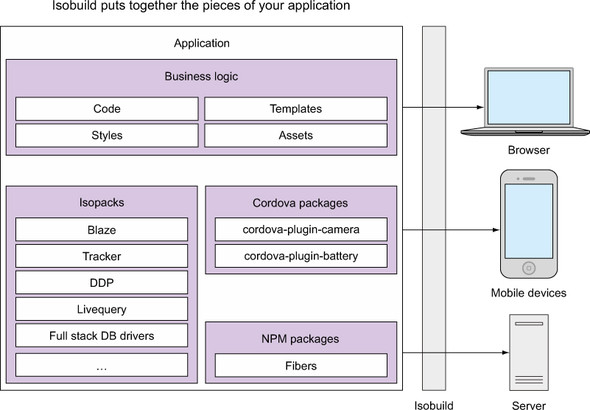
Let’s revisit the graphic introduced in chapter 1 that showed the various parts that make up the source of a Meteor application (see figure 11.1). Building an application means taking the contents from the box on the left side and processing them so they may run on any or all of the platforms shown on the right. Isobuild takes care of this transformation. It’s a complete tool chain for turning source code into programs that may run on various platforms.
Figure 11.1. Isobuild takes all parts that compose a Meteor application and turns them into applications for various platforms.
For a platform to be isomorphic, all functionality that’s added via packages must behave the same on multiple—or ideally all—components of the stack. Certainly there are exceptions—for example, accessing the phonebook of a mobile phone on a server platform is hardly possible. But most other functions, like fetching contents from a web service, must be called in exactly the same way, regardless of where they take place. Instead of you having to use jQuery.get() in a browser and http.request() on the server, Meteor provides an abstract API that allows you to use HTTP.get() anywhere and achieve the same results. It’s not just the same language that’s used across the entire stack—it’s the same API so that the same code can run anywhere.
This command will compile the application and open it in a simulated iPhone or Android device. Although the application itself won’t make use of any UI guidelines for the platform, all input fields like drop-down lists and text boxes will rely on the devices’ default interfaces (see figure 11.8).