concept access in category mondrian

This is an excerpt from Manning's book Mondrian in Action.
In addition to performance, enterprises have other considerations when dealing with corporate data, such as restricting access to specific users and supporting tenanted environments with multiple clients. Mondrian uses a role-based approach to restrict data access.
Role-based security means that data is restricted based on a role associated with a user. For example, HR managers may have access to sensitive information about employees that shouldn’t be shared with other employees. Financial managers will need to know costs, but inventory managers will only need to know inventory levels. By assigning unique roles to each of these different types of users, Mondrian can have a single analytics database but only show the data needed by each user. Analysis and reporting tools will only get the data appropriate for the particular user, so you don’t need separate reports for different roles simply to limit data.
In the chapters on security, we’ll show you how to apply roles to restrict access to sensitive data. We’ll also show you some advanced approaches that you can use to make roles dynamic and to separate data for multiple clients, securing the data for each in a multi-tenanted environment. This latter feature is useful for organizations that don’t just want to use analysis internally, but want to expose the analysis to external clients as well.
A key consideration in any organization is limiting access to sensitive data, and Adventure Works is no exception. They want to be able to restrict sensitive sales information to only the sales managers who need it. They also want to make sure that only HR has access to human resource information about employees.
If you recall from chapter 4, hierarchies make up the structure of dimensions. Each dimension must have at least one hierarchy and one or more levels. Similarly, within a cube grant you can have dimension and hierarchy grants, and these are both at the same level. The dimension grant restricts access to an entire dimension and all of its hierarchies, whereas a hierarchy grant specifies access to just a single hierarchy within the dimension.
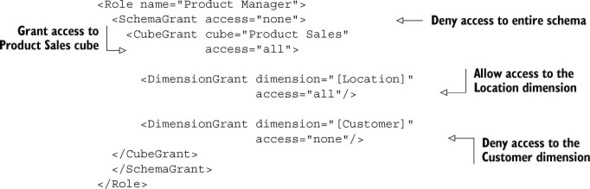
The DimensionGrant has two required attributes: dimension, the name of the dimension, and access, which can be either all or none. An access of all doesn’t usually add a lot of value, because it’s the default, so you’ll typically only use none. Dimension grants also can’t have any children. If you want finer-grained control over the contents of a dimension, you’ll need to use a hierarchy grant.
The following listing shows an example of a dimension grant that gives access to the Location dimension and restricts access to the Customer dimension.
The HierarchyGrant has two required attributes: hierarchy, the name of the hierarchy, and access. The values for each of these attributes are described in the following sections. There are also several optional attributes that we’ll discuss in a bit. As you’ll also see, there are some special rules for the HierarchyGrant if you want to include other grants.