concept cache in category mondrian

This is an excerpt from Manning's book Mondrian in Action.
All of the caches work together to maximize Mondrian performance, and the next few sections describe how they work. Understanding the caches is important for understanding when the caches should be primed or cleared.
The schema cache keeps each of the unique caches in memory. The key for each cache is a checksum for the schema. When the schema is flushed from the cache, its associated member and segment caches are flushed as well, making this a brute-force approach. But if the schema has changed, or if determining the details of what to flush is too complex, this can be the best approach and certainly is the simplest. The caches can be repopulated using the techniques described in the previous section.
Most tools using Mondrian, such as Pentaho, provide a way to manually flush the cache. In Pentaho you can use the Enterprise Console or User Console. If you’re logged into the User Console as an administrator, simply select Tools > Refresh > Mondrian Schema Cache.
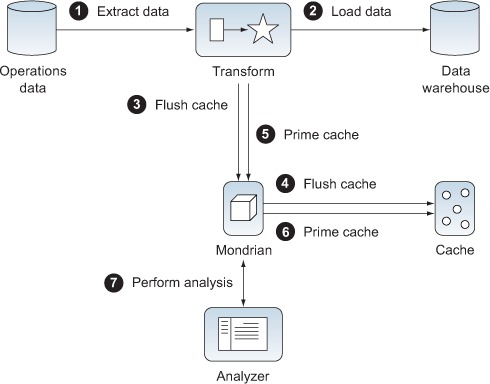
The manual approach works fine, but administrators usually want to automate cache flushing as part of the overall ETL workflow. Figure 7.15 shows how Mondrian and the cache fit into the overall ETL workflow. After populating the OLAP database, Mondrian is called to flush and then prime the cache. This process makes sure the cache is synchronized with the underlying database so that when analysis is performed, the data is up to date.
To make it easy to integrate flushing the cache into the ETL process, you can create a class that contains methods to flush parts of the cache. You can also create a JSP that uses the new class. It then becomes easy to flush the cache by calling a URL with the appropriate parameters.
Table 7.1 shows the three scenarios that the flushing tool will support. The scenarios run from flushing everything to flushing a specific region of the cache. Mondrian’s cache control SPI is very detailed and can allow you to control any parts of the cache, so these are only examples of what’s possible.
Table 7.1. Cache-flushing scenarios
Parameters required
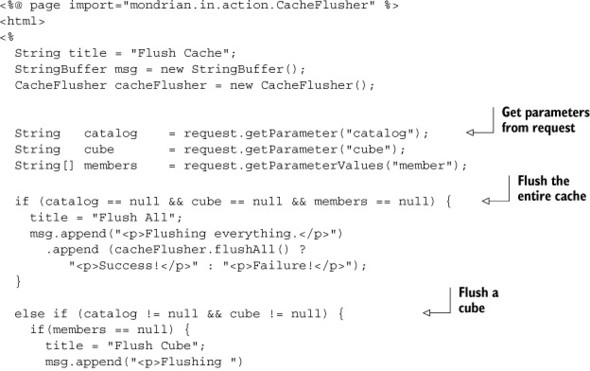
Everything No parameters Specific cube Catalog and cube Specific region Catalog, cube, and members Listing 7.8 shows some JSP code that controls caching. It receives parameters and then calls to the CacheFlusher class to flush the appropriate parts of the cache. This makes it easy to separate the work of flushing the cache from the user interface. The same class could be used in an action sequence or be embedded in an application if appropriate.
Mondrian will automatically update the caches as schemas and dimensions are read and aggregates are calculated. This means, however, that the first user to access the data is populating the cache rather than getting the benefits of it. What you really want is the ability to prepopulate the cache before business users start performing analysis. Because the cache is populated as part of returning the results of a query, this means any call that makes a query to Mondrian will populate the cache.