concept role in category mondrian

This is an excerpt from Manning's book Mondrian in Action.
Role-based security means that data is restricted based on a role associated with a user. For example, HR managers may have access to sensitive information about employees that shouldn’t be shared with other employees. Financial managers will need to know costs, but inventory managers will only need to know inventory levels. By assigning unique roles to each of these different types of users, Mondrian can have a single analytics database but only show the data needed by each user. Analysis and reporting tools will only get the data appropriate for the particular user, so you don’t need separate reports for different roles simply to limit data.
In the chapters on security, we’ll show you how to apply roles to restrict access to sensitive data. We’ll also show you some advanced approaches that you can use to make roles dynamic and to separate data for multiple clients, securing the data for each in a multi-tenanted environment. This latter feature is useful for organizations that don’t just want to use analysis internally, but want to expose the analysis to external clients as well.
The first things to understand are what a role is and how it can be used by Mondrian to restrict access to data. After reading this section, you’ll understand what roles are, how they’re generally applied to restrict data, and how they’re provided via external settings. You’ll also see how to set the default role in the schema. Finally, we’ll touch on the concept of joint roles, which let you combine multiple roles together to create entirely new roles.
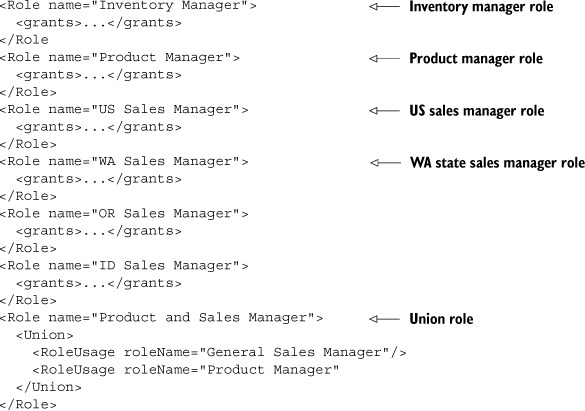
Roles must be defined in the Mondrian schema to which they’ll be applied. Listing 6.1 shows the high-level role declarations. The basic declaration of a role is simple; just use the Role element and assign a value to the name attribute. Later sections will describe the various security grants that can be given. The last role declaration combines the product and sales manager role using the Union element.
Mondrian allows you to define role-based restrictions for security. For example, if a user is assigned to the role of sales manager, that person can only see data that a sales manager is allowed to see. If sales managers aren’t allowed to see information about customers, anyone assigned to this role couldn’t see customer information unless they’re assigned to a second role that gives access to customer information.
Mondrian schemas define roles, and Mondrian enforces roles, but it’s up to the container to provide the role of the user when performing queries. The container does this when it makes a connection to Mondrian. It’s important to remember that Mondrian doesn’t perform any authentication for incoming requests. Mondrian assumes that the security is handled by the container and that the roles provided are correct. This makes sense, because it means Mondrian can be used in a wide variety of containers and security scenarios without change. But it also means that if the container doesn’t properly apply security restrictions, Mondrian will return data that you might want restricted.
How roles are set depends on the container. If you’re writing your own application, setting roles must be part of the code. If you’re using the Saiku server, you can set the user roles in the users.properties file. Finally, if you’re using Mondrian with Pentaho, you have to tell Pentaho to send role information to Mondrian via XML configuration. Because Pentaho is the most common container for Mondrian, we’ll explore how to configure security for Pentaho.