concept client in category .net

This is an excerpt from Manning's book Concurrency in .NET.
When software goes live, multiple factors can go wrong, causing the programs to behave unreliably. A while ago, my boss called me to analyze a production issue. The application was a simple chat system used for customer support. The program was using web sockets to communicate from the frontend directly with the Windows server hub written in C#. The underlying technology to establish the bidirectional communication between client and server was Microsoft SignalR (http://mng.bz/Fal1). See figure 3.1.
The client is a mobile application, an iOS app for iPhone built using Xamarin and Xamarin.Forms. In the mobile client, the values change in real time in response to notifications from the server. Users of the application can manage their own portfolio by setting orders to buy and/or sell a specific stock when it reaches a predetermined price. In addition to the mobile application, a WPF version of the client program is provided in the downloadable source code.
Figure 14.5 A representative model of the stock market web-server application, which is based on the CQRS pattern. The commands (
Writes) are pushed across the application pipeline to perform the trading operations in a different channel than the queries (Reads). In this design, the queries (Reads) are performed automatically by the system in the form of server notifications, which are broadcast to the clients through SignalR connections. Imagine SignalR as the channel that allows the client to receive the notifications generated from the server. In the callouts it’s specified as the technologies used to implement the specified component.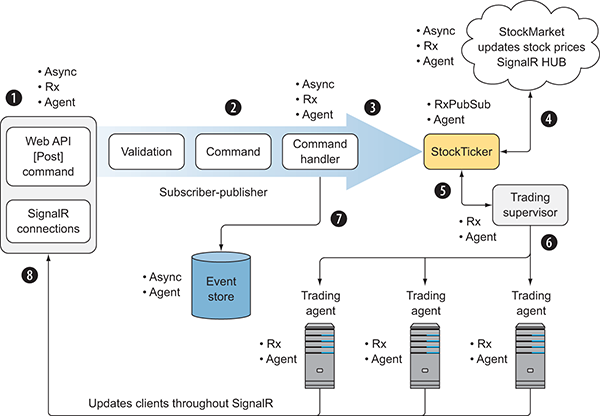
Note that the
TradingAgentconstruct takes a reference to the underlying SignalR channel, which is used to enable direct communication to the client, in this case a mobile device for real-time notifications. The trading operationsBuyandSellare dispatched to the relatedTradingAgent, which is identified using the unique ID from the local observer’s state. The dispatch operation is performed using theOnNextsemantic of theObservertype. As mentioned, theTradingCoordinator's responsibility is to coordinate the operations of theTradingAgent, whose implementation is shown in Listing 14.9.Listing 14.9
TradingAgentthat represents an active usertype TradingAgent(connId : string, initialAmount : float, caller : ➥ IHubCallerConnectionContext<IStockTickerHubClient>) = #1 let agent = new Agent<Trading>(fun inbox -> let rec loop cash (portfolio : Portfolio) (buyOrders : Treads) (sellOrders : Treads) = async { #2 let! msg = inbox.Receive() match msg with | Kill(reply) -> reply.Reply() #3 | Error(exn) -> raise exn #3 | Trading.Buy(symbol, trading) -> #4 let items = setOrder buyOrders symbol trading let buyOrders = createOrder symbol trading TradingType.Buy caller.Client(connId).UpdateOrderBuy(buyOrders) return! loop cash portfolio items sellOrders | Trading.Sell(symbol, trading) -> #4 let items = setOrder sellOrders symbol trading let sellOrder = createOrder symbol trading TradingType.Sell caller.Client(connId).UpdateOrderSell(sellOrder) return! loop cash portfolio buyOrders items | Trading.UpdateStock(stock) -> #5 caller.Client(connId).UpdateStockPrice stock let cash, portfolio, sellOrders = updatePortfolio cash ➥ stock portfolio sellOrders TradingType.Sell let cash, portfolio, buyOrders = updatePortfolio cash ➥ stock portfolio buyOrders TradingType.Buy let asset = getUpdatedAsset portfolio sellOrders ➥ buyOrders cash #6 caller.Client(connId).UpdateAsset(asset) #7 return! loop cash portfolio buyOrders sellOrders } loop initialAmount (Portfolio(HashIdentity.Structural)) (Treads(HashIdentity.Structural)) (Treads(HashIdentity.Structural))) member this.Agent = agent interface IObserver<Trading> with #8 member this.OnNext(msg) = agent.Post(msg:Trading) member this.OnError(exn) = agent.Post(Error exn) #3 member this.OnCompleted() = agent.PostAndReply(Kill) #3 #1 The constructor accepts a reference of the SignalR connection to enable real-time notifications. #2 The TradingAgent maintains local in-memory state of the client portfolio and the trading orders in process. #3 Uses a special message to implement the observer method to complete (terminate) the notifications and handle errors #4 Shows the trade order messages #5 Updates the value of the stock, which notifies the client and updates the portfolio if the new value satisfies any of the trading orders in progress #6 Checks the current portfolio for potential updates according to the new stock value #7 The client receives notifications through the underlying SignalR channel. #8 The TradingAgent implements the IObserver interface to act as subscribers for the observable TradingCoordinator type

This is an excerpt from Manning's book Entity Framework 4 in Action.
The design is made of just one core assembly containing the model, the mapping information, and the generated code. Later, you’ll create a set of client applications that use it. The client can be an ASP.NET application, a console application, a Windows Presentation Foundation (WPF) application, and so on. For this example, you’ll use a Windows Form, but in later chapters we’ll show you how get the best out of Entity Framework with other technologies.
You can solve many problems with a service-oriented application. Sometimes these types of applications are used by client applications (clients from now on) within a larger system. Other times, clients are developed by third-party organizations, and your duty is to build services. This means that you have no GUI to develop—just services.
Whatever the client is, the application must be separated into different physical tiers that are completely disconnected from each other and that communicate through a specific interface: the contract. In the context of Entity Framework, working in a disconnected way is the obvious pattern for these types of applications because the context can’t be propagated from the server to the client tier, which means modifications made on the client side can’t be tracked, and a new context for each request is required on the server side.
Figure 16.6 shows the entire workflow of an entity sent from the server to the client, which modifies it and then sends it back to the server.
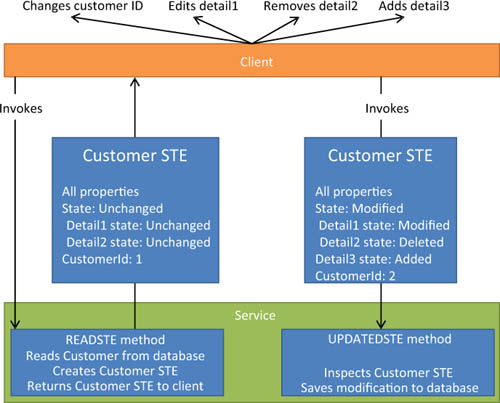
The biggest challenge you face when developing n-tier applications is that the context exists only on the server side, so changes made to entities on the client aren’t tracked (this is a typical example of a disconnected scenario). Suppose you have a web service with one method that reads the customer and another that updates it (an example we’ve looked at previously). Figure 16.1 shows how such a web service handles the context.

This is an excerpt from Manning's book LINQ in Action.
Similar to what happened with ObjectSpaces and about the same time, Microsoft had started working on an XQuery processor. A preview was included in the first beta release of the .NET Framework version 2.0, but eventually it was decided not to ship a client-side[6] XQuery implementation in the final version. One problem with XQuery is that it was an additional language we would have to learn specifically to deal with XML.
In this case, we’re referring to the client in a generic sense. The client does not have to be a person or presentation layer. The client is anything that consumes the LINQ to SQL entities. This can include a SOA service or data access tier.
Checking the generated SQL statement, we can see that the function is translated to run directly on the server rather than the client as we iterate over each result.
SELECT     Name, CONVERT(Int, dbo.fnBookCountForPublisher(ID)) AS value
FROM       Publisher AS t0
If it weren’t for the composability that LINQ and deferred execution offer, the query would need to return the list of publishers to the client and then issue separate function calls to the database to evaluate each row. Due to LINQ’s composability, the entire query is executed directly on the server. As a result, we minimize round-trips to the database and maximize performance due to optimized execution plans on the server.

This is an excerpt from Manning's book ASP.NET AJAX in Action.
Normally, a user action such as clicking a button on a form invokes an HTTP request back to the web server. The server then processes the request, possibly doing some calculations or performing a few database operations; and then returns back to the client a whole new page to render. Technically, this makes a lot of sense—web pages are stateless by nature, and because all the logic about the application typically resides on the server, the browser is just used to display the interface. The server goes through the entire page lifecycle again and returns to the browser the HTML, CSS, and any other resources it needs to refresh the page. Unfortunately, this doesn’t present the user with a desirable experience. Instead, they’re exposed to a stop-start-stop pattern where they temporarily (and unwillingly) lose interaction with the page and are left waiting for it to be updated.
A website is a perfect example of the client/server architecture. Each instance of a browser (the client) can send requests to a server for data and content. When the client initiates a request to a known remote server to execute a procedure or subroutine, it’s often called a remote procedure call (RPC). Working closely with ASP.NET Web Services, the ASP.NET AJAX framework significantly simplifies the effort it takes to execute RPC patterns from JavaScript. In simpler terms, the framework makes it easy for you to communicate with Web Services from JavaScript.

By default, the ASP.NET Web Services used by the Ajax framework use the JSON (see chapter 3) data format for the transfer of data between the client and server. This means the value is first serialized with a JSON serializer before it’s written in the response’s payload. One of the key reasons JSON is used is because of its natural integration with JavaScript and its lightweight nature. (You can convert JSON into a JavaScript object by passing it into the eval method.)
Listing 5.9. Adding support for the Employee class on the client using GenerateScriptType
[ScriptService] [GenerateScriptType(typeof(Employee))] [WebService(Namespace = "http://aspnetajaxinaction.com/")] [WebServiceBinding(ConformsTo = WsiProfiles.BasicProfile1_1)] public class StarbucksService : System.Web.Services.WebService { ...This is all you need to do to provide support for instantiating a server-side object on the client. To prove that this class can be created and manipulated from JavaScript, add the following lines of markup and script to the page: