concept context in category .net

This is an excerpt from Manning's book .NET Core in Action.
Sometimes you have some setup or cleanup code that’s common to a set of tests. This is called shared context. xUnit has a few different approaches to shared context, depending on the level at which you want to share context.
Listing 5.22. Updates the inventory counts based on the PartCommands
foreach (var cmd in context.GetPartCommands())         #1
{
  var item = context.Inventory.Single(i =>             #2
    i.PartTypeId == cmd.PartTypeId);
  if (cmd.Command == PartCountOperation.Add)           #3
    item.Count += cmd.PartCount;
  else
    item.Count -= cmd.PartCount;

  context.UpdateInventoryItem(item.PartTypeId,
    item.Count);
  context.DeletePartCommand(cmd.Id);                   #4
}

This is an excerpt from Manning's book Concurrency in .NET.
A closure aims to simplify functional thinking, and it allows the runtime to manage state, releasing extra complexity for the developer. A closure is a first-class function with free variables that are bound in the lexical environment. Behind these buzzwords hides a simple concept: closures are a more convenient way to give functions access to local state and to pass data into background operations. They are special functions that carry an implicit binding to all the nonlocal variables (also called free variables or up-values) referenced. Moreover, a closure allows a function to access one or more nonlocal variables even when invoked outside its immediate lexical scope, and the body of this special function can transport these free variables as a single entity, defined in its enclosing scope. More importantly, a closure encapsulates behavior and passes it around like any other object, granting access to the context in which the closure was created, reading, and updating these values.
Throughout this chapter, we revisit the examples from chapter 9, with slightly more complex variations. The code examples are in C# or F#, using the programming language that best resonates with the idea in context. But all the concepts apply to both programming languages, and in most cases you’ll find the alternate code example in the source code.
Listing 10.15 Using
AsyncResultBuilderlet processImage (blobReference:string) (destinationImage:string) ➥ : AsyncResult<unit> = asyncResult { #1 let storageAccount = CloudStorageAccount.Parse("<Azure Connection>") let blobClient = storageAccount.CreateCloudBlobClient() let container = blobClient.GetContainerReference("Media") let! _ = container.CreateIfNotExistsAsync() let blockBlob = container.GetBlockBlobReference(blobReference) use memStream = new MemoryStream() do! blockBlob.DownloadToStreamAsync(memStream) let image = Bitmap.FromStream(memStream) let! thumbnail = toThumbnail(image) return! toByteArrayAsyncResult thumbnail } |> AsyncResult.bimap (fun bytes -> ➥ FileEx.WriteAllBytesAsync(destinationImage, bytes)) (fun ex -> logger.Error(ex) |> async.Return.retn) #1 Wraps the code block into an asyncResult to make the bind operator run in the context of the AsyncResultBuilder CEs !@%STYLE%@! {"css":"{\"css\": \"font-weight: bold;\"}","target":"[[{\"line\":2,\"ch\":1},{\"line\":2,\"ch\":12}],[{\"line\":18,\"ch\":33},{\"line\":18,\"ch\":44}],[{\"line\":6,\"ch\":10},{\"line\":6,\"ch\":11}],[{\"line\":9,\"ch\":9},{\"line\":9,\"ch\":10}],[{\"line\":11,\"ch\":10},{\"line\":11,\"ch\":11}],[{\"line\":12,\"ch\":13},{\"line\":12,\"ch\":14}],[{\"line\":6,\"ch\":10},{\"line\":6,\"ch\":11}],[{\"line\":9,\"ch\":9},{\"line\":9,\"ch\":10}],[{\"line\":11,\"ch\":10},{\"line\":11,\"ch\":11}],[{\"line\":12,\"ch\":13},{\"line\":12,\"ch\":14}],[{\"line\":6,\"ch\":10},{\"line\":6,\"ch\":11}],[{\"line\":9,\"ch\":9},{\"line\":9,\"ch\":10}],[{\"line\":11,\"ch\":10},{\"line\":11,\"ch\":11}],[{\"line\":12,\"ch\":13},{\"line\":12,\"ch\":14}],[{\"line\":6,\"ch\":10},{\"line\":6,\"ch\":11}],[{\"line\":9,\"ch\":9},{\"line\":9,\"ch\":10}],[{\"line\":11,\"ch\":10},{\"line\":11,\"ch\":11}],[{\"line\":12,\"ch\":13},{\"line\":12,\"ch\":14}],[{\"line\":14,\"ch\":8},{\"line\":14,\"ch\":25}]]"} !@%STYLE%@!Now, all you need do is wrap the operations inside an
asyncResultCE block. The compiler can recognize the monadic (CE) pattern and treats the computations in a special way. When thelet!bind operator is detected, the compiler automatically translates theAsyncResult.ReturnandAsyncResult.Bindoperations of a CE in context.
Figure 10.8 The
Applyoperator implements the function wrapped inside an elevated type to a value in the context. The process triggers the unwrapping of both values; then, because the first value is a function, it’s applied automatically to the second value. Finally, the output is wrapped back inside the context of the elevated type.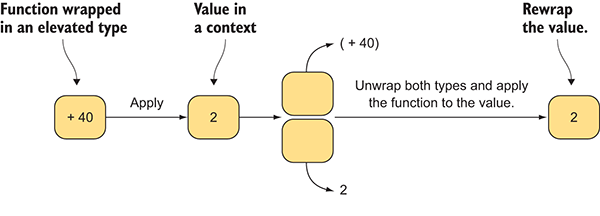
In the context of the
Taskelevated type, it takes a valueTask<T>and a wrapped functionTask<(T -> R)>(translated in C# asTask<Func<T, R>>) and then returns a new valueTask<R>generated by applying the underlying function to the value ofTask<T>:
This is an excerpt from Manning's book Dependency Injection in .NET.
Before DI had a name, people started to refer to frameworks that manage DEPENDENCIES as Inversion of Control Containers, and soon, the meaning of IoC gradually drifted towards that particular meaning: Inversion of Control over DEPENDENCIES. Always the taxonomist, Martin Fowler introduced the term Dependency Injection to specifically refer to IoC in the context of dependency management.[5]Dependency Injection has since been widely accepted as the most correct terminology.
Often, the DEPENDENCY will represent some sort of context for an operation that’s supplied alongside a “proper” value:
public string DoStuff(SomeValue value, ISomeContext context)In this case, the value parameter represents the value on which the method is supposed to operate, whereas the context contains information about the current context of the operation. The caller supplies the DEPENDENCY to the method, and the method uses or ignores the DEPENDENCY as it best suits it.
In this case, the context has a static Current property that a consumer can access. This property may be truly static, or may be associated with the currently executing thread.
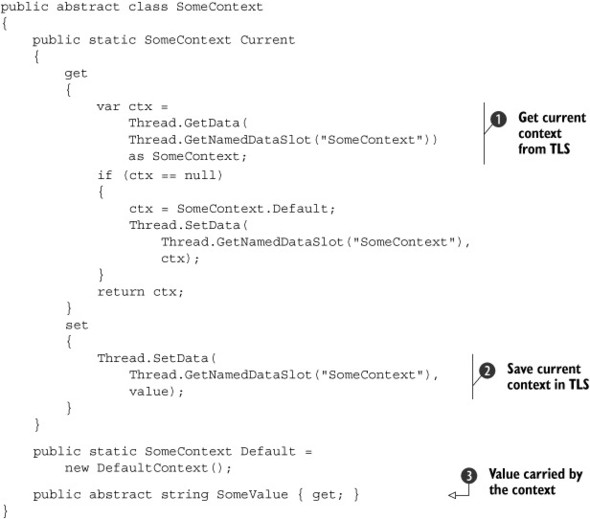
To be useful in DI scenarios, the context itself must be an ABSTRACTION and it must be possible to modify the context from the outside—in the previous example, this means that the Current property must be writable. The context itself might be implemented as shown in the following listing.
The context is an abstract class, which allows us to replace one context with another implementation at runtime.
In this example, the Current property stores the current context in Thread Local Storage (TLS)
, which means that every thread has its own context that’s independent from the context of any other thread. In cases where no one has already assigned a context to TLS, a default implementation is returned. It’s important to be able to guarantee that no consumer will ever get a NullReferenceException when they try to access the Current property, so there must be a good LOCAL DEFAULT. Note that in this case, the Default property is shared across all threads. This works because, in this example, DefaultContext (a class that derives from SomeContext) is immutable. If the default context was mutable, you would need to assign a separate instance to each thread to prevent cross-thread pollution.
This is an excerpt from Manning's book Entity Framework 4 in Action.
When the objects are ready to be consumed, the context comes into play. By context we mean the lifetime of the communication between the application and Entity Framework. It’s established using a well-known class (ObjectContext, or context), and it’s active as long as the class is referenced in the code or it isn’t disposed of. The context class is used from the beginning because this class creates the entry point for querying the object model.
After the objects are materialized, they’re automatically added to the context memory, but this behavior can be overridden for performance reasons. During the materialization process, if the object that’s going to be created already exists in the context memory, it’s skipped by the engine, and a reference to the in-memory object is returned to the code executing the query. This means the context acts as a sort of local cache.
The objects that are attached to the context are automatically tracked by the state manager component. This mechanism ensures that any modifications made to objects are correctly managed and recorded in the database. To do this, the state manager stores the original data of every object that’s loaded so it can compare them and perform an optimized update. This component gives you many options to customize its behavior.
More precisely, an entity outside the context has no state. We referred to Detached status because in Entity Framework 1.0 that’s the state an entity is in when it’s not tracked by a context.
If you attach an entity to the context (more on this in section 6.2), it will move to the Unchanged state. If you retrieve an entity from the database and then get rid of the context, the entity state will be Detached. If you retrieve an entity, dispose of the context, and create a new context and add the entity to it, the entity will be in the Added state (again, this will be explained in section 6.2). As these examples make clear, the state is the relationship between the entity and the context that holds a reference to it.
At first, you might have thought that the entity state reflected the state of the entity compared to the corresponding row in the database, but it’s not like that. The context is the application database; this is why entities relate their state to the context and not to the database.
AddObject allows you to add an entity to the context in the Added state. When the entity is added to the context, it’s added to those tracked by the context for modifications. When the persistence process is triggered, the context saves the object as a new row in the tables using INSERT commands. In the OrderIT example, persisting an order will cause an INSERT into the Order table, whereas persisting a shirt will cause an INSERT into the Product and the Shirt tables.
Public Class Repository(Of T As Class)
  Implements IRepository(Of T)
  Private context As ObjectContext
  Private entitySet As ObjectSet(Of T)

  Public Sub New(ByVal context As ObjectContext)
    If context Is Nothing Then
      Throw New ArgumentNullException("context")
    End If

  Me.context = context
    Me.entitySet = context.CreateObjectSet(Of T)()
  End Sub
End Class


This is an excerpt from Manning's book NHibernate in Action.
First, we define the notion of persistence in the context of .NET applications. We then demonstrate how a classic .NET application is implemented, using the standard persistence tools available in the .NET framework. You’ll discover some common difficulties encountered when using relational databases with object-oriented frameworks such as .NET, and how popular persistence approaches try to solve these problems. Collectively, these issues are referred to as the paradigm mismatch between object-oriented and database design. We then go on to introduce the approach taken by NHibernate and discuss many of its advantages. Following that, we dig into some complex persistence challenges that make a tool like NHibernate essential. Finally, we define ORM and discuss why you should use it. By the end of this chapter, you should have a clear idea of the great benefits you can reap by using NHibernate.
The first step to enable this feature is to set the context. You do so using the configuration property current_session_context_class:
<property name="current_session_context_class">
   web
</property>
This example sets the context to web, which is the short name of an implementation included in NHibernate that uses HttpContext to track the current session. It’s therefore appropriate for ASP.NET applications.

This is an excerpt from Manning's book LINQ in Action.
Instead of merely listing these new language features and detailing them one by one, let’s discover them in the context of an ongoing example. This will help us clearly see how they can help us in our everyday coding.
An iterator is an object that allows you to traverse through a collection’s elements. What is named an iterator in .NET is also known as a generator in other languages such as Python, or sometimes a cursor, especially within the context of a database.
Throughout this book, we’ll write queries either using the query operators directly or using query expressions. Even when using query expressions, we may have to explicitly use some of the query operators. Only a subset of the standard query operators is supported by the query expression syntax and keywords. It’s often necessary to work with some of the query operators right in the context of a query expression.
The C# compiler translates query expressions into invocations of the following operators: Where, Select, SelectMany, Join, GroupJoin, OrderBy, OrderByDescending, ThenBy, ThenByDescending, GroupBy, and Cast, as shown in table 3.2. If you need to use other operators, you can do so in the context of a query expression.
Listing 8.2. Default concurrency implementation with LINQ to SQL
Ch8DataContext context = new Ch8DataContext() Book mostExpensiveBook = (from book in context.Books orderby book.Price descending select book).First(); decimal discount = .1M; mostExpensiveBook.Price -= mostExpensiveBook.Price * discount; context.SubmitChanges();