concept element in category .net

This is an excerpt from Manning's book Concurrency in .NET.
Sorting algorithms are used generally in technical computing and can be a bottleneck. Let’s consider a Quicksort algorithm,3 a CPU-bound computation amenable to parallelization that orders the elements of an array. This example aims to demonstrate the pitfalls of converting a sequential algorithm into a parallel version and points out that introducing parallelism in your code requires extra thinking before making any decisions. Otherwise, performance could potentially have an opposite outcome to that expected.
Figure 4.2 Data parallelism is the simultaneous execution of the same function across the elements of a data set. Task parallelism is the simultaneous execution of multiple different functions across the same or different data sets.

In FP, a fold, also known as reduce and accumulate, is a higher-order function that reduces a given data structure, typically a sequence of elements, into a single value. Reduction, for example, could return an average value for a series of numbers, calculating a summation, maximum value, or minimum value.
The
foldfunction takes an initial value, commonly called the accumulator, which is used as a container for intermediate results. As a second argument it takes a binary expression that acts as a reduction function to apply against each element in the sequence to return the new value for the accumulator. In general, in reduction you take a binary operator—that is, a function with two arguments—and compute it over a vector or set of elements of size n, usually from left to right. Sometimes, a special seed value is used for the first operation with the first element, because there’s no previous value to use. During each step of the iteration, the binary expression takes the current element from the sequence and the accumulator value as inputs, and returns a value that overwrites the accumulator. The final result is the value of the last accumulator, as shown in figure 5.3.
Listing 13.12 Custom
Observablestream reader and parserstatic IObservable<StockData> ObservableStreams (this IEnumerable<string> filePaths, ➥ Func<string, string, StockData> map, int delay = 50) #1 { return filePaths .Select(key => new FileLinesStream<StockData>(key, row => map(key, row))) #2 .Select(fsStock => { var startData = new DateTime(2001, 1, 1); return Observable.Interval(TimeSpan.FromMilliseconds(delay)) #3 .Zip(fsStock.ObserveLines(), (tick, stock) => { #4 stock.Date = startData + TimeSpan.FromDays(tick); return stock; }); } ) .Aggregate((o1, o2) => o1.Merge(o2)); #5 } #1 The ObservableStreams custom observable extension method takes as an argument a list of file paths to process, and a lambda function for the file content transformation. #2 An instance of FileLinesStream is created for each file and used to generate an observable. This observable reads each line of the file and applies the map function for the transformation. #3 The Interval operator is used to apply a delay between notifications. The value can be zero to disable the delays. #4 The Zip operator combines an element from each sequence in turn. In this case, one sequence is generated from the Interval operator, which ensures that a delay is applied for each notification. #5 The Aggregate operator merges (reduces) all the observables into one.

This is an excerpt from Manning's book C# in Depth.
Arrays are strongly typed,[10] so at compile time you can’t set an element of a string[] to be a FileStream, for instance. But reference type arrays also support covariance, which provides an implicit conversion from one type of array to another, as long as there’s a conversion between the element types. Checks occur at execution time to make sure that the wrong type of reference isn’t being stored, as shown in the following listing.
from element in sourceThe element part is just an identifier, with an optional type name before it. Most of the time you won’t need the type name, and we won’t have one for the first example. The source part is a normal expression. Lots of different things can happen after that first clause, but sooner or later you always end with a select clause or a group clause.
from element in source

This is an excerpt from Manning's book LINQ in Action.
XML is all about documents, elements, attributes, hierarchical structures, and XPath.
Listing 9.27. Replacing the contents of a element with new content
books.Element("book").ReplaceNodes( new XElement("title", "Ajax in Action"), new XElement("author", "Dave Crane") );Both SetElementValue and ReplaceNodes operate over the content of an element. If you need to replace an entire node rather than update its contents, you can use the ReplaceWith method defined on XNode. ReplaceWith operates over the element itself, rather than its content. This allows entire elements to be replaced. For example, if we want to replace all the <title/> elements within our XML file with <book_title/> elements, we could use listing 9.28.
Listing 9.28. Replace an entire node with ReplaceWith
var titles = books.Descendants("title").ToList(); foreach(XElement title in titles) { title.ReplaceWith(new XElement("book_title", (string) title)); }In the listing, we first select all the <title/> elements using the Descendants axis method (which we’ll discuss in the next chapter). Once we have all of the elements, we loop over each element and call the ReplaceWith method, passing a new XElement with book_title as its XName and the value of the current element as the value. This results in all the <title/> elements being replaced with <book_title/> elements.
As we’ve seen, when updating XML, we have several options at our disposal. ReplaceWith allows entire nodes to be replaced and is ideal for scenarios where we need to replace all instances of a given element with a new element. SetElementValue and ReplaceNodes offer us the ability to replace the contents of elements. SetElementValue is only meant for simple content, while ReplaceNodes supports more advanced content.
Throughout the last several sections, we’ve focused on how to add, delete, and update XML with a strong focus on elements. Since elements are the fundamental building block that we use to build XML, it’s understandable that they’ve received most of our attention. Now that we have a firm grasp of how to work with elements, we need to look into how we can annotate our elements with attributes. After all, attributes are used in the majority of XML documents today. If we’re going to be able to create and read real-world XML documents, we’ll need to understand how LINQ to XML makes that possible. In the next section, we provide a complete run down of how to deal with attributes when working with LINQ to XML.
One of the most confusing aspects of XML is all the XML names, XML namespaces, and namespace prefixes. When creating elements with the DOM, developers have several overloaded factory methods that allow them to include details of the fully expanded name of an element. How the DOM figures out the name, namespace, and prefix is confusing and complicates the API unnecessarily. Within LINQ to XML, XML names have been greatly simplified. Rather than having to worry about local names, qualified names, namespaces, and namespace prefixes, we can focus on a single fully expanded name. The XName class represents a fully expanded name, which includes the namespace and local name for the elements. When a namespace is included as part of an XName, it takes the following form: {http://schemas.xyxcorp.com/}localname.
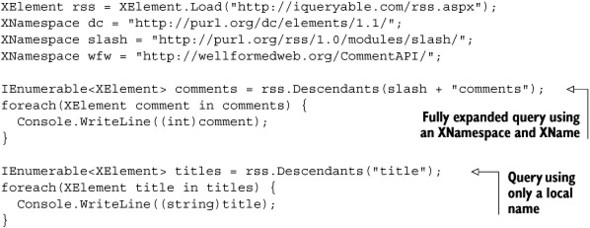
In addition to simplifying the process of creating elements that use namespaces, LINQ to XML also makes it much easier to query an XML tree for elements that have a namespace specified. Let’s look at the code for querying the following RSS feed (which has namespaces), shown in listing 9.5.
Listing 9.5. An RSS feed that uses XML namespaces
<?xml-stylesheet href=http://iqueryable.com/friendly-rss.xsl type="text/xsl" media="screen"?> <rss version="2.0" xmlns:dc="http://purl.org/dc/elements/1.1/" xmlns:slash="http://purl.org/rss/1.0/modules/slash/" xmlns:wfw="http://wellformedweb.org/CommentAPI/"> <channel> <title>Steve Eichert</title> <link>http://iqueryable.com/</link> <generator>ActiveType CMS v0.1</generator> <dc:language>en-US</dc:language> <description /> <item> <dc:creator>Steve Eichert</dc:creator> <title>Parsing WordML using LINQ to XML</title> <link>http://iqueryable.com/LINQ/ParsingWordMLusingLINQ to XML</link> <pubDate>Wed, 02 Aug 2006 15:52:44 GMT</pubDate> <guid>http://iqueryable.com/LINQ/ParsingWordMLusingLINQ to XML</guid> <comments> http://iqueryable.com/LINQ/ParsingWordMLusingLINQ to XML#comments </comments> <wfw:commentRss> http://iqueryable.com/LINQ/ParsingWordMLusingLINQ to XML/commentRss.aspx </wfw:commentRss> <slash:comments>1</slash:comments> <description>Foo...</description> </item> </channel> </rss>Note that the RSS feed uses several XML namespaces: http://purl.org/dc/elements/1.1/, http://purl.org/rss/1.09/modules/slash/, and http://well-formedweb.org/commentapi/. Listing 9.6 shows the code for using the DOM to select values out of elements that use a namespace prefix for the aforementioned namespaces.
Always use fully expanded names when working with elements and attributes. If the element that you’re interested in has a namespace associated with it, use it when constructing your XName; if it doesn’t, then don’t. Listing 9.7 shows the LINQ to XML code for querying our sample XML.
As you can see, the way we deal with namespaces in LINQ to XML is straightforward. In our first query, we build our fully expanded name (XName) by appending the element’s local name to our XNamespace (slash). In the second query for the titles of the items in the RSS feed, we use just the local name (title) since it doesn’t have any namespace associated with it. By combining the namespace and the local name into a single concept, LINQ to XML makes working with XML documents that use namespaces and namespace prefixes much simpler. Everything is wrapped up into a single concept and encapsulated in a single class, XName.

This is an excerpt from Manning's book ASP.NET AJAX in Action.
Cascading Style Sheets (CSS)— Provides a way to define the visual appearance of elements on a web page. CSS is used in Ajax applications to modify the exterior of the user interface interactively.
Table 2.6. Extension methods added to the JavaScript Array object
Method
Description
add Adds an element to the end of an Array object addRange Copies all the elements of the specified array to the end of an Array object clear Removes all elements from an Array object clone Creates a shallow copy of an Array object contains Determines whether an element is in an Array object dequeue Removes the first element from an Array object forEach Performs a specified action on each element of an Array object indexOf Searches for the specified element of an Array object and returns its index insert Inserts a value at the specified location in an Array object parse Creates an Array object from a string representation remove Removes the first occurrence of an element in an Array object removeAt Removes an element at the specified location in an Array object
The Sys.UI.DomElement class provides a group of methods for performing common tasks related to CSS and positioning. If you pass a DOM element and a string with the name of a CSS class to the addCssClass method, you add the class to the list of CSS classes associated with an element. If you pass the same arguments to the removeCssClass method, you remove the class from the list of associated CSS classes.
The getLocation method takes a reference to a DOM element and returns an object with two attributes, x and y, which store the left and top coordinates of the element relative to the upper-left corner of the parent frame:
var top = location.y;
var left = location.x;
The setLocation method accepts the x and y coordinates (specified in pixels) and sets the element’s position using the left and top attributes of its style object. In this case, the element’s location is set based on the positioning mode of the element and its parent node. Consider the following statement:
Sys.UI.DomElement.setLocation(element, 100, 100);If the parent node of element has a specific positioning mode (for example, relative or absolute), then its location—by CSS rules—is set relative to the parent element and not to the parent frame.
If you need to know the bounds of an element—its location and its dimensions—the Sys.UI.DomElement.getBounds method takes a reference to a DOM element and returns an object with four attributes: x, y, height, and width.