concept lambda expression in category .net

This is an excerpt from Manning's book Concurrency in .NET.
C# design tends toward an imperative language, first with full support for OOP. (I like to define this as imperative OO.) The functional paradigm, during the past years and since the release of .NET 3.5, has influenced the C# language with the addition of features like lambda expressions and LINQ for list comprehension.
Listing 2.6 Event register with a lambda expression capturing a local variable
void UpdateImage(string url)
{
 System.Windows.Controls.Image image = img;   #1

    var client = new WebClient();
 client.DownloadDataCompleted += (o, e) =>   #2
    {
        if (image != null)
            using (var ms = new MemoryStream(e.Result))
            {
                var imageConverter = new ImageSourceConverter();
                image.Source = (ImageSource)
➥ imageConverter.ConvertFrom(ms);
            }
    };
 client.DownloadDataAsync(new Uri(url));   #3
}

#1   Captures an instance of the local image control into the variable image
#2   Registers the event DownloadDataCompleted using an inline lambda expression
#3   Starts DownloadDataAsync asynchronously
First, you get a reference of the image control named
img. Then you use a lambda expression to register the handler callback for the eventDownloadDataCompletedto process whenDownloadDataAsynccompletes. Inside the lambda block, the code can access the state from out of scope directly due to closures. This access allows you to check the state of the image pointer, and, if it isn’tnull, update the UI.
Interestingly, the compiler uses a closure to store the data structure, which is accessible through the lambda expression returned from the function. A lambda expression is an especially handy way to provide a function with a precomputed state. Then, you can define the
fastFuzzyMatchfunction by supplying the argumentList<string> words, which is used to prepare an underlying lookup table, resulting in faster computation. After supplyingList<string> words,fastFuzzyMatchreturns a function that takes the stringwordargument, but immediately computes theHashSetfor the lookup.

This is an excerpt from Manning's book C# in Depth.
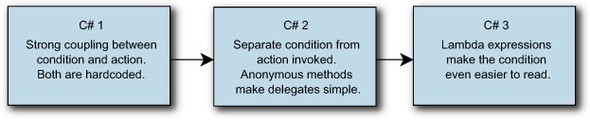
Listing 1.13. Testing with a lambda expression (C# 3)
List<Product> products = Product.GetSampleProducts(); foreach (Product product in products.Where(p => p.Price > 10)) { Console.WriteLine(product); }The combination of the lambda expression putting the test in just the right place and a well-named method means you can almost read the code out loud and understand it without thinking. You still have the flexibility of C# 2—the argument to Where could come from a variable, and you could use an Action<Product> instead of the hardcoded Console.WriteLine call if you wanted to.
This task has emphasized what you already knew from sorting—anonymous methods make writing a delegate simple, and lambda expressions are even more concise. In both cases, that brevity means that you can include the query or sort operation inside the first part of the foreach loop without losing clarity.
In section 10.3.4 I gave a brief example of defect tracking as a real use for extension methods and lambda expressions. We’ll use the same idea for almost all of the sample code in this chapter—it’s a fairly simple model, but one that can be manipulated in many different ways to give useful information. Defect tracking is also a domain that most professional developers are all too familiar with, unfortunately.
This is where it’s important that lambda expressions can be converted into both delegate instances and expression trees. All the examples in this chapter will use delegates, but you’ll see how expression trees are used when we look at the other LINQ providers in chapter 12. When I present the signatures for some of the methods called by the compiler later on, remember that these are just the ones called in LINQ to Objects—whenever the parameter is a delegate type (which most of them are), the compiler will use a lambda expression as the argument and then try to find a method with a suitable signature.
It’s also important to remember that wherever a normal variable (such as a local variable within the method) appears within a lambda expression after translation has been performed, it’ll become a captured variable in the same way that you saw back in chapter 5. This is normal lambda expression behavior, but unless you understand which variables will be captured, you could easily be confused by the results of your queries.
This is an excerpt from Manning's book Entity Framework 4 in Action.
From this point on, you’ll develop queries using LINQ query syntax. If you’re familiar with LINQ, you’ll already know what query syntax is; if you’re not familiar with LINQ, you can learn more in appendix A, and we strongly recommend that you read it before continuing with this chapter. We’ll resort to combining extension methods and lambda expressions when query syntax can’t be used. We’ll generally use query syntax because it’s more intuitive, but that doesn’t mean that it’s recommended over its counterpart. The compiler produces the same IL code for both techniques.
Now that you’ve had a quick refresher on coding before .NET 3.5, you’re ready to dive into lambda expressions and understand their logic. Let’s start by refactoring the example in listing A.6 using lambda expressions like in figure A.4.

In C#, a lambda expression is formed by two main blocks separated by the lambda operator. The left block declares the input parameters for the lambda expression. You don’t have to explicitly set the type of the parameter because the compiler relies once again on type inference to correctly identify it. Because the list that must be filtered contains Order instances, in this case, the input variable type (o) is of type Order. If the lambda expression accepts more than one parameter, they must be separated using a comma, and the left part must be surrounded by brackets, as in the following snippet:
var result = orders.Where((o, i) => o.OrderDate.Date == date.Date && i
  > 10);
The block at the right of the lambda operator contains the lambda expression that’s applied to each object to determine whether it should be included in the result. The difference between the lambda expression–based code and the anonymous method–based code is that the return keyword is omitted. The C# team has enabled you to omit the return keyword to further reduce code.

This is an excerpt from Manning's book LINQ in Action.
Listing 2.10. Calling the DisplayProcesses method using a lambda expression (LambdaExpressions.csproj)
DisplayProcesses(process => process.WorkingSet64 >= 20*1024*1024);Notice how the code is simplified when using a lambda expression. This lambda expression reads like this: “Given a process, return true if the process consumes 20 megabytes of memory or more.”
As you can see, in the case of lambda expressions, we don’t need to provide the type of the parameter. Again, this was duplicated information in the previous code: The new C# compiler is able to deduce the type of the parameters from the method signature.

As you saw in the example, lambda expressions are compatible with delegates. To give you a feel for lambda expressions as delegates, we’ll use some delegate types.