concept list in category .net

This is an excerpt from Manning's book Concurrency in .NET.
Here is a list of concurrency hazards with a brief explanation. Later, you’ll get more details on each, with a specific focus on how to avoid them:
Listing 3.2 Constructing .NET immutable collections
var list = ImmutableList.Create<int>();   #1
list = list.Add(1);   #2
list = list.Add(2);
list = list.Add(3);

var builder = ImmutableList.CreateBuilder<int>();   #3
builder.Add(1);   #4
builder.Add(2);
builder.Add(3);
list = builder.ToImmutable();   #5

#1   Creates an empty immutable list
#2   Adds a new item to the list and returns a new list
#3   Creates a list builder to construct a list definition, with mutable semantics, then freezes the collection
#4   Adds a new item to the list builder, which mutates the collection in place
#5   Closes the list builder to create the immutable list
The second approach simplifies the construction of the list by creating a temporary list builder, which is used to add an element to the list and then seals (freezes) the elements into an immutable structure.
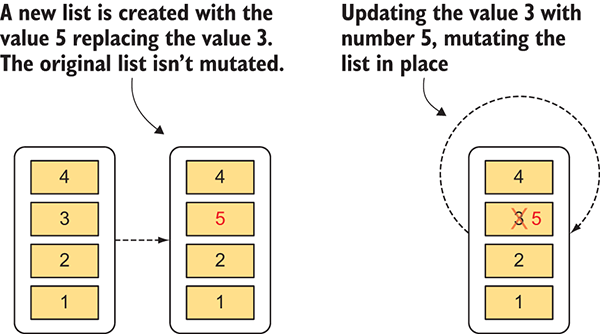
Figure 3.3 Destructive update vs. a persistent update of a list. The list at right is updating in place to mutate the value 3 with the value 5, without preserving the original list. This process is also known as destructive. At left, the functional list doesn’t mutate its values, but creates a new list with the updated value.
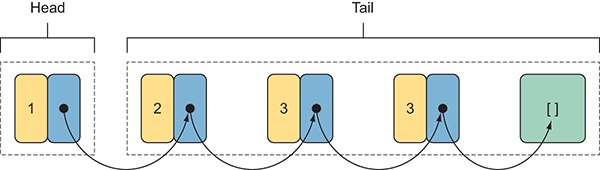
The most common and generally adoptedfunctional data structureis the list, which is a series of homogeneous types used to store an arbitrary number of items. In FP, lists are recursive data structures composed by two linked elements:
HeadorConsandTail. The purpose ofConsis to provide a mechanism to contain a value and a connection to otherConselements via an object reference pointer. This pointer reference is known as theNextpointer.Lists also have a special state called
nilto represent a list with no items, which is the last link connected to anything. Thenil, or empty, case is convenient during a recursive traverse of a list to determine its end. Figure 3.5 shows a constructed list of fourConscells and an empty list. Each cell (Head) contains a number and a reference to the remaining list (Tail), until the lastConscell, which defines an empty list. This data structure is similar to a singly linked list (https://en.wikipedia.org/wiki/Linked_list), where each node in the chain has a single link to another node, representing a series of nodes linked together into a chain.Figure 3.5 Functional list of integers composed by four numbers and an empty list (the last box [ ] on the right). Each item has a reference, the black arrow, linked to the rest of the list. The first item on the left is the head of the list, which is linked to the rest of the list, the tail.

This is an excerpt from Manning's book C# in Depth.
The easiest way to display a list in a particular order is to sort the list and then run through it, displaying items. In .NET 1.1, this involved using ArrayList.Sort, and optionally providing an IComparer implementation to specify a particular comparison. You could make the Product type implement IComparable, but that would only allow you to define one sort order, and it’s not a stretch to imagine that you might want to sort by price at some stage, as well as by name.
The following listing implements IComparer, and then sorts the list and displays it.
True story:[1] The other day my wife and I went out to do our weekly grocery shopping. Just before we left, she asked me if I had the list. I confirmed that I did have the list, and off we went. It was only when we got to the grocery store that our mistake became obvious. My wife had been asking about the shopping list, whereas I’d brought the list of neat features in C# 2. When we asked an assistant whether we could buy any anonymous methods, we received a strange look.
Dictionary<TKey,TValue> doesn’t have any generic methods, but its close neighbor List<T> does. As you can imagine, List<T> is just a list of items of whatever type is specified—List<string> is a list of strings, for instance. Remembering that T is the type parameter for the whole class, let’s dissect a generic method declaration. Figure 3.2 identifies the different parts of the declaration of the ConvertAll method.
So you have a method that can operate on a list of strings, using a converter to produce a list of GUIDs. Now that you understand the method’s signature, it’s easier to understand the documentation, which confirms that this method does the obvious thing and creates a new List<Guid>, converts each element in the original list into the target type, adding it to the new list, and then returns that list. Thinking about the signature in concrete terms gives you a clearer mental model, and makes it simpler to think about what the method might do. Although this technique may sound somewhat simplistic, I find it useful for complicated methods even now. Some of the LINQ method signatures with four type parameters are fearsome beasts, but putting them into concrete terms tames them significantly.
Just to prove I haven’t been leading you down the garden path, let’s take a look at the ConvertAll method in action. The following listing shows the conversion of a list of integers into a list of floating-point numbers, where each element of the second list is the square root of the corresponding element in the first list. After the conversion, the results are printed.
Listing 3.2. The List<T>.ConvertAll<TOutput> method in action
static double TakeSquareRoot(int x) { return Math.Sqrt(x); } ... List<int> integers = new List<int>(); #1 integers.Add(1); #1 integers.Add(2); #1 integers.Add(3); #1 integers.Add(4); #1 Converter<int,double> converter = TakeSquareRoot; #2 List<double> doubles; doubles = integers.ConvertAll<double>(converter); #3 foreach (double d in doubles) { Console.WriteLine(d); } #1 – 1 Creates, populates list of integers #2 – 2 Creates delegate instance #3 – 3 Calls generic method to convert list !@%STYLE%@! {"css":"{\"css\": \"font-weight: bold;\"}","target":"[]"} !@%STYLE%@!The creation and population of the list
is straightforward enough—it’s just a strongly typed list of integers. The assignment to converter
uses a feature of delegates (method group conversions) which is new to C# 2 and which we’ll discuss in more detail in section 5.2. Although I don’t like using a feature before describing it fully, the line would’ve been too long to fit on the page with the C# 1 delegate syntax. It does what you expect it to, though. At
you call the generic method, specifying the type argument for the method in the same way you’ve seen for generic types. This is one situation where you could’ve used type inference to avoid explicitly specifying the type argument, but I wanted to take it one step at a time. Writing out the list that has been returned is simple, and when you run the code you’ll see it print 1, 1.414..., 1.732..., and 2, as expected.
What’s the point of all of this? We could’ve just used a foreach loop to go through the integers and printed out the square root immediately, of course, but it’s not uncommon to want to convert a list of one type to a list of another by performing some logic on it. The code to do it manually is simple, but it’s easier to read a version that does it in a single method call. That’s often the way with generic methods—they often do things that previously you’d have happily done “longhand” but that are simpler with a method call. Before generics, there could’ve been a similar operation to ConvertAll on ArrayList converting from object to object, but it would’ve been a lot less satisfactory. Anonymous methods (see section 5.4) also help here—if you hadn’t wanted to introduce an extra method, you could’ve specified the conversion inline. LINQ and lambda expressions take this pattern much further, as you’ll see in part 3 of the book.

This is an excerpt from Manning's book Dependency Injection in .NET.
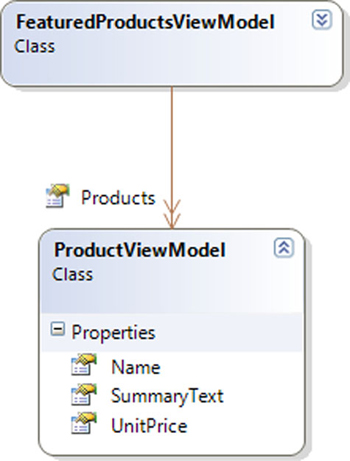
This will enable the web application to execute without error, but the list of featured products will always be empty. Providing the list of featured products is a task for the Domain Model.
Instead of feeling constrained by Castle Windsor, we should embrace its conventions and let it guide us toward a better and more consistent design. In this section, we’ll look at an example that will demonstrate how we can refactor away from ambiguity, as well as show how Castle Windsor deals with sequences, arrays, and lists.
Listing 12.1. Wiring a list of dependencies
<object id="Entrée" type="Rillettes" /> <object id="MainCourse" type="CordonBleu" /> <object id="Dessert" type="MousseAuChocolat" /> <object id="Meal" type="ThreeCourseMeal"> <constructor-arg ref="Entrée" /> <constructor-arg ref="MainCourse" /> <constructor-arg ref="Dessert" /> </object>
This is an excerpt from Manning's book Entity Framework 4 in Action.
After playing with the prototype, your customer changes the specifications and wants to see the details under each order in the list. The solution becomes more challenging, because you can choose different approaches:
The ReturnType attribute contains the Collection keyword, which says that this function returns a list of Int32 instances and not a single value. In the Entity SQL code in the DefiningExpression element, you place a full query, not just a simple expression. With these simple tweaks, a function can return a collection of items.
Listing 11.6. User-defined function that returns a list of DbDataRecord objects
<Function Name="GetUDFDetailsWithNoDiscount_Record"> <ReturnType> <CollectionType> <RowType> <Property Name="OrderDetailId" Type="Int32"/> <Property Name="UnitPrice" Type="Decimal"/> <Property Name="Quantity" Type="Int32"/> </RowType> </CollectionType> </ReturnType> <Parameter Name="o" Type="OrderITModel.Order" /> <DefiningExpression> SELECT d.OrderDetailId, d.UnitPrice, d.Quantity FROM o.OrderDetails AS d WHERE d.discount == 0 </DefiningExpression> </Function>

This is an excerpt from Manning's book IronPython in Action.
dir(object) will give you a list of all the attributes available on an object. It returns a list of strings, so you can filter it or do anything else you might do with a list. The following code snippet looks for all the interfaces in the System.Collections namespace by building a list and then printing all the members whose name begins with I.
The list is a very flexible datatype. You can store objects of any type in lists, and they grow themselves in memory—you don’t need to specify a size for them. You can use them with the minimum of boilerplate code.
As the name implies, lists are used for storing multiple objects. The objects are stored in a sequence, one after another, and you access them by their positions in the list. In Python terminology, the objects contained in a list (or other containers) are usually referred to as members. This is slightly different than the way .NET terminology uses member, which corresponds more closely to the Python term attribute.
The list is the archetypal sequence type in Python. You access the members of a list by position, a process called indexing; the first member is at position zero. You can also access members starting from the end, by using negative numbers.
>>> a = [1, 2, 3, 4]
>>> a[0]
1
>>> a[-1]
4
Attempting to access a member outside the bounds of the list will raise an IndexError.

This is an excerpt from Manning's book NHibernate in Action.
Popular media players allow you to rate the songs you hear and later sort them based on your rating. This means your ratings are persisted. When you open a list of songs, you listen and rate them one by one. When should persistence take place?
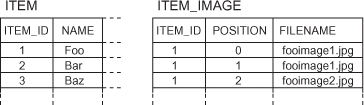
The primary key consists of the ITEM_ID and POSITION columns. Notice that duplicate elements (FILENAME) are allowed, which is consistent with the semantics of a list. (You don’t have to change the Item class; the types you used earlier for the bag are the same.)
Note that even though the IList contract doesn’t specify that a list is an ordered collection, NHibernate’s implementation preserves the ordering when persisting the collection.
Alternatively, you could use a .NET array instead of a list. NHibernate supports this usage, and the details of an array mapping are virtually identical to those of a list. But we strongly recommend against the use of arrays, because arrays can’t be lazily initialized (there is no way to proxy an array at the CLR level). Here is the mapping:

This is an excerpt from Manning's book LINQ in Action.
As is evident from the results, we have filtered a list of words to select only the ones whose length is less than or equal to five characters.
We’ll start with the simplest code possible, using only .NET 2.0 constructs, and then we’ll improve it by progressively introducing the new language features. Each refactoring step will address one specific problem or syntax feature. First, let’s get acquainted with our simple example: an application that outputs a list of running processes.
Let’s say we want to get a list of the processes running on our computer. This can be done easily thanks to the System.Diagnostics.Process.GetProcesses API.


This is an excerpt from Manning's book ASP.NET AJAX in Action.
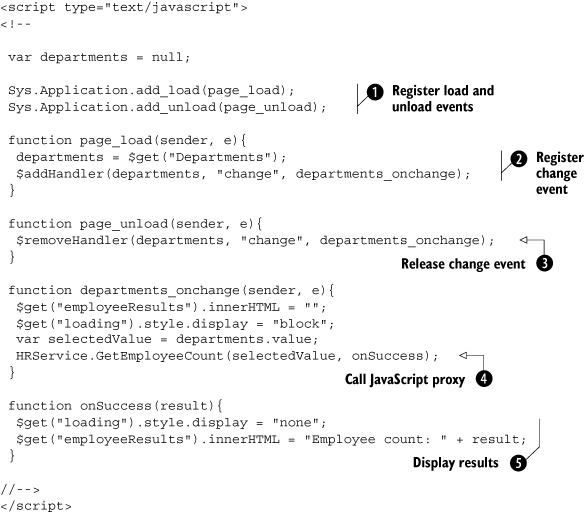
Because you aren’t relying on any of the business or UI logic to come from the server, you can use normal HTML elements on the page instead of the heavier server controls. This includes a select element for the list of
departments and a
span element to display visual feedback to the user when retrieving data from the server. To make this page come to life, add the JavaScript shown in listing 1.16.
Note the functions registered with the application model for the
remove the registered handler.
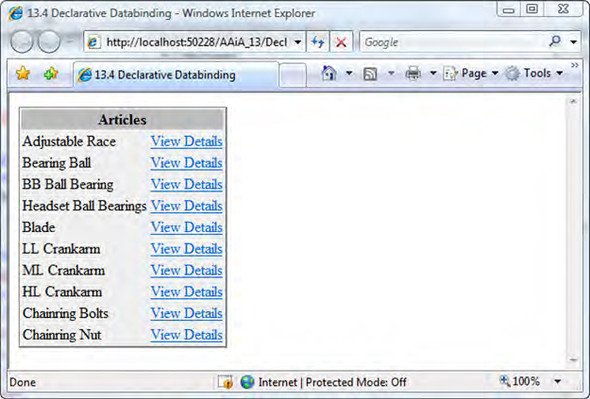
In the following example, you’ll use the ListView control to display a list of products extracted from the AdventureWorks database. (You can download this database for free from the Microsoft website and use it as a test database during the development phase. Appendix A contains instructions on how to set up the AdventureWorks database.) To make things more interesting, you’ll write the client-side logic using XML Script, the client declarative language that we discussed in chapter 11. As usual, you can download the complete code for the example from the book’s website, www.manning.com/gallo. Figure 13.7 shows the example up and running in Internet Explorer.
The list can be data bound.