concept method in category .net

This is an excerpt from Manning's book .NET Core in Action.
Experienced .NET Framework developers may encounter a few surprises when working in .NET Core. Writing new code should be relatively straightforward, because you’re unlikely to use older constructs like HashTable or ArrayList. Visual Studio’s IntelliSense will also indicate whether a type, method, property, and so on, is supported in .NET Core. In figure 1.5, you can see the auto-completion window flagging members that are different in .NET Core.
The async/await constructs are a bit of compiler magic that make asynchronous code much easier to write. The await signals a point in the method where the code will need to wait for something. The C# compiler will split the Convert method into two methods, with the second being invoked when the awaited item is finished. This all happens behind the scenes, but if you’re curious about how it works, try viewing the IL (the .NET Intermediate Language—the stuff inside a .NET DLL) generated for async methods in the ILDASM tool that comes with Visual Studio.
Much of modern programming involves writing and communicating with HTTP services. ASP.NET Core makes writing HTTP REST services quick and intuitive by using a convention-based approach. Methods like Content, Created, Accepted, and the like match the HTTP specifications. Routing requests to the right methods is handled via the Http* attributes, and accessing parameters from the URI or query string doesn’t require manual parsing.

This is an excerpt from Manning's book Concurrency in .NET.
1 A side effect arises when a method changes some state from outside its scope, or it communicates with the “outside world,” such as calling a database or writing to the file system.
Listing 8.4 Analyzing the history of stock prices
async Task<StockData[]> ConvertStockHistory(string stockHistory)   #1
{
 return await Task.Run(() => {   #2
             string[] stockHistoryRows =
                   stockHistory.Split(Environment.NewLine.ToCharArray(),
                                StringSplitOptions.RemoveEmptyEntries);
             return (from row in stockHistoryRows.Skip(1)
                     let cells = row.Split(',')
                     let date = DateTime.Parse(cells[0])
                     let open = double.Parse(cells[1])
                     let high = double.Parse(cells[2])
                     let low = double.Parse(cells[3])
                     let close = double.Parse(cells[4])
                     select new StockData(date, open, high, low, close))
                                                              .ToArray();
     });
}   #1

async Task<string> DownloadStockHistory(string symbol)
{
    string url =
        $"http://www.google.com/finance/historical?q={symbol}&output=csv";
 var request = WebRequest.Create(url);   #3
    using (var response = await request.GetResponseAsync()
 .ConfigureAwait(false))   #4
    using (var reader = new StreamReader(response.GetResponseStream()))
 return await reader.ReadToEndAsync().ConfigureAwait(false);   #5
}

async Task<Tuple<string, StockData[]>> ProcessStockHistory(string symbol)
{
 string stockHistory = await DownloadStockHistoryAsync(symbol);   #6
 StockData[] stockData = await ConvertStockHistory(stockHistory);   #6
 return Tuple.Create(symbol, stockData);   #7
}

async Task AnalyzeStockHistory(string[] stockSymbols)
{
    var sw = Stopwatch.StartNew();

    IEnumerable<Task<Tuple<string, StockData[]>>> stockHistoryTasks =
 stockSymbols.Select(stock => ProcessStockHistory(stock));   #8

    var stockHistories = new List<Tuple<string, StockData[]>>();
    foreach (var stockTask in stockHistoryTasks)
 stockHistories.Add(await stockTask);   #9

 ShowChart(stockHistories, sw.ElapsedMilliseconds);   #10
}

#1   Method that parses the string of stock history data and returns an array of StockData
#2   Uses an asynchronous parser of the CSV stock history
#3   Web request for a given endpoint to retrieve the stock history; in this case, the financial Google API
#4   Web request to asynchronously get the HTTP response
#5   Creates a stream reader using the HTTP response to read the content asynchronously; all the CSV text is read in once
#6   The method ProcessStockHistory asynchronously executes the operation to download and to process the stock history.
#7   A new tuple instance carries information for each stock history analyzed to the chart.
#8   A lazy collection of asynchronous operations processes the historical data.
#9   Asynchronously processes the operations, one at a time
#10   Shows the chart


!@%STYLE%@!
{"css":"{\"css\": \"font-weight: bold;\"}","target":"[[{\"line\":0,\"ch\":0},{\"line\":0,\"ch\":5}],[{\"line\":18,\"ch\":0},{\"line\":18,\"ch\":5}],[{\"line\":29,\"ch\":0},{\"line\":29,\"ch\":5}],[{\"line\":36,\"ch\":0},{\"line\":36,\"ch\":5}],[{\"line\":51,\"ch\":12},{\"line\":51,\"ch\":17}],[{\"line\":53,\"ch\":19},{\"line\":53,\"ch\":24}],[{\"line\":54,\"ch\":72},{\"line\":54,\"ch\":77}],[{\"line\":55,\"ch\":35},{\"line\":55,\"ch\":40}],[{\"line\":57,\"ch\":25},{\"line\":57,\"ch\":30}],[{\"line\":2,\"ch\":8},{\"line\":2,\"ch\":13}],[{\"line\":23,\"ch\":26},{\"line\":23,\"ch\":31}],[{\"line\":26,\"ch\":8},{\"line\":26,\"ch\":13}],[{\"line\":31,\"ch\":23},{\"line\":31,\"ch\":28}],[{\"line\":32,\"ch\":25},{\"line\":32,\"ch\":30}],[{\"line\":45,\"ch\":20},{\"line\":45,\"ch\":25}],[{\"line\":0,\"ch\":0},{\"line\":0,\"ch\":5}],[{\"line\":18,\"ch\":0},{\"line\":18,\"ch\":5}],[{\"line\":29,\"ch\":0},{\"line\":29,\"ch\":5}],[{\"line\":36,\"ch\":0},{\"line\":36,\"ch\":5}],[{\"line\":51,\"ch\":12},{\"line\":51,\"ch\":17}],[{\"line\":53,\"ch\":19},{\"line\":53,\"ch\":24}],[{\"line\":54,\"ch\":72},{\"line\":54,\"ch\":77}],[{\"line\":55,\"ch\":35},{\"line\":55,\"ch\":40}],[{\"line\":57,\"ch\":25},{\"line\":57,\"ch\":30}],[{\"line\":2,\"ch\":8},{\"line\":2,\"ch\":13}],[{\"line\":23,\"ch\":26},{\"line\":23,\"ch\":31}],[{\"line\":26,\"ch\":8},{\"line\":26,\"ch\":13}],[{\"line\":31,\"ch\":23},{\"line\":31,\"ch\":28}],[{\"line\":32,\"ch\":25},{\"line\":32,\"ch\":30}],[{\"line\":45,\"ch\":20},{\"line\":45,\"ch\":25}],[{\"line\":2,\"ch\":8},{\"line\":2,\"ch\":13}],[{\"line\":23,\"ch\":26},{\"line\":23,\"ch\":31}],[{\"line\":26,\"ch\":8},{\"line\":26,\"ch\":13}],[{\"line\":31,\"ch\":23},{\"line\":31,\"ch\":28}],[{\"line\":32,\"ch\":25},{\"line\":32,\"ch\":30}],[{\"line\":45,\"ch\":20},{\"line\":45,\"ch\":25}],[{\"line\":0,\"ch\":0},{\"line\":0,\"ch\":5}],[{\"line\":18,\"ch\":0},{\"line\":18,\"ch\":5}],[{\"line\":29,\"ch\":0},{\"line\":29,\"ch\":5}],[{\"line\":36,\"ch\":0},{\"line\":36,\"ch\":5}],[{\"line\":51,\"ch\":12},{\"line\":51,\"ch\":17}],[{\"line\":53,\"ch\":19},{\"line\":53,\"ch\":24}],[{\"line\":54,\"ch\":72},{\"line\":54,\"ch\":77}],[{\"line\":55,\"ch\":35},{\"line\":55,\"ch\":40}],[{\"line\":57,\"ch\":25},{\"line\":57,\"ch\":30}],[{\"line\":2,\"ch\":8},{\"line\":2,\"ch\":13}],[{\"line\":23,\"ch\":26},{\"line\":23,\"ch\":31}],[{\"line\":26,\"ch\":8},{\"line\":26,\"ch\":13}],[{\"line\":31,\"ch\":23},{\"line\":31,\"ch\":28}],[{\"line\":32,\"ch\":25},{\"line\":32,\"ch\":30}],[{\"line\":45,\"ch\":20},{\"line\":45,\"ch\":25}],[{\"line\":2,\"ch\":8},{\"line\":2,\"ch\":13}],[{\"line\":23,\"ch\":26},{\"line\":23,\"ch\":31}],[{\"line\":26,\"ch\":8},{\"line\":26,\"ch\":13}],[{\"line\":31,\"ch\":23},{\"line\":31,\"ch\":28}],[{\"line\":32,\"ch\":25},{\"line\":32,\"ch\":30}],[{\"line\":45,\"ch\":20},{\"line\":45,\"ch\":25}],[{\"line\":2,\"ch\":8},{\"line\":2,\"ch\":13}],[{\"line\":23,\"ch\":26},{\"line\":23,\"ch\":31}],[{\"line\":26,\"ch\":8},{\"line\":26,\"ch\":13}],[{\"line\":31,\"ch\":23},{\"line\":31,\"ch\":28}],[{\"line\":32,\"ch\":25},{\"line\":32,\"ch\":30}],[{\"line\":45,\"ch\":20},{\"line\":45,\"ch\":25}]]"}
!@%STYLE%@!
Exposing your intent is crucial if you want to increase the readability of your code. Introducing the Resultclass helps to show if the method is a failure or success, removes unnecessary boilerplate code, and results in a clean design.

This is an excerpt from Manning's book C# in Depth.
The full method is a little longer than the one shown in listing 1.22, displaying status messages and clearing the results at the start, but this listing contains all the important parts. The new parts of syntax are in bold—the method has the new async modifier, and there are two await expressions.
If you squint and ignore those for the moment, you can probably understand the general flow of the code. It starts off performing lookups on both the product directory and warehouse to find out the product details and current stock. The method then waits until it has the product information, and quits if the directory has no entry for the given ID. Otherwise, it fills in the UI elements for the name and price, and then waits to get the stock information, and displays that too.
Both the product and stock lookups are asynchronous—they could be database operations or web service calls. It doesn’t matter—when you await the results, you’re not actually blocking the UI thread, even though all the code in the method runs on that thread. When the results come back, the method continues from where it left off. The example also demonstrates that normal flow control (try/finally) operates exactly as you’d expect it to. The really surprising thing about this method is that it has managed to achieve exactly the kind of asynchrony you want without any of the normal messing around starting other threads or BackgroundWorkers, calling Control .BeginInvoke, or attaching callbacks to asynchronous events. Of course you still need to think—asynchrony doesn’t become easy using async/await, but it becomes less tedious, with far less boilerplate code to distract you from the inherent complexity you’re trying to control.
Listing 2.4. Improvements in delegate instantiation brought in by C# 2
static void HandleDemoEvent(object sender, EventArgs e) { Console.WriteLine ("Handled by HandleDemoEvent"); } ... EventHandler handler; handler = new EventHandler(HandleDemoEvent); #1 handler(null, EventArgs.Empty); handler = HandleDemoEvent; #2 handler(null, EventArgs.Empty); #2 handler = delegate(object sender, EventArgs e) #3 { #3 Console.WriteLine ("Handled anonymously"); #3 }; #3 handler(null, EventArgs.Empty); #3 handler = delegate #4 { #4 Console.WriteLine ("Handled anonymously again"); #4 }; #4 handler(null, EventArgs.Empty); #4 MouseEventHandler mouseHandler = HandleDemoEvent; #5 mouseHandler(null, new MouseEventArgs(MouseButtons.None, #5 0, 0, 0, 0)); #5 #1 – 1 Specifies delegate type and method #2 – 2 Implicitly converts to delegate instance #3 – 3 Specifies action with anonymous method #4 – 4 Uses anonymous method shortcut #5 – 5 Uses delegate contravariance !@%STYLE%@! {"css":"{\"css\": \"font-weight: bold;\"}","target":"[[{\"line\":28,\"ch\":7},{\"line\":28,\"ch\":35}]]"} !@%STYLE%@!
Inheritance wouldn’t help you in this situation (you want this behavior to be available for all streams, not just ones you’re responsible for), and you can’t go changing the Stream class itself, so what can you do? With C# 2, you were out of options—you had to stick with the static methods and live with the clumsiness. C# 3 allows you to change your static class to expose its members as extension methods, so you can pretend that the methods have been part of Stream all along. Let’s see what changes are required.
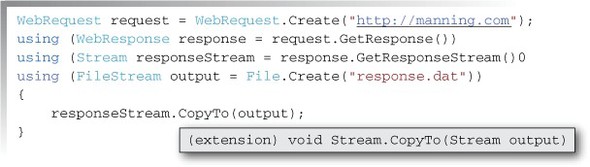
If you’re using Visual Studio, you can hover over a method call and get an indication in the tooltip when it’s an extension method, as shown in figure 10.1. IntelliSense also indicates when it’s offering an extension method, in both the icon for the method and the tooltip when it’s selected. Of course, you don’t want to have to hover over every method call you make or be super careful with IntelliSense, but most of the time it doesn’t matter whether you’re calling an instance or extension method.
Anyone who does a significant amount of .NET programming is bound to encounter a NullReferenceException caused by calling a method via a variable whose value turns out to be a null reference. You can’t call instance methods on null references in C# (although IL itself supports it for nonvirtual calls), but you can call extension methods with a null reference. This is demonstrated by the following listing. Note that this isn’t a snippet, since nested classes can’t contain extension methods.
This is an excerpt from Manning's book AOP in .NET.
[Serializable]
public class MyAspect : OnMethodBoundaryAspect {
    public override void OnEntry(MethodExecutionArgs args) {
        Console.WriteLine("Before the method");
    }
}
Instantiate a MyClass object inside the Main method, and call the method. The following code shows how the Program class should look now:
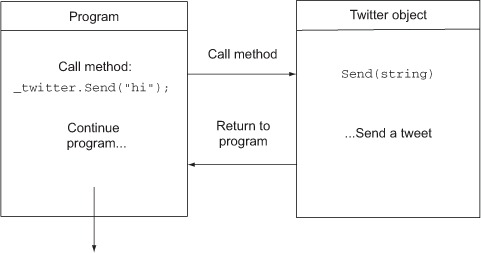
This chapter covered one of the most common types of aspects: method interception aspects. Method interception aspects are like middlemen between code that’s calling a method and the method itself. They give you the opportunity to add or modify method behavior without modifying the method and thus the ability to encapsulate cross-cutting concerns into their own classes, not only for improved organization but also for improved reuse.
PostSharp, Castle DynamicProxy, and other similar tools make it easy to write method interception aspects. Their APIs allow you to proceed to the intercepted method when you want to. Their APIs are also able to give you contextual information about the method being intercepted, including information about the method (for example, the method’s name), the class that the method is in, and much more.
This is an excerpt from Manning's book Dependency Injection in .NET.
It’s possible to change the signature of the method to return a sequence of a type defined within the Domain Model. It would also be more correct, but it doesn’t solve the problem.
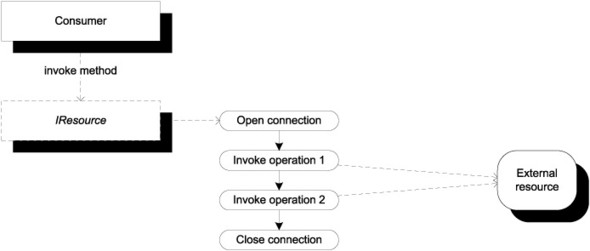
Figure 6.3. We can design an interface so that it’s sufficiently coarse-grained that each method encapsulates all interactions with an external resource in a single batch. The Consumer invokes a method on the IResource interface. An implementation of that method could open a connection and invoke several methods against the external resource before closing the connection and returning a result to the consumer.
The StructureMap API has changed a lot recently. It’s often the case that we find a code example on the internet that uses a method or class that isn’t available in the current version; most likely, it was renamed or otherwise refactored. Although all code examples compiled and worked when this chapter was written, some parts of the API might have changed between then and when you’re reading this.
There are more advanced options available for configuring StructureMap, but we can configure an entire application with the methods shown here. To save ourselves from too much explicit maintenance of container configuration, we could instead consider a more convention-based approach, using AUTO-REGISTRATION.
This is an excerpt from Manning's book Entity Framework 4 in Action.
Using classes is a natural choice for most applications today. Classes are the foundation of object-oriented programming. They easily represent data, perform actions, publish events, and so on. From a data organization point of view, classes express data through methods and properties (which, in the end, are special methods).
In the method declaration
, you have to indicate what type the method must be attached to. In VB, this is accomplished by specifying in the first parameter the class that’s extended, and adding the Extension attribute to the method. In C#, you only need to add the this keyword before the extended type without using any attribute. If the method accepts other parameters, they must be added after the first parameter; if the type isn’t first, you’ll get a compile-time error. There is one caveat in both languages: in VB, an extension method can be defined only in a module; and in C#, it must be defined in a static class, and the method must be static too.
This is an excerpt from Manning's book DSLs in Boo: Domain-Specific Languages in .NET.
Automatic variable declaration and type inference[1]— The compiler takes care of things for you, so you don’t have to type the same thing over and over again. Some would say that this is bad, due to the lack of explicit typing, but it’s worth trying. In my experience, it works. Take a look at listing 2.1. 1 C# 3.0 has introduced the var keyword, which allows the C# compiler to do much the same for local variables. Boo supports this for just about everything (fields, properties, methods, local variables, and so on).
1 C# 3.0 has introduced the var keyword, which allows the C# compiler to do much the same for local variables. Boo supports this for just about everything (fields, properties, methods, local variables, and so on).

This is an excerpt from Manning's book IronPython in Action.
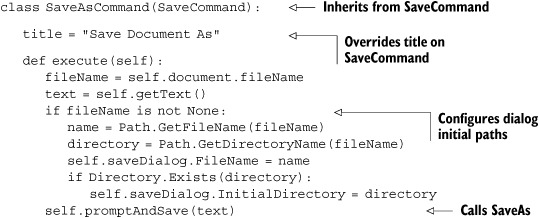
This page shows that Application.Run can be called in three different ways. .NET allows classes to have multiple versions of methods, including constructors. Multiple methods and constructors are called overloads; the type of objects you pass in determines which overload is called. The three different call signatures of Run are as follow:

This is an excerpt from Manning's book NHibernate in Action.
In the context of an auction application (such as eBay), NHibernate lets you easily save an Item and its Bids by implementing a method like this:
Figure 4.1 shows these states and their transitions in a state chart. You can also see the method calls to the persistence manager that trigger transitions. We discuss this chart in this section; refer to it later whenever you need an overview.

This is an excerpt from Manning's book LINQ in Action.
Object-oriented general-purpose programming languages and .NET live in a world of classes, methods, properties, inheritance, and loops.
Listing 5.14. Dynamic query refactored into a method
void ConditionalQuery<TSortKey>( int minPageCount, String titleFilter, Func<Book, TSortKey> sortSelector) { var query = SampleData.Books .Where(book => book.PageCount >= minPageCount.Value) .Where(book => book.Title.Contains(titleFilter)) .OrderBy(sortSelector) .Select( book => new { book.Title, book.PageCount, Publisher=book.Publisher.Name }); dataGridView1.DataSource = query.ToList(); }
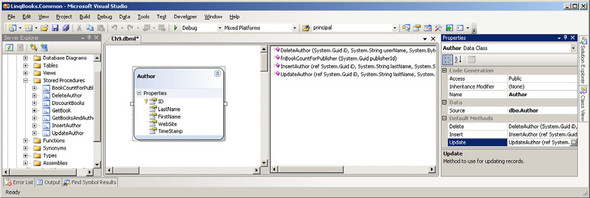
When we were working with tables, we mapped the tables directly to classes. When we query the data, we use extension methods or query syntax to define our queries. Stored procedures, on the other hand, are implemented as method calls that return objects. Since the designer defines the stored procedure as a method in the custom data context, we call it as shown in listing 8.11.
In the UpdateAuthor(Author instance) method, we use a predefined signature designating that this method be used to update records on this object type rather than creating the update method dynamically. If we define methods in our DataContext with the following signatures, they will be used instead of the dynamic SQL: InsertT(T instance), UpdateT(T instance), and DeleteT(T instance). In this case, since we’re updating an Author instance, we define our method as UpdateAuthor(Author instance). If we have a method with this signature in the context attached to the objects we’re updating, it will be called when SubmitChanges is called on that DataContext instance rather than dynamically creating the update SQL statement.
So far, we’ve demonstrated coding the procedures manually. In many cases, it may be easier to at least start with the designer and then use the generated code to learn now to do it manually. In figure 8.4, we show the Visual Studio designer again. This time, pay attention to each of the four panes: the Server Explorer, both sides of the Method pane, and the Properties window. To generate a method from a stored procedure, we simply drag and drop the procedure in question from the Server Explorer into the Method pane. The generated method’s signature will appear.

This is an excerpt from Manning's book ASP.NET AJAX in Action.
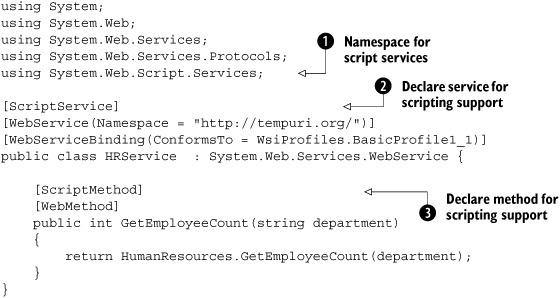
First, note the
using statement for the System.Web.Script.Services namespace. This namespace is part of the core ASP.NET AJAX framework that encapsulates some of the network communication and scripting functionality. It’s not required, but it’s included to save you a little extra typing. Next are the new attributes adorned on the
class and
method declarations of the web service. These attributes are parsed by the ASP.NET AJAX framework and used to determine what portions of the service are exposed in the JavaScript proxies. The ScriptMethod attribute isn’t required, but you can use it to manipulate some of a method’s settings.
If you view the ASMX file in your browser but append /js to the end of the URL, you get a glimpse of the JavaScript proxy that is generated for this service. Figure 1.14 shows the generated JavaScript proxy that is produced by the framework after decorating the class and methods in the web service.
In a JavaScript object, the purpose of the prototype object is to hold all the properties that will be inherited by all the instances. The prototype object defines the structure of an object, in a manner similar to what is done with classes in many object-oriented languages. In the previous section, you saw how a function—the constructor—can be used to create custom objects and to add properties to the instances. Listing 3.3 shows how you can use the constructor’s prototype object to add additional properties and methods to instances.
Listing 3.3. Expanding the prototype object to define an object’s initial structure
function Cat() { this._name; this._age; } Cat.prototype.speak = function() { alert("Meeeeooow!"); }In listing 3.3, you access the prototype of the Cat function and add a speak method. The speak method calls the alert function to display a string with the voice of a (hungry) cat. What are the consequences of adding a method to the prototype object of the constructor? First, whenever you create an object with the new operator and the Cat constructor, the new instance inherits the speak method, as shown in the following code:
Adding methods to the prototype object is safe, because you’re sharing the same function objects between different instances. This can yield some advantages in terms of memory used to store multiple instances, because you’re sharing the same function objects. But accessing functions in the prototype is slightly slower than accessing them in the constructor, because they’re searched first in the current instance and then in the prototype. A common approach is to declare members in the constructor and methods in the prototype object; this is the approach we’ll follow in this book.
In JavaScript, you can override a method by assigning a new function to the same property: You replace the previous function with the new one. This raises an interesting question: If you’re deriving from a base class, how can you call the implementation of the base class if you’re replacing it? The answer is that you should store a reference to the base method before replacing it in the child class. The good news is that this is done automatically when you implement inheritance using the Microsoft Ajax Library. Base methods can be invoked through a method named callBaseMethod. Listing 3.10 shows how you can invoke the Pet implementation of the speak method from the child Cat class.
Listing 3.10. Calling the implementation of a method defined in the base class
Samples.Cat.prototype = { speak : function() { Samples.Cat.callBaseMethod(this, 'speak'); } }The first argument accepted by callBaseMethod is always the current instance, pointed to by this. The second argument is a string with the name of the method to invoke on the base class. In this case, because the base implementation of the speak method was defined in listing 3.4 to throw a client exception, the overridden method will behave in the same manner as the base method and throw the same client exception. If the base method accepts parameters, you encapsulate them into an array and pass it as the third argument to callBaseMethod, as shown in figure 3.5.

1. Create a method that adds an event handler.
2. Create a method that removes an event handler.
3. Create a method that is responsible for raising the event.
The methods responsible for adding and removing the event handlers must follow a naming convention defined by the Microsoft Ajax Library:
The name of the method responsible for adding an event handler must be add_eventName, where eventName is the name of the event. The name of the method responsible for removing an event handler must be remove_eventName, where eventName is the name of the event.