concept Serilog in category .net
This is an excerpt from Manning's book Microservices in .NET Core: with examples in Nancy.
The first thing to do is install the Serilog and Serilog.Sinks.ColoredConsole NuGet packages. You do that by adding them to the project.json file:
"dependencies": {
    "Microsoft.AspNetCore.Server.IISIntegration": "1.0.0",
    "Microsoft.AspNetCore.Server.Kestrel": "1.0.0",
    "Microsoft.AspNetCore.Owin": "1.0.0",
    "Nancy": "2.0.0-barneyrubble",
    "Polly": "4.2.1",
    "Dapper": "1.50.0-rc2a",
    "LibOwin": "1.0.0",
    "Serilog": "2.0.0-rc-600",
    "Serilog.Sinks.ColoredConsole": "2.0.0-beta-1001"
  }
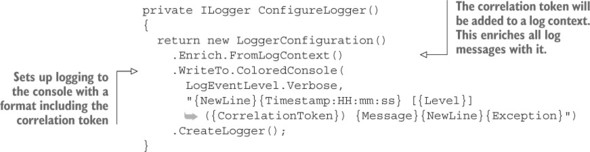
Now, go to the Startup.cs file to configure Serilog and create a logger object. The logger object is an ILogger—an interface from Serilog—and is the object used to send out log messages. Add this method to the Startup class.
The LoggerConfiguration type is the entry point to a fluent API for configuring Serilog. Here, you configure Serilog to write to the console and to include the correlation token in what is written out. Serilog lets you write log messages to several different places at the same time—you add more WriteTo segments to do so. Serilog also allows you to enrich log messages, which means adding extra properties to them. Enriching can be used to add a server name, an environment name (such as QA or production), the role of the user who initiated the request, or whatever else you’re interested in putting in log messages that isn’t readily available in the code where you write the messages. Here, you use enriching to add the correlation token. You add the token to the log context, which is a Serilog facility that allows you to add log properties to everything that goes on in a certain context. We’ll return to what this means shortly.
Serilog is a library for doing structured logging. You can use OWIN middleware and Serilog’s log context to add correlation tokens to log messages.
Serilog introduces a bit of syntax to log messages on top of .NET format strings. The extra syntax lets you give names to parameters and control whether a parameter’s value should be converted to a string with a .ToString() call, or whether the object should be included as a whole in the log message. Named parameters are enclosed in braces: for example, "{RequestTime}". You tell Serilog to include the entire value in the message by putting an @ in front of the name: "{@Request}". As with .NET format strings, you add formatting directives to parameters without a leading @.
For instance, you can use Serilog to send a log message like this, assuming that log is an object of the Serilog type Ilogger:
var simplyfiedRequest = new
{
  Path = "/foo",
  Method = "GET",
  Protocol = "HTTP",
};

var requestTime = 200;

log.Information(
  "Processed request: {@Request} in {RequestTime:000} ms.",
  simplyfiedRequest,
  requestTime);
simplyfiedRequest and requestTime are objects that are part of the message. Like other logging frameworks, Serilog lets you configure different sinks to which log messages are written. The sink you’ll use here is the console. When the previous log message is written to the console, simplyfiedRequest and requestTime are JSON serialized and inserted into the log message string. Serilog also adds some metadata, so the message written to the console looks like this: