concept server in category .net

This is an excerpt from Manning's book .NET Core in Action.
Now that you’ve written some applications, you can try deploying them to a server. .NET Core was designed to deploy by simply copying files. It helps to know where these files come from.

This is an excerpt from Manning's book Concurrency in .NET.
Building software in a controlled environment usually doesn’t lead to unwelcome surprises. Unfortunately, if a program that you write on your local machine is deployed to a server that isn’t under your control, this might introduce different variables. In the production environment, programs can run into unanticipated problems and unpredictable heavy loads. I’m sure that more than once in your career, you’ve heard, “It works on my machine.”
When software goes live, multiple factors can go wrong, causing the programs to behave unreliably. A while ago, my boss called me to analyze a production issue. The application was a simple chat system used for customer support. The program was using web sockets to communicate from the frontend directly with the Windows server hub written in C#. The underlying technology to establish the bidirectional communication between client and server was Microsoft SignalR (http://mng.bz/Fal1). See figure 3.1.
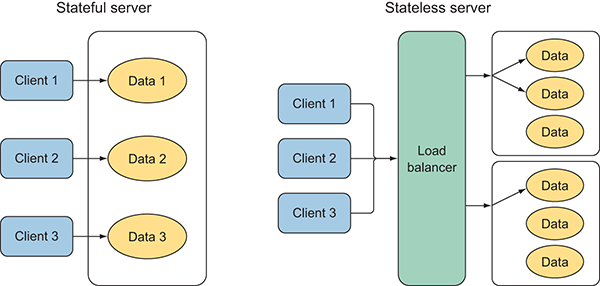
Figure 14.1 Server with state (stateful) compared to a server without state (stateless). The stateful server must keep the state between requests, which limits the scalability of the system, requiring more resources to run. The stateless server can auto-scale because there’s no sharing of state. Before stateless servers, there can be a load balancer that distributes the incoming requests, which can be routed to any machine without worrying about hitting a particular server.
Listing 14.12 Client-side mobile application using Xamarine.Forms
public class MainPageViewModel : ModelObject, IStockTickerHubClient
{
    public MainPageViewModel(Page page)
    {
        Stocks = new ObservableCollection<StockModelObject>();
        Portfolio = new ObservableCollection<Models.OrderRecord>();
        BuyOrders = new ObservableCollection<Models.OrderRecord>();
 SellOrders = new ObservableCollection<Models.OrderRecord>();   #1

        SendBuyRequestCommand =
                 new Command(async () => await SendBuyRequest());
        SendSellRequestCommand =
 new Command(async () => await SendSellRequest());   #2

 stockTickerHub = DependencyService.Get<IStockTickerHub>();   #3
        hostPage = page;

        var hostBase = "http://localhost:8735/";
 stockTickerHub   #3
            .Init(hostBase, this)
            .ContinueWith(async x =>
            {
                var state = await stockTickerHub.GetMarketState();
                isMarketOpen = state == "Open";
                OnPropertyChanged(nameof(IsMarketOpen));
                OnPropertyChanged(nameof(MarketStatusMessage));

                await stockTickerHub.GetAllStocks();
 }, TaskScheduler.FromCurrentSynchronizationContext());   #4

        client = new HttpClient();
        client.BaseAddress = new Uri(hostBase);
        client.DefaultRequestHeaders.Accept.Clear();
        client.DefaultRequestHeaders.Accept.Add(
 new MediaTypeWithQualityHeaderValue("application/json"));   #5
    }
    private IStockTickerHub stockTickerHub;
    private HttpClient client;
    private Page hostPage;

    public Command SendBuyRequestCommand { get; }
 public Command SendSellRequestCommand { get; }   #2

    private double price;
 public double Price   #6
    {
        get => price; set
        {
            if (price == value)
                return;
            price = value;
            OnPropertyChanged();
        }
    }
 private async Task SendTradingRequest(string url)   #7
    {
        if (await Validate()) {
        var request = new
➥ TradingRequest(stockTickerHub.ConnectionId, Symbol, Price, Amount);
        var response = await client.PostAsJsonAsync(url, request);
        response.EnsureSuccessStatusCode();
        }
    }
    private async Task SendBuyRequest() =>
 await SendTradingRequest("/api/trading/buy");   #7
    private async Task SendSellRequest() =>
 await SendTradingRequest("/api/trading/sell");   #7

    public ObservableCollection<Models.OrderRecord> Portfolio { get; }
    public ObservableCollection<Models.OrderRecord> BuyOrders { get; }
    public ObservableCollection<Models.OrderRecord> SellOrders { get; }
 public ObservableCollection<StockModelObject> Stocks { get; }   #1

    public void UpdateOrderBuy(Models.OrderRecord value) =>
 BuyOrders.Add(value);   #8
    public void UpdateOrderSell(Models.OrderRecord value) =>
 SellOrders.Add(value);   #8
}

#1   Uses observable collections to notify the auto-updates for the ViewModel properties
#2   Uses asynchronous commands to send the trading orders to buy or sell
#3   Initializes the stockTickerHub to establish a connection to the server. During the initialization and client-server connection, the UI is updated accordingly.
#4   The stockTickerHub initialization is performed in the UI synchronization context to freely update the UI controls.
#5   Initializes the HttpClient used to send requests to the Web Server API
#6   Property in the ViewModel used for data binding with the UI. Only one property is shown for demonstration purposes; other properties follow the same structure.
#7   Uses a function to send requests to the Web Server API
#8   Uses functions triggered by the SignalR channel when sending notifications from the web server application to the client. These functions update the UI.

This is an excerpt from Manning's book Entity Framework 4 in Action.
Whatever the client is, the application must be separated into different physical tiers that are completely disconnected from each other and that communicate through a specific interface: the contract. In the context of Entity Framework, working in a disconnected way is the obvious pattern for these types of applications because the context can’t be propagated from the server to the client tier, which means modifications made on the client side can’t be tracked, and a new context for each request is required on the server side.
In chapter 6, you learned that a degree of discipline is required to work in a disconnected scenario. Although the code on the client side is simple (the client code isn’t even aware that Entity Framework is used by the server), persisting modifications on the service side requires a certain amount of code.
The attributes to use are DataContract
and DataMember
. DataContract must be applied on the class to specify that only properties decorated with DataMember should be exposed by the service. The result of listing 16.4 is that in the WSDL exposed by the service, Company contains the CompanyId, Name, and Version (required for concurrency checks) properties, and Customer contains only the Shipping-Address and BillingAddress properties. When the client generates its classes from the WSDL, it will create them with only those properties and will never know that on the server, the classes contain more properties.

This is an excerpt from Manning's book Continuous Integration in .NET.
VisualSVN Server is a great choice if you want to quickly set up the SVN server on a Windows machine. It contains all you need to set up a Subversion server. It has a user interface to create repositories and users. It cuts out all the friction you’d have with setting up an Apache server on a Windows machine, configuring SSL to work on it, creating users, and setting repositories manually. It comes in a free version that has some limitations.


This is an excerpt from Manning's book IronPython in Action.
Every computer user does some system administration, even if it’s only maintaining a stable and working system. System administration encompasses everything from keeping a computer operating to maintaining large networks with many computers and servers. Although these are radically different situations, they share some needs and techniques in common. We start our look at administration with an example of simple scripting.
Clients and servers
Web applications are networked applications—they’re implemented as a conversation between two computers. When we talk about events that occur in the application, it’s important to have a clear understanding of where the events happen. Generally, the computer running the web browser that displays the application user interface is called the client, and events that happen on that computer are client-side events. The computer that lives at the browser’s destination URL is called the server, and things that happen on the server are said to be server-side.
ASP stands for Active Server Pages, and was introduced by Microsoft with Internet Information Services (IIS) 3 in 1996. Originally, it provided a simple way of intermingling HTML and JavaScript client-side code with code (usually written in a language called VBScript) executed on the server. When the .NET platform was released in 2002, it introduced a model for building web applications that was substantially different from the original ASP system, called ASP.NET.
ASP.NET provides a structure for creating web applications that allows you to reuse parts of your user interface in the same way that you can reuse code. It also enables you to package the client-side definition of components (their HTML and JavaScript code) together with code that defines their behavior on the server. Before we can look at how ASP.NET combines the client and server code, we need to define some of the key concepts of the system.
Listing 12.22. Sending a note to the server from the client
def writeNoteToRequest(note, request): doc = XmlDocument() doc.AppendChild(doc.CreateXmlDeclaration('1.0', 'utf-8', 'yes')) doc.AppendChild(note.toXml(doc)) request.ContentType = 'text/xml' stream = request.GetRequestStream() writer = XmlWriter.Create(stream) doc.WriteTo(writer) writer.Flush() stream.Close()

This is an excerpt from Manning's book ASP.NET AJAX in Action.
Normally, a user action such as clicking a button on a form invokes an HTTP request back to the web server. The server then processes the request, possibly doing some calculations or performing a few database operations; and then returns back to the client a whole new page to render. Technically, this makes a lot of sense—web pages are stateless by nature, and because all the logic about the application typically resides on the server, the browser is just used to display the interface. The server goes through the entire page lifecycle again and returns to the browser the HTML, CSS, and any other resources it needs to refresh the page. Unfortunately, this doesn’t present the user with a desirable experience. Instead, they’re exposed to a stop-start-stop pattern where they temporarily (and unwillingly) lose interaction with the page and are left waiting for it to be updated.
At the heart of Ajax programming is the ability to make asynchronous calls from the browser to the server. Establishing this dialogue eliminates the need for the browser to reload as a result of each request or user interaction. Instead, relevant data can be exchanged in the background while updates to the page are applied incrementally from the browser. Web pages that leverage this technique remain responsive, and the user experience is greatly improved.
In chapter 1, you got a glimpse into how this type of programming works with ASP.NET AJAX—we called this approach the client-centric development model. This model grants you more control over the application by moving the logic from the server into the browser. This shift from traditional ASP.NET development means the server is primarily used for data rather than application logic and data together.
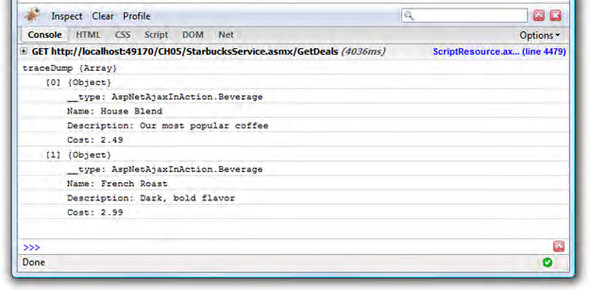
If you insert a call to Sys.Debug.traceDump(result) from the callback function for the GetDeals method, you can use the Firebug tool to inspect what comes back from the server (see figure 5.5).
What about classes that aren’t used in the Web Service? In some cases, the client would like to use the same class they defined on the server, in the browser as well. It seems redundant to have to define the same object in JavaScript because it isn’t used by the service.
To demonstrate how you can resolve this situation, let’s create another class on the server called Employee. For simplicity, this class also has three basic properties: first name, last name, and title. Listing 5.8 shows the implementation for the class.
Listing 5.8. The Employee class: another complex type defined on the server
using System; namespace AspNetAjaxInAction { public class Employee { public Employee() { } private string first; public string First { get { return this.first; } set { this.first = value; } } private string last; public string Last { get { return this.last; } set { this.last = value; } } private string title; public string Title { get { return this.title; } set { this.title = value; } } } }
Let us recap what you know so far. First, you learned that including scripts in pages from other domains allows you to retrieve data from their services. But due to the way requests are delegated (via the HTTP GET verb), certain limitations restrict you from doing more than retrieving simple data. Second, you know that in the server-side code (in the code-behind files), you have full access to other domains through the rich APIs afforded to you in .NET. This leads to the second option for making cross-domain calls: calls through the server.