concept Express in category node

This is an excerpt from Manning's book Getting MEAN with Mongo, Express, Angular, and Node.js 2ED.
Express is the E in MEAN. Because Node.js is a platform, it doesn’t prescribe how it should be set up or used, which is one of its great strengths. But every time you create websites and web applications, quite a few common tasks need doing. Express is a web application framework for Node.js that’s designed to perform these tasks in a well-tested, repeatable way.
The technology focus for this chapter is on Node and Express. Figure 7.1 shows where this chapter fits into the overall architecture and your grand plan.
Figure 7.1. This chapter focuses on updating the Express application from chapter 4 to interact with the REST API developed in chapter 6.
![]()
In this chapter, we’ll discuss how to call an API from within Express and how to deal with the responses. You’ll make calls to the API to read from the database and write to the database. Along the way, we’ll look at handling errors, processing data, and creating reusable code by separating concerns. Toward the end, we’ll cover the various layers of the architecture to which you can add validation and why these different layers are useful.

This is an excerpt from Manning's book Isomorphic Web Applications: Universal Development with React.
On the server side, you’ll build a Node.js server using Express to handle routing. You’ll take advantage of React’s ability to render on the server and use it to build up a complete HTML response that can be served to the browser. Table 1.1 shows how all these pieces fit together.
Express is a framework for Node.js that makes it easy to build REST APIs and to implement view rendering. In the All Things Westies app, Express handles the incoming requests to the Node.js server—for example, when the user wants to go to the Products page, the first place the request gets handled is by the Express app routing. Part of building an isomorphic app with JavaScript is handling initial requests to your web server; the server handles routing, fetching data, and rendering the page. The fully rendered page is then sent in the response to the browser.
This is an excerpt from Manning's book Node.js in Action, Second Edition.
If you open your package.json file, you should see express added under the dependencies property. Also, if you look inside the node_modules folder, you’ll see an express directory. This contains the version of Express that you just installed. You can also install modules globally by using the --global option. You should use local modules as much as possible, but global modules can be useful for command-line tools that you want to use outside Node JavaScript code. An example of a command-line tool that’s installable with npm is ESLint (http://eslint.org/).
In chapter 3, you saw how to build a simple Express application. This chapter provides a more in-depth study of Express and Connect. These two popular Node modules are used by many web developers. This chapter shows you how to build web apps and REST APIs with the most commonly used patterns.
Connect and Express
Express is a popular web framework formerly built on Connect but still compatible with Connect middleware. Although Express comes with basic functionality, such as serving static files, URL routing, and application configuration, it’s still minimal. It provides enough structure so you can compose reusable chunks without being too restrictive of your development practices.
Over the next few sections, you’ll implement a new Express application by using the Express skeleton app generator. This process is more detailed than the brief overview in chapter 3, so by the end of this chapter you should have enough knowledge of Express to build your own Express web apps and RESTful APIs. As the chapter continues, you’ll keep adding functionality to the skeleton to produce a full app by the end.
This is an excerpt from Manning's book Express in Action: Writing, building, and testing Node.js applications.
Request is almost the opposite of Express. Whereas Express lets you accept incoming HTTP requests, Request lets you make outgoing HTTP requests. It has a simple API, and you can find out more at https://www.npmjs.com/package/request.
Express is philosophically similar to jQuery. People want to add dynamic content to their web pages, but the vanilla browser APIs can be verbose, confusing, and limited in features. Developers often have to write boilerplate code, and a lot of it. jQuery exists to cut down on this boilerplate code by simplifying the APIs of the browser and adding helpful new features. That’s basically it.
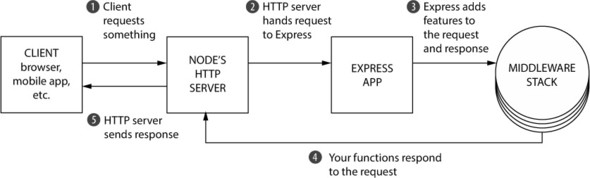
Express is exactly the same. People want to make web applications with Node.js, but the vanilla Node.js APIs can be verbose, confusing, and limited in features. Developers often have to write a lot of boilerplate code. Express exists to cut down on this boilerplate code by simplifying the APIs of Node.js and adding helpful new features. That’s basically it!
Like jQuery, Express aims to be extensible. It’s hands-off about most parts of your applications’ decisions and is easily extended with third-party libraries. Throughout this book and your Express career, you’ll have to make decisions about your applications’ architectures, and you’ll extend Express with a bevy of powerful third-party modules.
You probably didn’t pick up this book for the “in short” definition, though. The rest of this chapter (and book, really) will discuss Express in much more depth.
This is an excerpt from Manning's book Node.js in Practice.
If you’re producing or consuming JSON APIs, Node is an excellent choice because it makes working with JavaScript objects easy. Node’s web frameworks (like Express, http://expressjs.com) make creating JSON APIs fast and friendly. We have full details on this in chapter 9.
Express is a minimalist framework, so it doesn’t hold your hand when it comes to organizing projects. Projects that start simple can become unwieldy if you don’t pay attention. The secret to successfully organizing larger projects is to embrace Node’s module system.
The first avenue of attack is routes, but you can apply this technique to every facet of development with Express. You can even treat applications as self-contained Node modules, and mount them within other applications.
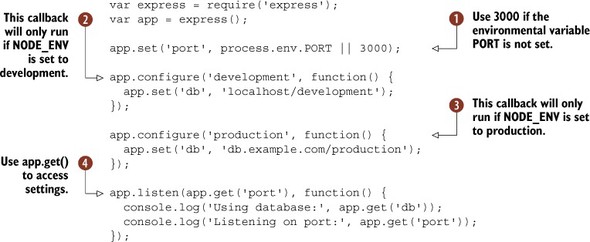
In such cases, you can set configuration values as part of the deployment environment. Environmental variables are a standard way to configure the behavior of Unix and Windows programs, and you can access them with process.env. The basic example of this is switching between deployment environments, using the NODE_ENV setting. The following listing shows the pattern Express uses for storing configuration values.
Express has a small API for setting application configuration values: app.set, app.get
, and app.configure. You can also use app.enable and app.disable to toggle Boolean values, and app.enabled and app.disabled to query them. The app.configure blocks are equivalent to if (process.env.NODE_ENV === 'development')
and if (process.env.NODE_ENV === 'production')
, so you don’t really need to use app.configure if you don’t want to. It will be removed in Express 4. If you’re not using Express, you can just query process.env.
To install Express 4 and the necessary middleware, you should run the following command in a new directory:
npm install --save body-parser cookie-parser \
            csurf express-session method-override \
            serve-favicon express
This will install all of the required middleware modules along with Express 4, and save them to a package.json file. Once you’ve loaded the middleware components with require
, you can add them to your application’s stack with app.use as you did in Express 3