concept shader in category opencl

This is an excerpt from Manning's book OpenCL in Action: How to Accelerate Graphics and Computation.
As discussed in appendix B, OpenGL makes it possible to code GPU routines called shaders that take part in the rendering process. Shaders are similar to OpenCL kernels in many respects, but kernels provide three significant advantages:
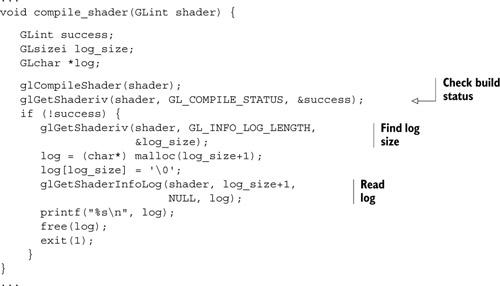
If a shader fails to compile, you need to examine the build log, and obtaining this involves two steps. First, find the size of the build log by invoking glGetShaderiv with GL_INFO_LOG_LENGTH. Then call getShaderInfoLog to read the log. This is shown in the following code.
In my opinion, the best way for an OpenCL programmer to understand shaders is to see how they compare with kernels. Table B.6 presents a list of similarities and differences between the two.
Table B.6. Shader code and kernel code—similarities and differences
Similarities
Differences
Shaders and kernels must be implemented as C functions that return void. Shader functions must be called main. Kernels can take any name, but must be preceded by the __kernel modifier. Shaders and kernels process data in vectors and provide mathematical operators for vectors. Shaders support matrix data types. Kernels don’t. Shaders and kernels are math-oriented—there are no strings, no pointers, and no access to stdio.h or similar routines from the C Standard Library. Shaders have built-in variables, some of which must receive values. Kernels don’t have built-in variables. Shaders and kernels can execute functions that closely resemble those in traditional math.h. OpenCL variables have modifiers that identify where they’re stored on the device. The fundamental difference between kernels and shaders is that, while a kernel can serve any purpose, each shader in an OpenGL application has a specific role to play. At the very least, an OpenGL application must have one shader to process vertices and one to process fragments.
In general, vertex shaders determine texture coordinates using one of two methods. First, a shader may compute texture coordinates based on the coordinates of the vertex being processed. In the following line of code, the shader sets the texture coordinates (s, t) equal to the (x, y) coordinates of the vertex:
gl_TexCoord[0].st = gl_Position(x, y);Second, the shader can access texture coordinates through input attributes. As explained earlier, attributes identify specific portions of VBO data. For example, the following code initializes the vertex coordinates of the first square (first_coords) and the coordinates of the texture (tex_coords) used to cover the square: