concept application in category osgi

This is an excerpt from Manning's book Enterprise OSGi in Action.
Despite their eventual unpopularity, entity beans did much to popularize Object-Relational Mapping (ORM). The ORM ideas were picked up by a range of lightweight alternatives to EJBs. The dominant competitor was an open source product called Hibernate. Hibernate uses an XML file (or, in later versions, annotations) to define the mapping between data objects and database content. The Hibernate framework does all the JDBC work so that the application doesn’t have to.
Uniquely among the servers in this chapter, GlassFish doesn’t include a Blueprint implementation. The assumption is that users will use Java EE’s CDI (Contexts and Dependency Injection) for inversion of control. In its base form, CDI has no awareness of OSGi, but GlassFish has extended it with an @OSGiService annotation that allows services to be injected. This approach has the advantage of being annotation-based, which allows dependencies to be injected concisely. It will also feel natural if you’re already used to using CDI. But because it’s not standards-based, applications written for the GlassFish CDI won’t be portable to other application servers.
At the time of writing, several of the servers we’ll discuss ship with incorrectly versioned javax.servlet and javax.persistence packages. Although the OSGi Enterprise Specification specifies versions for these packages, these semantic versions aren’t the same as the marketing versions, which caused a few implementation hiccups. If you migrate an application from the little Aries assembly to an affected server, you may find some bundles no longer resolve. If this happens, we’re afraid you’ll have to grit your teeth, forgo semantic versioning temporarily, and import a broad version range for javax.servlet and javax.persistence.
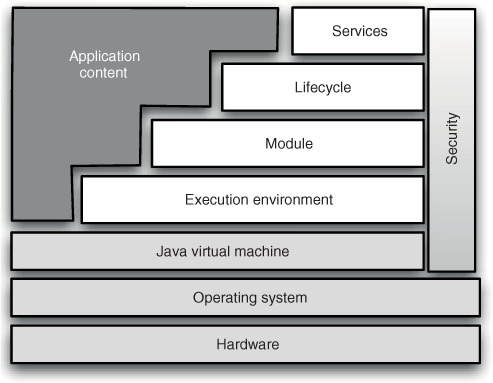
Figure A.9. The functionality of OSGi includes a number of layers. The white elements are provided by OSGi, the gray elements are prerequisites, and the black elements are user content. Applications will take advantage of the core OSGi framework by providing modules, possibly with sophisticated lifecycles. These modules may communicate with one another and the supporting platform using OSGi services. Security is provided across all layers.

This is an excerpt from Manning's book OSGi in Depth.

The first problem is portability. We need a single programming platform that abstracts the application from the underlying operating system and the hardware. In other words, we need a virtual machine. Does anything come to your mind? Yes, of course. Let’s use Java to solve our first problem.
We’re now ready to bootstrap and run the OSGi framework with our applications. To do so properly, you’ll learn in this chapter how to launch the OSGi framework with a simpler custom interface, how to deploy your applications in a consistent manner, and finally how to keep the applications up to date and support live plug-ins of extensions.
A simple and consistent mechanism for installing and starting your OSGi applications when launching the framework is therefore to place the application’s bundle files in the autodeploy directory. For example, to provide the auction application out of the box, you need to place the following files within the bundle directory:
bundle$ ls
auction.api_1.0.0.jar
auction.auctioneer.sealed_1.0.0.jar
auction.auditor.sealed_1.0.0.jar
auction.buyer.http_1.0.0.jar
auction.buyer.simple_1.0.0.jar
auction.core_1.0.0.jar
auction.seller.simple_1.0.0.jar
auction.spi_1.0.0.jar
Having installed your applications, the next step is to learn how to do live updates of individual application features, which generally would be a subset of an application’s bundles. We’ll do this in the next section.
We need to make sure that the launched OSGi framework instance contains all of our application bundles out of the box, so that the end user isn’t bothered with the task of having to individually install our infrastructure bundles using the shell console or through some other custom form. After all, the application user, whether an IT person, an extension developer, or the end user, knows nothing about the implementation details of the application itself. Along the same lines, we want to remove any bundles that we deem not necessary for the purpose of executing our application. Let’s investigate how we can achieve this.

This is an excerpt from Manning's book OSGi in Action: Creating Modular Applications in Java.
Nearly all but the simplest of applications can benefit from the modularity features OSGi provides, so if you’re wondering if OSGi is something you should be interested in, the answer is most likely, “Yes!” Still not convinced? Here are some common scenarios you may have encountered where OSGi can be helpful:
Do you know what packages a given JAR file needs at execution time? Many developers have tacit or hidden knowledge of what JAR files to put on the class path. Such knowledge is often gained from years of experience getting applications to run, where you reflexively add JAR files to the class path until any ClassNotFoundExceptions disappear. This leads to situations where an abundance of JAR files is loaded at execution time, not because they’re all required, but because a developer feels they may be necessary based on past experience.
You can deploy your jEdit bundle by using the same simple launcher used to launch the earlier paint examples. Remember, this launcher first installs any bundles found in the directory and then uses the first Main-Class header it finds to bootstrap the application. Your manifest already has a Main-Class, so you need to point the launcher at the jEdit directory, like so:
$ cd ..

$ cp ../../launcher/dist/launcher.jar .

$ java -jar launcher.jar jEdit
Unfortunately, something’s not quite right. The bundle installs and the application starts, but it hangs at the splash screen shown in figure 6.8, and the main jEdit window never appears.
Most applications are made up of one or more JAR files. One way to migrate an application to OSGi is to take these individual JAR files and convert each of them into a bundle using the techniques discussed in the previous section. Converting lots of JAR files is time consuming (especially for beginners), so a simpler approach is to take your complete application and wrap it up as a single bundle. In this section, we’ll show you how to start from such a single application bundle and suggest ways of dividing it further into multiple bundles. Along the way, we’ll look at how you can introduce other OSGi features, such as services, to make your application more flexible. Finally, we’ll suggest places where it doesn’t make sense to introduce a bundle.