concept difference in category react

This is an excerpt from Manning's book Isomorphic Web Applications: Universal Development with React.
Make sure any libraries you include in an isomorphic app support running in both the server and browser environments. Check out chapter 10 for what to watch for and how to handle differences in environments. If you intend to use a library only on the server, you don’t need to check for browser compatibility.
Handling the differences between Node.js and the browser
Listing 3.5. List item—components/Chapter_3_4/listItemFunctional.jsx
import React from 'react'; import Button from './button.jsx'; const ListItemFunctional = (props) => { #1 return ( #2 <div> <div>{props.name}</div> #3 <Button key='Delete' #4 clickHandler={props.deleteCallback} #3 label='Delete'></Button> <Button key='Complete' #4 clickHandler={props.completeCallback} #3 label='Complete'></Button> </div> ) } export default ListItemFunctional; #1 Create the component with a JavaScript function declaration—creates pure or functional component. #2 Return JSX to be rendered—must be a single root node or you’ll get error. #3 Parent component passes in the properties ListItem uses, including name and the click handler callback. #4 If multiple elements of the same type are siblings, give them unique keys so React knows the difference between them on subsequent renders. !@%STYLE%@! {"css":"{\"css\": \"font-weight: bold;\"}","target":"[[{\"line\":3,\"ch\":58},{\"line\":3,\"ch\":60}],[{\"line\":19,\"ch\":0},{\"line\":19,\"ch\":2}],[{\"line\":4,\"ch\":58},{\"line\":4,\"ch\":60}],[{\"line\":20,\"ch\":0},{\"line\":20,\"ch\":2}],[{\"line\":6,\"ch\":58},{\"line\":6,\"ch\":60}],[{\"line\":8,\"ch\":58},{\"line\":8,\"ch\":60}],[{\"line\":11,\"ch\":58},{\"line\":11,\"ch\":60}],[{\"line\":21,\"ch\":0},{\"line\":21,\"ch\":2}],[{\"line\":7,\"ch\":58},{\"line\":7,\"ch\":60}],[{\"line\":10,\"ch\":58},{\"line\":10,\"ch\":60}],[{\"line\":22,\"ch\":0},{\"line\":22,\"ch\":2}],[{\"line\":6,\"ch\":58},{\"line\":6,\"ch\":60}],[{\"line\":8,\"ch\":58},{\"line\":8,\"ch\":60}],[{\"line\":11,\"ch\":58},{\"line\":11,\"ch\":60}],[{\"line\":21,\"ch\":0},{\"line\":21,\"ch\":2}],[{\"line\":7,\"ch\":58},{\"line\":7,\"ch\":60}],[{\"line\":10,\"ch\":58},{\"line\":10,\"ch\":60}],[{\"line\":22,\"ch\":0},{\"line\":22,\"ch\":2}],[{\"line\":6,\"ch\":58},{\"line\":6,\"ch\":60}],[{\"line\":8,\"ch\":58},{\"line\":8,\"ch\":60}],[{\"line\":11,\"ch\":58},{\"line\":11,\"ch\":60}],[{\"line\":21,\"ch\":0},{\"line\":21,\"ch\":2}]]"} !@%STYLE%@!

This is an excerpt from Manning's book React in Action.
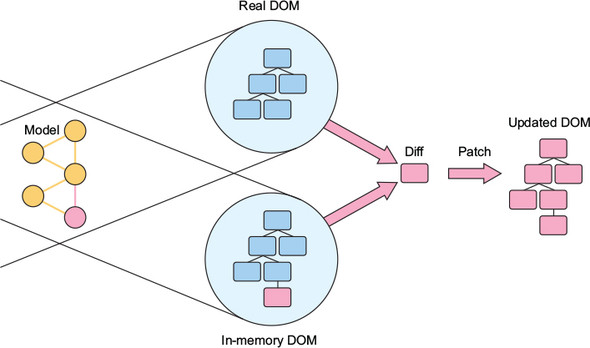
Figure 1.5. React’s diffing and update procedure. When a change happens, React determines differences between the actual and in-memory DOMs. Then it performs an efficient update to the browser’s DOM. This process is often referred to as a diff (“what changed?”) and patch (“update only what changed”) process.
There are two general types of state: mutable and immutable. A simple way to think about the difference between them is to think in terms of time. Can something change after being created? If so, it can be called mutable. If not, it can be called immutable. There are in-depth academic areas of study on these topics, so I won’t go into depth on them here.
HTML tags versus React components— Custom React components you created using React.createClass are by convention capitalized so you can determine the difference between custom and native HTML components.