concept function in category react
This is an excerpt from Manning's book React Hooks in Action.
To define a component, React lets you use two JavaScript structures: a function or a class. Before React Hooks, you would use a function when the component didn’t need any local state (you would pass it all its data via props).
React provides a small number of functions, or hooks, to enable it to track values in your components and keep the state and UI in sync. For single values it gives us the useState hook and that’s the hook we explore in this chapter. We look at how to call the hook, what it returns, and how we use it to update the state, triggering React to update the UI. Components often need more than one piece of state to do their jobs, so we see how we can call useState multiple times to handle multiple values. It’s not just a matter of documenting the useState API - you can go to the official React docs for that - we use the discussion of the useState hook to help us better understand what function components are and how they work. To that end, we finish the chapter with a review of the key concepts met as our code listings have evolved.
Luckily, the useState hook accepts a function as its argument, a lazy initial state, as shown in figure 3.16.
Figure 3.16 You can pass a function to useState as the initial value. React will use the function’s return value as the initial value.
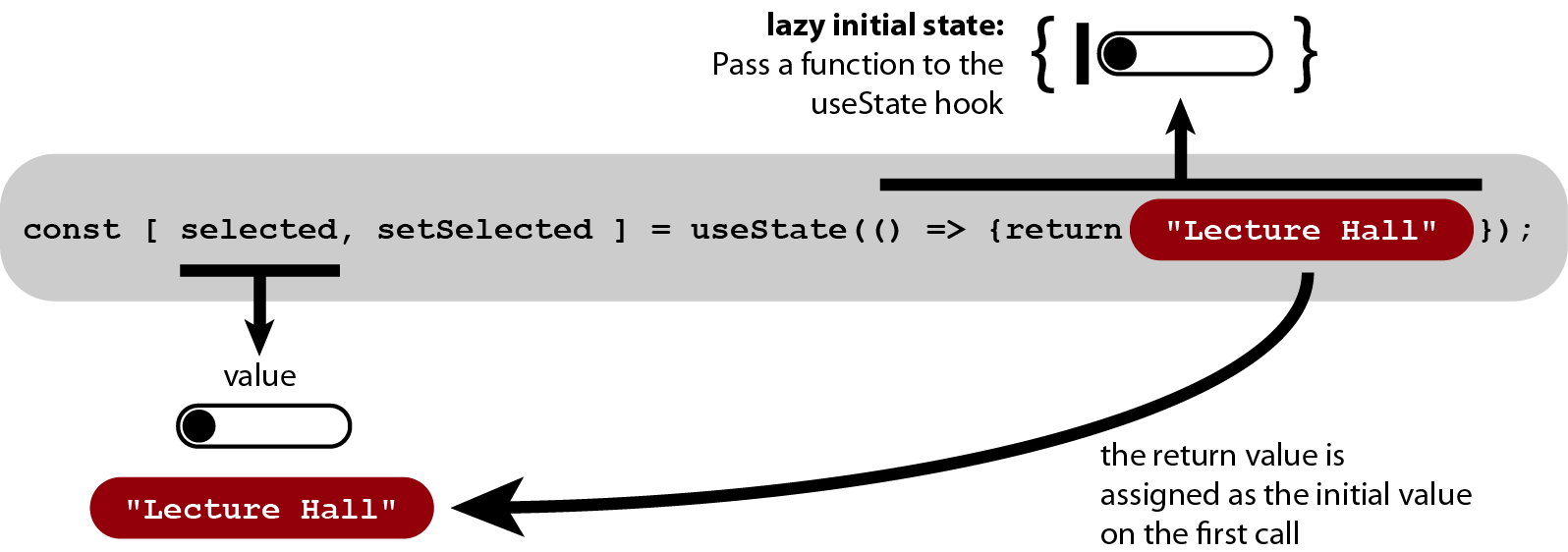
React only executes the function the first time the component’s rendered. It uses the function’s return value as the initial state.
Listing 3.11 Passing a function to setBookableIndex
import React, { useState } from "react";
import {bookables} from "../../static.json";
import {FaArrowRight} from "react-icons/fa";                             #A

export default function BookablesList () {
  const group = "Rooms";
  const bookablesInGroup = bookables.filter(b => b.group === group);
  const [ bookableIndex, setBookableIndex ] = useState(0);

  function nextBookable () {                                             #B
    setBookableIndex(i => (i + 1) % bookablesInGroup.length);            #C
  }

  return (
    <div>
      <ul className="bookables">
        {bookablesInGroup.map((b, i) => (
          <li
            key={b.title}
            className={i === bookableIndex ? "selected" : null}
          >
            <button
              className="btn"
              onClick={() => setBookableIndex(i)}
            >
              {b.title}
            </button>
          </li>
        ))}
      </ul>
      <p>
        <button
          className="btn"
          onClick={nextBookable}                                         #D
          autoFocus
        >
          <FaArrowRight/>
          <span>Next</span>
        </button>
      </p>
    </div>
  );
}

This is an excerpt from Manning's book React in Action.
React.createElement takes a string or component (either a class extending React.Component or a function), a props object, and children and returns a React element. Remember, a React element is a lightweight representation of something you want React to render. It can indicate either a DOM element or another React component.
How can you make this happen? One kind of data we haven’t looked at passing via props is functions. Because functions can be passed as arguments to other functions in JavaScript, you can use this to your advantage. You can define a method on a parent component and give it to the child component as a property. That way, the child component can send data back up to its parent without having to know how the parent will handle the data. If you needed to change what happened with the data, you wouldn’t need to do anything to the CreateComment component. To execute a function passed as a prop, the child only needs to call the method and pass any data to it. The following listing shows how to use functions as props.
Listing 2.8. Using functions as props
//... class CreateComment extends Component { constructor(props) { super(props); this.state = { content: '', user: '' }; this.handleUserChange = this.handleUserChange.bind(this); this.handleTextChange = this.handleTextChange.bind(this); this.handleSubmit = this.handleSubmit.bind(this); } handleUserChange(event) { this.setState(() => ({ user: event.target.value })); } handleTextChange(event) { this.setState(() => ({ content: event.target.value })); } handleSubmit(event) { event.preventDefault(); this.props.onCommentSubmit({ #1 user: this.state.user.trim(), #1 content: this.state.content.trim() #1 }); this.setState(() => ({ user: '', text: '' })); } render() { return React.createElement( 'form', { className: 'createComment', onSubmit: this.handleSubmit #2 }, React.createElement('input', { type: 'text', placeholder: 'Your name', value: this.state.user, onChange: this.handleUserChange }), React.createElement('input', { type: 'text', placeholder: 'Thoughts?', value: this.state.content, onChange: this.handleTextChange }), React.createElement('input', { type: 'submit', value: 'Post' }) ); } } //... #1 Call the onCommentSubmit function that’s been passed as a prop by the parent—you’re passing in data from the form and resetting the form so the user knows their action was successful. #2 Don’t forget to bind the method you’ve set up to the onSubmit event—without it, there won’t be any connection between the right event and your method. !@%STYLE%@! {"css":"{\"css\": \"font-weight: bold;\"}","target":"[[{\"line\":24,\"ch\":50},{\"line\":24,\"ch\":52}],[{\"line\":25,\"ch\":50},{\"line\":25,\"ch\":52}],[{\"line\":26,\"ch\":50},{\"line\":26,\"ch\":52}],[{\"line\":63,\"ch\":0},{\"line\":63,\"ch\":2}],[{\"line\":24,\"ch\":50},{\"line\":24,\"ch\":52}],[{\"line\":25,\"ch\":50},{\"line\":25,\"ch\":52}],[{\"line\":26,\"ch\":50},{\"line\":26,\"ch\":52}],[{\"line\":63,\"ch\":0},{\"line\":63,\"ch\":2}],[{\"line\":24,\"ch\":50},{\"line\":24,\"ch\":52}],[{\"line\":25,\"ch\":50},{\"line\":25,\"ch\":52}],[{\"line\":26,\"ch\":50},{\"line\":26,\"ch\":52}],[{\"line\":63,\"ch\":0},{\"line\":63,\"ch\":2}],[{\"line\":38,\"ch\":50},{\"line\":38,\"ch\":52}],[{\"line\":64,\"ch\":0},{\"line\":64,\"ch\":2}]]"} !@%STYLE%@!
In React, components created as JavaScript classes (https://developer.mozilla.org/en-US/docs/Web/JavaScript/Reference/Classes) that extend React.Component may have both mutable and immutable state, whereas components created from functions (stateless functional components) only have access to immutable state (props). I’ll cover these in future chapters; for now I’ll stick to components that inherit from React.Component and get state and additional methods. In these sorts of components, state is accessible from the this.state property of the instance of the class. The immutable state made available to you is accessed with this.props, which you’ve been using already to create static components.
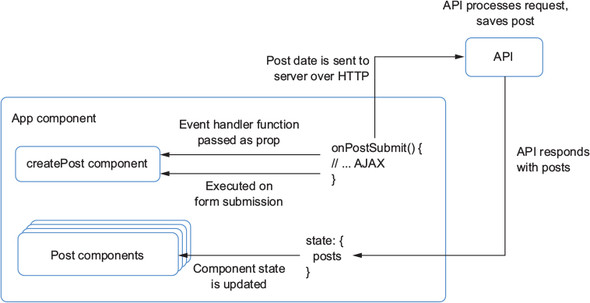
Figure 5.5. The CreatePost component overview. The CreatePost component receives a function as a prop, uses its internal state as an input for that function, and calls it when the user clicks Submit. That function, passed from the parent App component, sends the data to the API, updates the local posts, and initiates a refresh of posts from the API.

This is an excerpt from Manning's book Redux in Action.
Functions with side effects do something other than return a value. createTask mutates some external state—the ID that you increment whenever you create a new task.
We should clarify: when asked where you want to handle side effects, the answer isn’t restricted to either action creators or middleware. “Both” is an entirely reasonable answer! Remember, the redux-thunk package provides middleware to handle functions returned by action creators—an example of both action creators and middleware working together to manage side effects.
Things get more complicated when the contents of that modal need to be populated by an AJAX call. You could choose, for example, to dispatch an action only after the AJAX call returns, or dispatch several actions along the way to indicate loading progress. Again, the store deals in actions and is unequipped to handle functions or promises, so it’s up to you to make sure that whatever reaches the store is an action.
When you need to perform asynchronous activities, redux-thunk makes it possible for an action creator to return a function in lieu of an action. Within the fetchTasks action creator, an anonymous function (thunk) is returned. The thunk middleware provides the dispatch and getState arguments, so the body of the function can view the contents of the current store and dispatch new actions to indicate loading, success, or failure states. View the following listing for a recap.
Listing 6.1. src/actions/index.js
export function fetchTasks() { return (dispatch, getState) => { #1 dispatch(fetchTasksRequest()); #2 ... dispatch(fetchTasksSuccess()); #3 ... } } #1 The action creator returns a function, also known as a thunk. #2 Within the thunk, more action creators can be dispatched. #3 Based on the results of a side effect, more dispatching may occur. !@%STYLE%@! {"css":"{\"css\": \"font-weight: bold;\"}","target":"[[{\"line\":1,\"ch\":43},{\"line\":1,\"ch\":45}],[{\"line\":9,\"ch\":0},{\"line\":9,\"ch\":2}],[{\"line\":2,\"ch\":43},{\"line\":2,\"ch\":45}],[{\"line\":10,\"ch\":0},{\"line\":10,\"ch\":2}],[{\"line\":4,\"ch\":43},{\"line\":4,\"ch\":45}],[{\"line\":11,\"ch\":0},{\"line\":11,\"ch\":2}]]"} !@%STYLE%@!
Sagas are built using functions that can be paused and resumed, called generators.

This is an excerpt from Manning's book React Quickly: Painless web apps with React, JSX, Redux, and GraphQL.
Let’s refer to the official React website for more hints about the problem React addresses: “We built React to solve one problem: building large applications with data that changes over time.”[3] Interesting! We can also look at the history of React for more information. A discussion on the React Podcast[4] mentions that the creator of React—Jordan Walke—was solving a problem at Facebook: having multiple data sources update an autocomplete field. The data came asynchronously from a back end. It was becoming more and more complicated to determine where to insert new rows in order to reuse DOM elements. Walke decided to generate the field representation (DOM elements) anew each time. This solution was elegant in its simplicity: UIs as functions. Call them with data, and you get rendered views predictably.
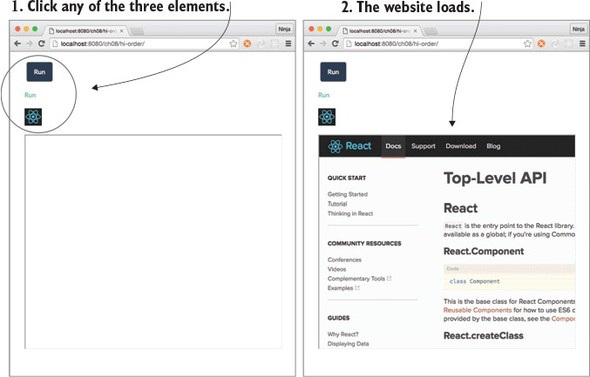
This button also requires a handler property, which must have a function as a value. (Last time I checked, buttons without actions were useless.)
const express = require('express')
const path = require('path')
const port = process.env.PORT || 8080
const app = express()


app.use(express.static(__dirname + '/public'))

app.get('*', function (request, response){
  response.sendFile(path.resolve(__dirname, 'public', 'index.html'))
})

app.listen(port)
console.log("server started on port " + port)