concept JavaScript in category react

This is an excerpt from Manning's book React Hooks in Action.
Describing UI using JSX - a blend of HTML-style templating and JavaScript Making the most of JavaScript without introducing too many idiomatic constraints
<TextToggle title="Question" text="Who created JavaScript?" show={true} />

<TextToggle title="Answer" text="Brendan Eich" show={false} />
In reality, for the size of grids we’re generating, we don’t really need useMemo. Modern browsers, JavaScript and React will hardly notice the work required. There’s also some overhead in requiring React to store functions, return values and dependency values, so we don’t want to memoize everything. As we saw with the Anagrams example earlier in the chapter, however, there will be times when expensive functions can adversely affect performance, so it’s good to have the useMemo hook in your toolbelt.

This is an excerpt from Manning's book Isomorphic Web Applications: Universal Development with React.
This book is intended for web developers looking to expand their architectural toolset and better understand the options available for building web apps. If you’ve ever built a single-page or server-rendered web app (say, with Ruby on Rails), you’ll have an easier time following the content in this book. Ideally, you’re comfortable with JavaScript, HTML, and CSS. If you’re new to web development, this book isn’t for you.
Being able to run JavaScript on the server (Node.js) and in the browser allows you to write code once and deploy it to both environments. React’s virtual DOM lets you render HTML on the server.

This is an excerpt from Manning's book React in Action.
This book is for anyone who’s working on or interested in building user interfaces. Really, it’s is for anyone who’s curious about React, even if you don’t work in UI engineering. You’ll get the most out of this book if you have some experience with using JavaScript to build front-end applications.
You can learn how to build applications with React as long as you know the basics of JavaScript and have some experience building web applications. I don’t cover the fundamentals of JavaScript in this book. Topics like prototypal inheritance, ES2015+ code, type coercion, syntax, keywords, asynchronous coding patterns like async/await, and other fundamental topics are beyond the scope of this book. I do lightly cover anything that’s especially pertinent to React but don’t dive deep into JavaScript as a language.
This doesn’t mean you can’t learn React or won’t get anything from this book if you don’t know JavaScript. But you’ll get much more if you take the time to learn JavaScript first. Charging ahead without a working knowledge of JavaScript will make things more difficult. You might run into situations where things might seem like “magic” to you—things will work, but you won’t understand why. This usually hurts rather than helps you as a developer, so ... last warning: get comfortable with the basics of JavaScript before learning React. It’s a wonderfully expressive and flexible language. You’ll love it!
You may already know JavaScript well and may have even dabbled in React before. This wouldn’t be too surprising given how popular React has become. If this is you, you’ll be able to gain a deeper understanding of some of the core concepts of React. But I don’t cover highly specific topics you may be looking for if you’ve been working with React for a while. For those, see other React-related Manning titles like React Native in Action.
Listing 2.4. Using PropTypes and the render method
import React, { Component } from "react"; #1 import { render } from "react-dom"; #1 import PropTypes from "prop-types"; #1 const node = document.getElementById('root'); class Post extends Component { #2 render() { return React.createElement( 'div', { className: 'post' #3 }, React.createElement( 'h2', { className: 'postAuthor', id: this.props.id }, this.props.user, #4 React.createElement( 'span', { className: 'postBody' #5 }, this.props.content #6 ) ) ); } } Post.propTypes = { user: PropTypes.string.isRequired, #7 content: PropTypes.string.isRequired, #7 id: PropTypes.number.isRequired #7 }; const App = React.createElement(Post, { id: 1, #8 content: ' said: This is a post!', #8 user: 'mark' #8 }); render(App, node); ... #1 Import React, React DOM, and prop-types. #2 Create a React class as your Post component. In this case, you’re only specifying propTypes and a render method. #3 Create a div element that has a class ‘post’. #4 What this refers to can sometimes be confusing in JavaScript—here it will refer to the component instance, not your React class blueprint. #5 Using className instead of class for the Dom element’s CSS class name #6 Again, the content prop is the inner content of a span element you’re creating. #7 Properties can be optional or required, have a type, and can even be required to have a certain “shape” (an object with certain properties, for example). #8 Pass the Post React Class to React.createElement along with some props to create something. React DOM can render—try changing the data to see how the render for your component output changes. !@%STYLE%@! {"css":"{\"css\": \"font-weight: bold;\"}","target":"[[{\"line\":0,\"ch\":49},{\"line\":0,\"ch\":51}],[{\"line\":1,\"ch\":49},{\"line\":1,\"ch\":51}],[{\"line\":2,\"ch\":49},{\"line\":2,\"ch\":51}],[{\"line\":47,\"ch\":0},{\"line\":47,\"ch\":2}],[{\"line\":0,\"ch\":49},{\"line\":0,\"ch\":51}],[{\"line\":1,\"ch\":49},{\"line\":1,\"ch\":51}],[{\"line\":2,\"ch\":49},{\"line\":2,\"ch\":51}],[{\"line\":47,\"ch\":0},{\"line\":47,\"ch\":2}],[{\"line\":0,\"ch\":49},{\"line\":0,\"ch\":51}],[{\"line\":1,\"ch\":49},{\"line\":1,\"ch\":51}],[{\"line\":2,\"ch\":49},{\"line\":2,\"ch\":51}],[{\"line\":47,\"ch\":0},{\"line\":47,\"ch\":2}],[{\"line\":5,\"ch\":49},{\"line\":5,\"ch\":51}],[{\"line\":48,\"ch\":0},{\"line\":48,\"ch\":2}],[{\"line\":10,\"ch\":49},{\"line\":10,\"ch\":51}],[{\"line\":49,\"ch\":0},{\"line\":49,\"ch\":2}],[{\"line\":18,\"ch\":49},{\"line\":18,\"ch\":51}],[{\"line\":50,\"ch\":0},{\"line\":50,\"ch\":2}],[{\"line\":22,\"ch\":49},{\"line\":22,\"ch\":51}],[{\"line\":51,\"ch\":0},{\"line\":51,\"ch\":2}],[{\"line\":24,\"ch\":49},{\"line\":24,\"ch\":51}],[{\"line\":52,\"ch\":0},{\"line\":52,\"ch\":2}],[{\"line\":32,\"ch\":49},{\"line\":32,\"ch\":51}],[{\"line\":33,\"ch\":49},{\"line\":33,\"ch\":51}],[{\"line\":34,\"ch\":49},{\"line\":34,\"ch\":51}],[{\"line\":53,\"ch\":0},{\"line\":53,\"ch\":2}],[{\"line\":32,\"ch\":49},{\"line\":32,\"ch\":51}],[{\"line\":33,\"ch\":49},{\"line\":33,\"ch\":51}],[{\"line\":34,\"ch\":49},{\"line\":34,\"ch\":51}],[{\"line\":53,\"ch\":0},{\"line\":53,\"ch\":2}],[{\"line\":32,\"ch\":49},{\"line\":32,\"ch\":51}],[{\"line\":33,\"ch\":49},{\"line\":33,\"ch\":51}],[{\"line\":34,\"ch\":49},{\"line\":34,\"ch\":51}],[{\"line\":53,\"ch\":0},{\"line\":53,\"ch\":2}],[{\"line\":38,\"ch\":49},{\"line\":38,\"ch\":51}],[{\"line\":39,\"ch\":49},{\"line\":39,\"ch\":51}],[{\"line\":40,\"ch\":49},{\"line\":40,\"ch\":51}],[{\"line\":54,\"ch\":0},{\"line\":54,\"ch\":2}],[{\"line\":38,\"ch\":49},{\"line\":38,\"ch\":51}],[{\"line\":39,\"ch\":49},{\"line\":39,\"ch\":51}],[{\"line\":40,\"ch\":49},{\"line\":40,\"ch\":51}],[{\"line\":54,\"ch\":0},{\"line\":54,\"ch\":2}],[{\"line\":38,\"ch\":49},{\"line\":38,\"ch\":51}],[{\"line\":39,\"ch\":49},{\"line\":39,\"ch\":51}],[{\"line\":40,\"ch\":49},{\"line\":40,\"ch\":51}],[{\"line\":54,\"ch\":0},{\"line\":54,\"ch\":2}]]"} !@%STYLE%@!
The subject of mobile development and how platforms, languages, and hardware in this world all play their different roles is beyond the scope of this book. But the choice between hybrid and all-native approaches is relevant to our discussion of React Native because React Native offers a new alternative. With React Native, you can build apps that are “really native” but you can use a combination of JavaScript and platform-specific code (like Swift or Java).
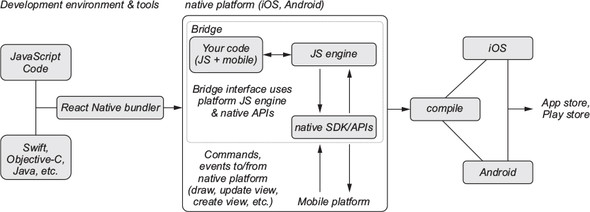
There’s much more to these processes and to how React Native works, but the basic process of translating between the JavaScript running on the device and the native platform APIs and events is where the “magic” of React Native happens. The result is a platform that you can work with but that also doesn’t compromise when it comes to performance. It’s a happy medium between the problems of previous hybrid approaches to mobile apps, and it also avoids some of the pain points of traditional mobile development. Figure 13.1 illustrates an overall view of how it works.
Figure 13.1. React Native works by creating a bridge between your JavaScript and the underlying native platform. Most native platforms implement a JavaScript virtual machine or other way of running JavaScript natively. The bridge enables execution of your application’s JavaScript. The React Native bridging system will relay messages between the underlying platform and your JavaScript so that native events can be translated into ones your React components can understand and respond to.

This is an excerpt from Manning's book React Quickly: Painless web apps with React, JSX, Redux, and GraphQL.
In contrast, React offers a new approach that streamlines front-end development. React is a powerful UI library that offers an alternative that many big firms such as Facebook, Netflix, and Airbnb have adopted and see as the way forward. Instead of defining a one-off template for your UIs, React allows you to create reusable UI components in JavaScript that you can use again and again in your sites.
Then there’s JSX, which is probably the most frequent argument for not using React. If you’re familiar with Angular, then you’ve already had to write a lot of JavaScript in your template code. This is because in modern web development, plain HTML is too static and is hardly any use by itself. My advice: give React the benefit of the doubt, and give JSX a fair run.
JSX is a little syntax for writing React objects in JavaScript using <> as in XML/HTML. React pairs nicely with JSX because developers can better implement and read the code. Think of JSX as a mini-language that’s compiled into native JavaScript. So, JSX isn’t run on the browser but is used as the source code for compilation. Here’s a compact snippet written in JSX:
if (user.session)
  return <a href="/logout">Logout</a>
else
  return <a href="/login">Login</a>
Even if you load a JSX file in your browser with the runtime transformer library that compiles JSX into native JavaScript on the run, you still don’t run the JSX; you run JavaScript instead. In this sense, JSX is akin to CoffeeScript. You compile these languages into native JavaScript to get better syntax and features than that provided by regular JavaScript.
What was lacking before React was a pure JavaScript implementation of this architecture. When you’re working with Angular, Backbone, Ember, or most of the other MVC-like front-end frameworks, you have one file for JavaScript and another for the template. (Angular uses the term directives for components.) There are a few issues with having two languages (and two or more files) for a single component.
The HTML and JavaScript separation worked well when you had to render HTML on the server, and JavaScript was only used to make your text blink. Now, single page applications (SPAs) handle complex user input and perform rendering on the browser. This means HTML and JavaScript are closely coupled functionally. For developers, it makes more sense if they don’t need to separate between HTML and JavaScript when working on a piece of a project (component).