concept Jest in category react

This is an excerpt from Manning's book React in Action.
To run your tests, as mentioned, you’ll use Jest. You can run Jest from the command line, and it will execute your tests, so you’re going to add a script to your package.json file so you can run it. The next listing shows how to add the custom script to your package.json. If you cloned the repository from GitHub, this script should already be available.
Listing 9.1. Setting up a custom npm script (package.json)
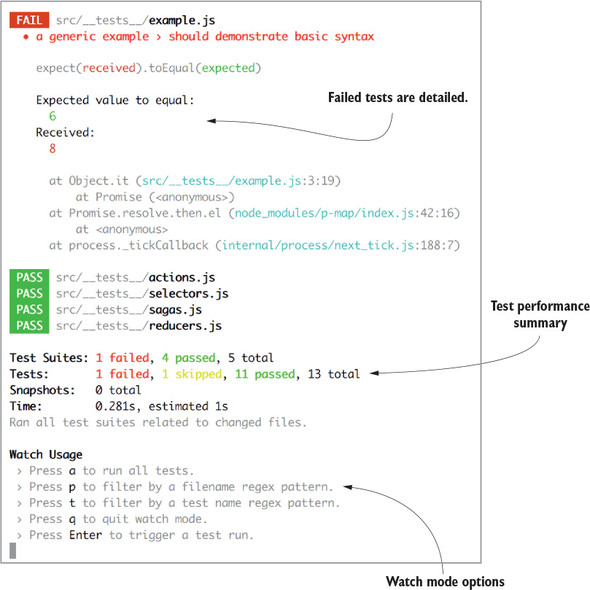
{ //... "scripts": { //... "test": "jest --coverage", #1 "test:w": "jest –watch --coverage", #2 "jest": { "testEnvironment": "jsdom", "setupFiles": ["raf/polyfill", "./test/setup.js"] #3 }, "repository": { "type": "git", "url": "git+ssh://git@github.com/react-in-action/letters-social.git" }, "author": "Mark Thomas <hello@ifelse.io>", // ... #1 Run your tests and output test coverage. #2 Run the tests in watch mode. #3 Configure Jest; some testing helpers and stubs are included with the sample code. !@%STYLE%@! {"css":"{\"css\": \"font-weight: bold;\"}","target":"[[{\"line\":4,\"ch\":55},{\"line\":4,\"ch\":57}],[{\"line\":17,\"ch\":0},{\"line\":17,\"ch\":2}],[{\"line\":5,\"ch\":55},{\"line\":5,\"ch\":57}],[{\"line\":18,\"ch\":0},{\"line\":18,\"ch\":2}],[{\"line\":8,\"ch\":55},{\"line\":8,\"ch\":57}],[{\"line\":19,\"ch\":0},{\"line\":19,\"ch\":2}]]"} !@%STYLE%@!Now that you have a command in place to run your tests (npm test), try it out. You shouldn’t get any helpful info back yet because there are no tests to run (Jest should warn you accordingly in your terminal). You can also run npm run test:w to run Jest in watch mode. That’s helpful when you don’t want to manually run your tests every time. Jest’s immersive watch mode makes it especially useful to work with—it will do some work to run only tests that relate to changed files. That’s helpful if you have a large test suite and don’t want to run every test every time. You can also provide regex patterns or search by text string to run only particular tests.
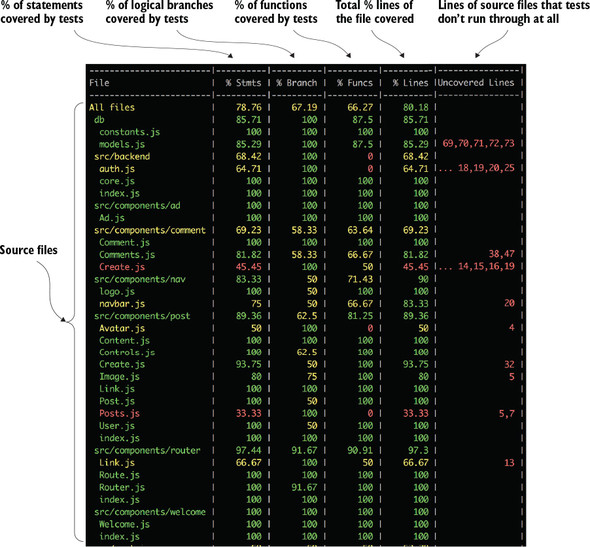
Figure 9.3. Test coverage output from Jest shows coverage stats for the different files in your project. Each column reflects a different aspect of coverage. For each type of coverage, Jest shows a percentage covered. Statements and functions are simply JavaScript statements and functions, whereas branches are logical branches. If your test doesn’t address one part of an if statement, that should be reflected in the code coverage both in the uncovered lines column and in the percent-covered stat for branches.
Test runner— You’ll need something to run your tests. Most tests could be executed as regular JavaScript files, but you’ll want to take advantage of some of the added features of test runners, such as running more than one test at a time and reporting back error or success information in a nicer way. For this book, you’ll use Jest for most aspects of your testing. Jest is a testing library developed by engineers at Facebook. Some popular alternatives with fewer features built in that you might consider include Mocha (https://mochajs.org) and Jasmine (https://jasmine.github.io). Jest is often used for testing React apps, but adapters are being created for other frameworks, too. The source code includes a setup file (test/setup.js) that invokes the adapter for React. Test doubles— When writing tests, you want to avoid tying your tests to other fragile or unpredictable parts of your infrastructure as much as possible; other tools you rely on should be mocked out—replaced with a “fake” function that behaves in an expected way. Testing this way promotes a focus on the code under test and modularity because your tests aren’t tied to the exact structure of your code at a given time. You’ll use Jest for mocking and test doubles, but there are other libraries that also do this, such as Sinon (http://sinonjs.org). Assertion libraries— You can use JavaScript to make assertions about your code (for example, does X equal Y?), but there are plenty of edge cases that you’ll need to account for. Developers have created solutions to make writing assertions about your code easier. Jest comes with assertion methods built in, so you’ll rely on those.

This is an excerpt from Manning's book Redux in Action.
Enzyme is a testing tool that mainly helps with React component testing. Enzyme used to require special configuration to use with Jest, but since Jest version 15, no additional configuration is required. Install Enzyme using npm:
It’s not crucial for you to understand what’s happening under the hood, and that’s exactly why Create React App hides these details by default. What’s important is that when you run the test command (npm test), Jest will run any tests in files that are within a __tests__ directory or end in .test.js, .test.jsx, .spec.js, or .spec.jsx. If you prefer to tweak those settings, that’s what ejecting is intended for.
If you have experience with the Jasmine testing framework, Jest will look familiar. Jest is a set of features built on top of Jasmine. However, as of May 2017, Jest maintains its own fork of Jasmine. The intention there is to maintain greater control over their own test runner and to add, change, or remove functionality as it meets the needs of Jest.
Next you’ll mock api.createTask, the function responsible for making the AJAX request. You’re using Jest to mock the function out entirely, but you’ll commonly see HTTP-mocking libraries such as nock used for similar purposes. HTTP mocking has the benefit of being slightly more of an integration test, because an additional component (the API call) is involved directly in the test. The downside is that it can occasionally lead to more overhead in test creation and maintenance. Flat out mocking the function that makes the API call means the action creator test is more focused, but it also means that it won’t catch any bugs related to the AJAX call.
For now, you’ll mock api.createTask directly using Jest’s mocking utilities, as shown in the following listing. This ensures api.createTask will return a promise that you control directly in the test, and you won’t have to worry about anything HTTP related.
Listing 9.7. Mocking api.createTask
... jest.unmock('../api'); #1 import * as api from '../api'; #2 api.createTask = jest.fn( #3 () => new Promise((resolve, reject) => resolve({ data: 'foo' })), #3 ); #3 ... #1 Opts out of Jest’s auto-mocking #2 Imports the api module #3 Explicitly mocks the api.createTask function to return a promise !@%STYLE%@! {"css":"{\"css\": \"font-weight: bold;\"}","target":"[[{\"line\":1,\"ch\":70},{\"line\":1,\"ch\":72}],[{\"line\":8,\"ch\":0},{\"line\":8,\"ch\":2}],[{\"line\":2,\"ch\":70},{\"line\":2,\"ch\":72}],[{\"line\":9,\"ch\":0},{\"line\":9,\"ch\":2}],[{\"line\":3,\"ch\":70},{\"line\":3,\"ch\":72}],[{\"line\":4,\"ch\":70},{\"line\":4,\"ch\":72}],[{\"line\":5,\"ch\":70},{\"line\":5,\"ch\":72}],[{\"line\":10,\"ch\":0},{\"line\":10,\"ch\":2}],[{\"line\":3,\"ch\":70},{\"line\":3,\"ch\":72}],[{\"line\":4,\"ch\":70},{\"line\":4,\"ch\":72}],[{\"line\":5,\"ch\":70},{\"line\":5,\"ch\":72}],[{\"line\":10,\"ch\":0},{\"line\":10,\"ch\":2}],[{\"line\":3,\"ch\":70},{\"line\":3,\"ch\":72}],[{\"line\":4,\"ch\":70},{\"line\":4,\"ch\":72}],[{\"line\":5,\"ch\":70},{\"line\":5,\"ch\":72}],[{\"line\":10,\"ch\":0},{\"line\":10,\"ch\":2}]]"} !@%STYLE%@!
If Jasmine is such a nice tool, why bother with Jest? For one, it works out of the box with React, saving you from having to install and configure something similar to jsdom. Jest keeps the syntax and test runner as a foundation but extends Jasmine in many significant ways. The test runner, for example, has been beefed up to provide more detailed output, a watch mode to automatically replay only tests affected by a code change, and a code coverage tool.

This is an excerpt from Manning's book React Quickly: Painless web apps with React, JSX, Redux, and GraphQL.
Jest (https://facebook.github.io/jest) is a command-line tool based on Jasmine. It has a Jasmine-like interface. If you’ve worked with Mocha, you’ll find that Jest looks similar to it and is easy to learn. Jest is developed by Facebook and is often used together with React; the API documentation is at https://facebook.github.io/jest/docs/api.html#content.
Jest offers these features:
Listing 16.4. Rendering a React element in Jest
describe('HelloWorld', ()=>{ const TestUtils = require('react-dom/test-utils') const React = require('react') it('has props', (done)=>{ class HelloWorld extends React.Component { render() { return <div>{this.props.children}</div> } } let hello = TestUtils.renderIntoDocument(<HelloWorld>Hello Node! </HelloWorld>) expect(hello.props).toBeDefined() console.log('my hello props:', hello.props) // my div: Hello Node! done() }) })