concept Letters Social in category react

This is an excerpt from Manning's book React in Action.
Think of an application like Facebook. As a social network, data is the lifeblood of everything it’s useful for. It provides a variety of ways to interact with other people over the internet, and all these ways are done via modifying and receiving data in your browser (or other platforms). Many other applications contain incredibly complex data which needs to be represented in a UI that people can understand and easily use. Developers also need to be able to maintain and reason about these interfaces and how data flows through them, so how an application deals with data is as important as its ability to handle changing data over time. The sample application you’ll start building in the next chapter, Letters Social (check it out at https://social.react.sh), will use lots of changing data, though it won’t be nearly as complex as most consumer or business apps. I’ll be more explicit about it in this chapter, but we’ll continue to learn about working with data in React for the rest of the book.
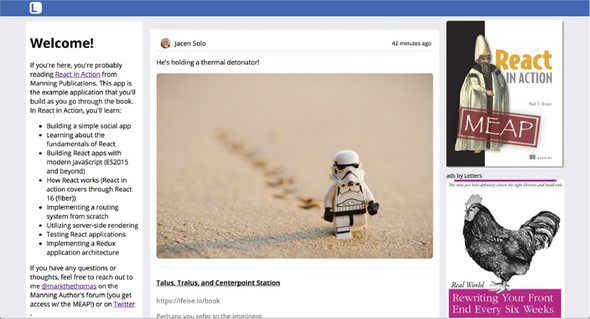
In this chapter, you’re going to start building the application Letters Social. We’ll pretend that we’re a startup focusing on creating the next great social networking application. Our company, Letters—ingeniously named to differentiate us from web giants like Alphabet—is working on Social. You’ll use React to build this application over the course of the book. By the end of the book, Letters Social will be using server-side rendering, Redux, and React. The application, shown in figure 4.1, supports a few features worth noting here so you know what you’ll be building over the course of the book:
You’ll start building Letters Social by creating an App component and a main index file that will serve as the entry point into the app (where React DOM’s render method is called). The App component will house some logic for fetching posts from the API and will render a number of Post components—you’ll create the component for posts next. The repository also contains a number of components that you won’t have to create yourself. You’ll use these now and in future chapters. The following listing shows the entrypoint file, src/index.js.
Listing 12.15. Embedding Redux state
const ogProps = { updated_time: new Date(), type: 'website', url: 'https://social.react.sh', title: 'Letters Social | React in Action by Mark Thomas from Manning Publications', description: 'Letters Social is a sample application for the React.js book React in Action by Mark Thomas from Manning Publications. Get it today at https://ifelse.io/book' }; #1 export const start = () => { #2 return `<!DOCTYPE html><html lang="en-us"> <head> <link rel="stylesheet" href="/static/styles.css" type="text/css" /> <link rel="stylesheet" href="https://api.mapbox.com/map- box.js/v3.1.1/mapbox.css" /> <meta http-equiv="X-UA-Compatible" content="IE=edge" /> <title> Letters Social | React in Action by Mark Thomas from Manning Publications </title> <link rel="manifest" href="/static/manifest.json" /> <meta name="viewport" content="width=device-width,initial-scale=1" /> <meta name="ROBOTS" content="INDEX, FOLLOW" /> <meta property="og:title" content="${ogProps.title}" /> <meta property="og:description" content="${ogProps.description}" /> <meta property="og:type" content="${ogProps.type}" /> <meta property="og:url" content="${ogProps.url}" /> <meta property="og:updated_time" content="${ogProps.updated_time}" /> <meta itemProp="description" content="${ogProps.description}" /> <meta name="twitter:card" content="summary" /> <meta name="twitter:title" content="${ogProps.title}" /> <meta name="twitter:description" content="${ogProps.description}" /> <meta property="book:author" content="Mark Tielens Thomas" /> <meta property="book:tag" content="react" /> <meta property="book:tag" content="reactjs" /> <meta property="book:tag" content="React in Action" /> <meta property="book:tag" content="javascript" /> <meta property="book:tag" content="single page application" /> <meta property="book:tag" content="Manning publications" /> <meta property="book:tag" content="Mark Thomas" /> <meta name="HandheldFriendly" content="True" /> <meta name="MobileOptimized" content="320" /> <meta name="theme-color" content="#4469af" /> <link href="https://fonts.googleapis.com/css?fam- ily=Open+Sans:400,700,800" rel="stylesheet" /> </head> <body> <div id="app"> `; }; export const end = reduxState => { #3 return `</div> <script id="initialState"> window.__INITIAL_STATE__ = ${JSON.stringify(reduxState)}; </script> #3 <script src="https://cdn.ravenjs.com/3.17.0/raven.min.js" type="text/javascript"></script> <script src="https://api.mapbox.com/mapbox.js/v3.1.1/mapbox.js" type="text/javascript"></script> <script src="/static/bundle.js" type="text/javascript"></script> </body> </html>`; }; #1 Basic metadata about the app—some boilerplate code is omitted as not relevant to current discussion #2 Inject your app into main div so when React-DOM takes over on browser, it won’t have to redo work server did #3 Redux store in browser should be able to take over where server left off, so embed store in JSON-stringified format; !@%STYLE%@! {"css":"{\"css\": \"font-weight: bold;\"}","target":"[[{\"line\":10,\"ch\":75},{\"line\":10,\"ch\":77}],[{\"line\":71,\"ch\":0},{\"line\":71,\"ch\":2}],[{\"line\":12,\"ch\":77},{\"line\":12,\"ch\":79}],[{\"line\":72,\"ch\":0},{\"line\":72,\"ch\":2}],[{\"line\":57,\"ch\":79},{\"line\":57,\"ch\":81}],[{\"line\":61,\"ch\":79},{\"line\":61,\"ch\":81}],[{\"line\":73,\"ch\":0},{\"line\":73,\"ch\":2}],[{\"line\":57,\"ch\":79},{\"line\":57,\"ch\":81}],[{\"line\":61,\"ch\":79},{\"line\":61,\"ch\":81}],[{\"line\":73,\"ch\":0},{\"line\":73,\"ch\":2}]]"} !@%STYLE%@!