concept middleware in category react

This is an excerpt from Manning's book Isomorphic Web Applications: Universal Development with React.
Next you’ll add middleware to your route handlers.

After you have the middleware set up, you also need to use it in app.es6. The following listing shows how to import and apply the middleware by passing it in as a callback to the route handler. Update app.es6 with the code from the listing.
Listing 7.5. Using renderView middleware for the catchall route—src/app.es6
import renderViewMiddleware from './middleware/renderView'; #1 app.get('/*', renderViewMiddleware); #2 #1 Import your renderView middleware. #2 Replace inline anonymous route handler (you pass middleware function into the route handler). !@%STYLE%@! {"css":"{\"css\": \"font-weight: bold;\"}","target":"[[{\"line\":0,\"ch\":63},{\"line\":0,\"ch\":65}],[{\"line\":4,\"ch\":0},{\"line\":4,\"ch\":2}],[{\"line\":2,\"ch\":66},{\"line\":2,\"ch\":68}],[{\"line\":5,\"ch\":0},{\"line\":5,\"ch\":2}]]"} !@%STYLE%@!
So far, you’ve set up routes that are terminated in a single function that takes in the request and responds to it with the response object. Next, you want to implement a middleware function that checks for a route match with one of the app views (for example, /cart). Express can chain multiple functions together to handle complex business logic. These individual functions are called middleware. (If you’re thinking this sounds a lot like Redux middleware, it is!)

This is an excerpt from Manning's book React in Action.
You have some actions created, but before you move on to reducers you can add some of your own middleware. Middleware is Redux’s way of letting you hook into the data flow process (actions dispatched to store, handled by reducer, state updated, listeners notified). Redux’s approach to middleware is similar to other tools like Express or Koa (web server frameworks for Node.js), although it solves a different problem. Figure 10.7 shows an example of a middleware-focused flow as it might appear in something like Express or Koa.
Figure 10.7. Middleware sits between a process’s start and end points and lets you do various things in between.
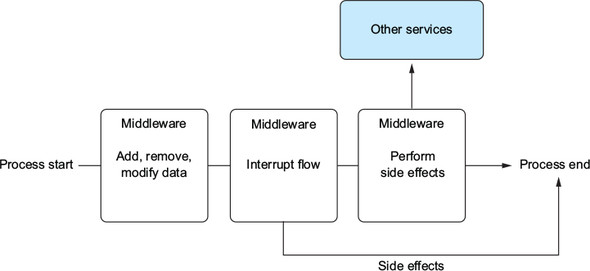
Sometimes you may want to interrupt the flow, send data off to another API, or solve any other application-wide problems. Figure 10.7 shows a few different use cases for middleware: data modification, flow interruption, and performing side effects. One key point here is that the middleware should be composable—you should be able to reorder any of these and not worry about them affecting each other.
redux-thunk is a Redux middleware library, which means it works as a sort of “on the way” or pass-through mechanism for Redux. You’ve probably used other APIs that make use of this concept, like Express or Koa (server-side frameworks for Node.js). Middleware works by letting you hook into a cycle or process of some kind in a composable way, meaning that you can create and use multiple middleware functionalities independent of each other in a single project.
Redux middleware is, in the words of the Redux docs, a “third-party extension point between dispatching an action and the moment it reaches the reducer.” This means you have one or more opportunities to act on or because of an action before it gets handled by a reducer. You’ll use Redux middleware to create an error-handling solution next, but right now you can use the redux-thunk middleware to enable asynchronous action creation in your application. Listing 10.8 shows how to integrate the redux-thunk middleware into your app. Note that you should add the middleware to both your production and development stores (configureStore.prod.js and configureStore.dev.js). Remember, you can choose whatever production/development store setup makes the most sense for your situation—I only broke them into two here to make clear which one gets used for each environment.
Listing 10.8. Enabling asynchronous action creators via redux-thunk
import thunk from 'redux-thunk'; import { createStore, compose, applyMiddleware } from 'redux'; #1 import rootReducer from '../reducers/root'; let store; export default (initialState) => { if (store) { return store; } const createdStore = createStore(rootReducer, initialState, compose( #2 applyMiddleware( #2 thunk, #2 ), #2 window.devToolsExtension() ) ); store = createdStore; return store; }; #1 To integrate middleware into your Redux store, pull in applyMiddleware utility #2 Insert and order middleware in Redux within the applyMiddleware function—here you’re inserting the redux-thunk middleware into your store. !@%STYLE%@! {"css":"{\"css\": \"font-weight: bold;\"}","target":"[[{\"line\":1,\"ch\":74},{\"line\":1,\"ch\":76}],[{\"line\":20,\"ch\":0},{\"line\":20,\"ch\":2}],[{\"line\":9,\"ch\":74},{\"line\":9,\"ch\":76}],[{\"line\":10,\"ch\":74},{\"line\":10,\"ch\":76}],[{\"line\":11,\"ch\":74},{\"line\":11,\"ch\":76}],[{\"line\":12,\"ch\":74},{\"line\":12,\"ch\":76}],[{\"line\":21,\"ch\":0},{\"line\":21,\"ch\":2}],[{\"line\":9,\"ch\":74},{\"line\":9,\"ch\":76}],[{\"line\":10,\"ch\":74},{\"line\":10,\"ch\":76}],[{\"line\":11,\"ch\":74},{\"line\":11,\"ch\":76}],[{\"line\":12,\"ch\":74},{\"line\":12,\"ch\":76}],[{\"line\":21,\"ch\":0},{\"line\":21,\"ch\":2}],[{\"line\":9,\"ch\":74},{\"line\":9,\"ch\":76}],[{\"line\":10,\"ch\":74},{\"line\":10,\"ch\":76}],[{\"line\":11,\"ch\":74},{\"line\":11,\"ch\":76}],[{\"line\":12,\"ch\":74},{\"line\":12,\"ch\":76}],[{\"line\":21,\"ch\":0},{\"line\":21,\"ch\":2}],[{\"line\":9,\"ch\":74},{\"line\":9,\"ch\":76}],[{\"line\":10,\"ch\":74},{\"line\":10,\"ch\":76}],[{\"line\":11,\"ch\":74},{\"line\":11,\"ch\":76}],[{\"line\":12,\"ch\":74},{\"line\":12,\"ch\":76}],[{\"line\":21,\"ch\":0},{\"line\":21,\"ch\":2}]]"} !@%STYLE%@!

This is an excerpt from Manning's book Redux in Action.
Install and configure Redux Thunk. You’ll have to add middleware to the Redux store, which is simpler than it might sound.
What exactly is middleware? The concept isn’t unique to Redux, and if you’ve worked with frameworks like Rails, Express.js, or Koa, you’ve likely used or been exposed to middleware in a shape or form. Generally, middleware is any code that runs between two other software components, typically as part of a framework. With a web server framework such as Express or Koa, you can add middleware that runs after an incoming request is received, and before the framework handles a request. This is useful for all kinds of things, such as logging data about each request and response, handling errors in a centralized way, authenticating users, and so on.
Frameworks such as Express and Koa are great for illustrating middleware, but you’re here for Redux. If you know that middleware can be described as code that sits between two components, such as a framework receiving an HTTP request and generating a response, where does middleware in Redux live?
Figure 5.1. Actions move through middleware, then reducers, prior to the final state being calculated.

Notice that middleware in figure 5.1 exists within the store. Think of middleware as being “registered” with the store. When an action is dispatched, the store will know to pass that action through any middleware you’ve added. When the entire chain of middleware is complete, the action is finally passed to the reducers to calculate the updated state of the application.
Listing 5.1. Creating the logger middleware – src/middleware/logger.js
const logger = store => next => action => { #1 console.group(action.type); #2 console.log('dispatching: ', action); const result = next(action); #3 console.log('next state: ', store.getState()); #4 console.groupEnd(action.type); return result; }; export default logger; #1 Creates the middleware using the correct function signature #2 Uses console.group to style console output #3 Uses next to ensure the action gets passed to the reducers and the next state is calculated #4 Logs the state of the store after the action has been applied !@%STYLE%@! {"css":"{\"css\": \"font-weight: bold;\"}","target":"[[{\"line\":0,\"ch\":59},{\"line\":0,\"ch\":61}],[{\"line\":11,\"ch\":0},{\"line\":11,\"ch\":2}],[{\"line\":1,\"ch\":59},{\"line\":1,\"ch\":61}],[{\"line\":12,\"ch\":0},{\"line\":12,\"ch\":2}],[{\"line\":3,\"ch\":59},{\"line\":3,\"ch\":61}],[{\"line\":13,\"ch\":0},{\"line\":13,\"ch\":2}],[{\"line\":4,\"ch\":59},{\"line\":4,\"ch\":61}],[{\"line\":14,\"ch\":0},{\"line\":14,\"ch\":2}]]"} !@%STYLE%@!
The real benefit of middleware is the ability to centralize certain tasks that need to be applied across many actions. Again, let’s use logging as an example. Say your goal is to log the type and payload of every action being dispatched. One way to accomplish this is to add logging statements at the point of every call to store.dispatch. Sure, you’re logging action dispatches, which was your original goal, but this solution should make you cringe for at least one reason: it’s not particularly scalable. Now you’ll have to add logging for every action you create.
Middleware allows you to bypass this entirely by defining the logic for logging actions in a single place. All new actions will get logging for free, without any developer intervention.
When is it a good idea to use middleware? For us, there are two golden rules:
Use middleware if you need to write code that applies across many, if not all, actions in the application. Logging is maybe the most classic example. But, use middleware only if the indirection caused by the middleware isn’t overly damaging to the readability and understandability of the code. In that last bit, there’s a lot of nuance, and it’s a good segue into an equally important question: When should you NOT use middleware?
Redux middleware in the right scenarios is incredibly useful and powerful, but like many things in life, it’s possible to have too much of a good thing. The main tradeoff with middleware is indirection. This usually isn’t an issue with big, cross-cutting concerns like logging, but you have to be wary when using middleware for tasks that affect the overall flow of control within your apps. For example, you’ll build an API middleware later in the chapter that helps centralize tasks common to all async actions that require an AJAX request. It’s a powerful abstraction, but because it directly impacts the flow of data, it’s an added layer of complexity that’s practically impossible for developers working in that area of the code to ignore.