concept parent in category react

This is an excerpt from Manning's book React Hooks in Action.
We start, in section 7.1, with a new
Colorscomponent that shares a selected color with three child components. We see how to update the shared state, managed by the parent, from a child. The rest of the chapter uses the bookings app example to explore two approaches to sharing state: passing a state object and a dispatch function for a reducer to the children and passing a single state value and its updater function to the children. Both approaches are common patterns and help to highlight some common questions regarding state, props, effects and dependencies.
More interesting (for a book about React hooks) are the
colorandsetColorprops. These props have come from a call touseStatein the parent.const [color, setColor] = useState(availableColors[0]);The
ColorPickerdoesn’t care where they’ve come from, it just expects acolorprop to hold the current color and asetColorprop to be a function it can call to set the color somewhere.ColorPickeruses thesetColorupdater function in theonClickhandler for each list item. By calling thesetColorfunction, the child component,ColorPicker, is able to set the state for the parent component,Colors. The parent then re-renders, updating all of its children with the newly selected color.We created the
Colorscomponent from scratch, knowing we needed shared state to pass down to child components. Sometimes we work with existing components and, as a project develops, realize they hold state that other siblings may also need. The next sections look at a couple of ways of lifting state up from children to parents to make it more widely available.

This is an excerpt from Manning's book React in Action.
Now that you have a way of listening for events and modifying the component’s state, you can implement a way to create new comments using unidirectional data flow. In React, data flows top-down, as an input from parents to children. When you create composite components, you can pass information to child components via props and make use of it in child components. That means you could store the data from the CreateComment component in a parent component and from there pass the data to child components. But how can you get the data from a new comment (in the form that the user types text into) in a child component back into the parent and into the child? Figure 2.12 shows an example of the sort of data flow you need.
Figure 2.12. To add a post, you need to capture the data from input fields and somehow send it to the parent component, and then that updated data will be used to render out the posts.
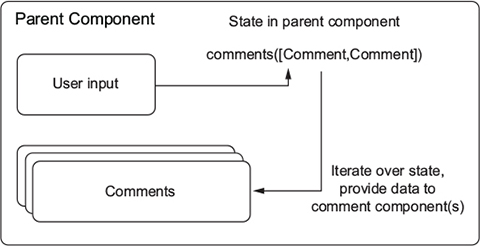
How can you make this happen? One kind of data we haven’t looked at passing via props is functions. Because functions can be passed as arguments to other functions in JavaScript, you can use this to your advantage. You can define a method on a parent component and give it to the child component as a property. That way, the child component can send data back up to its parent without having to know how the parent will handle the data. If you needed to change what happened with the data, you wouldn’t need to do anything to the CreateComment component. To execute a function passed as a prop, the child only needs to call the method and pass any data to it. The following listing shows how to use functions as props.
Listing 2.8. Using functions as props
//... class CreateComment extends Component { constructor(props) { super(props); this.state = { content: '', user: '' }; this.handleUserChange = this.handleUserChange.bind(this); this.handleTextChange = this.handleTextChange.bind(this); this.handleSubmit = this.handleSubmit.bind(this); } handleUserChange(event) { this.setState(() => ({ user: event.target.value })); } handleTextChange(event) { this.setState(() => ({ content: event.target.value })); } handleSubmit(event) { event.preventDefault(); this.props.onCommentSubmit({ #1 user: this.state.user.trim(), #1 content: this.state.content.trim() #1 }); this.setState(() => ({ user: '', text: '' })); } render() { return React.createElement( 'form', { className: 'createComment', onSubmit: this.handleSubmit #2 }, React.createElement('input', { type: 'text', placeholder: 'Your name', value: this.state.user, onChange: this.handleUserChange }), React.createElement('input', { type: 'text', placeholder: 'Thoughts?', value: this.state.content, onChange: this.handleTextChange }), React.createElement('input', { type: 'submit', value: 'Post' }) ); } } //... #1 Call the onCommentSubmit function that’s been passed as a prop by the parent—you’re passing in data from the form and resetting the form so the user knows their action was successful. #2 Don’t forget to bind the method you’ve set up to the onSubmit event—without it, there won’t be any connection between the right event and your method. !@%STYLE%@! {"css":"{\"css\": \"font-weight: bold;\"}","target":"[[{\"line\":24,\"ch\":50},{\"line\":24,\"ch\":52}],[{\"line\":25,\"ch\":50},{\"line\":25,\"ch\":52}],[{\"line\":26,\"ch\":50},{\"line\":26,\"ch\":52}],[{\"line\":63,\"ch\":0},{\"line\":63,\"ch\":2}],[{\"line\":24,\"ch\":50},{\"line\":24,\"ch\":52}],[{\"line\":25,\"ch\":50},{\"line\":25,\"ch\":52}],[{\"line\":26,\"ch\":50},{\"line\":26,\"ch\":52}],[{\"line\":63,\"ch\":0},{\"line\":63,\"ch\":2}],[{\"line\":24,\"ch\":50},{\"line\":24,\"ch\":52}],[{\"line\":25,\"ch\":50},{\"line\":25,\"ch\":52}],[{\"line\":26,\"ch\":50},{\"line\":26,\"ch\":52}],[{\"line\":63,\"ch\":0},{\"line\":63,\"ch\":2}],[{\"line\":38,\"ch\":50},{\"line\":38,\"ch\":52}],[{\"line\":64,\"ch\":0},{\"line\":64,\"ch\":2}]]"} !@%STYLE%@!
Props are data that gets passed to React components, either from a parent or from the defaultProps static method on the component itself. Whereas component state is localized to a single component, props are usually passed from a parent component. If you’re thinking, “Can I use state in a parent component to pass props to a child component?” you’re onto something. State in one component can be props for another.
Listing 3.6. Passing props from parent to child
import React from "react"; import { render } from "react-dom"; import PropTypes from "prop-types"; const UserProfile = props => { #1 return <img src={`https://source.unsplash.com/user/${props.username}`} />; }; UserProfile.propTypes = { pagename: PropTypes.string #2 }; UserProfile.defaultProps = { pagename: "erondu" #2 }; const UserProfileLink = props => { return <a href={`https://ifelse.io/${props.user- name}`}>{props.username}</a>; }; const UserCard = props => { #3 return ( <div> <UserProfile username={props.username} /> <UserProfileLink username={props.username} /> </div> ); }; render(<UserCard username="erondu" />, document.getElementById("root")); #1 Create a stateless functional component that returns an example image. #2 Remember, you can still specify default props and propTypes even on stateless functional components. #3 UserCard is a parent to UserProfile and UserProfileLink. !@%STYLE%@! {"css":"{\"css\": \"font-weight: bold;\"}","target":"[[{\"line\":4,\"ch\":58},{\"line\":4,\"ch\":60}],[{\"line\":31,\"ch\":0},{\"line\":31,\"ch\":2}],[{\"line\":8,\"ch\":58},{\"line\":8,\"ch\":60}],[{\"line\":12,\"ch\":58},{\"line\":12,\"ch\":60}],[{\"line\":32,\"ch\":0},{\"line\":32,\"ch\":2}],[{\"line\":8,\"ch\":58},{\"line\":8,\"ch\":60}],[{\"line\":12,\"ch\":58},{\"line\":12,\"ch\":60}],[{\"line\":32,\"ch\":0},{\"line\":32,\"ch\":2}],[{\"line\":20,\"ch\":58},{\"line\":20,\"ch\":60}],[{\"line\":33,\"ch\":0},{\"line\":33,\"ch\":2}]]"} !@%STYLE%@!
In React, data flows in one direction. That means that rather than flow between entities in a horizontal way where each can update the other, a hierarchy is established. You can pass data through components but can’t reach out and modify the state or props of other components without passing props. You also can’t modify the data in a parent.
But you can pass data back up the hierarchy via callbacks. When a parent receives a callback from a child component, it can change its data and send the changed data back down to the child components. Even in this scenario with callbacks, data still flows downwards in aggregate and remains determined by the parent passing that data down. That’s why we say that in React data flows unidirectionally, as shown in figure 3.4.
Figure 3.4. Data flows one way in React. Props are passed from parent to child (from owner to ownee), and children can’t edit the state or props of a parent component. Each component that has a backing instance can modify its own state but can’t modify anything outside itself apart from setting the props of one of its children.
