concept Redux in category react

This is an excerpt from Manning's book Isomorphic Web Applications: Universal Development with React.
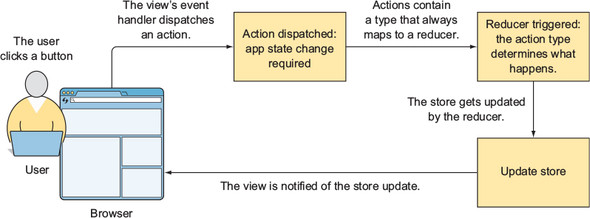
In real-world web apps, you need a way to manage the data flow. Redux provides an application state implementation that works nicely with React. It’s important to note that you don’t have to use Redux with React, or vice versa, but their concepts mesh well because they both use functional programming ideas. Using Redux and React together is also a community best practice.
Like React, Redux follows a single-direction flow of data. Redux holds the state of your app in its store, providing a single source of truth for your application. To update this store, actions (JavaScript objects that represent a discrete change of app state) are dispatched from the views. These actions, in turn, trigger reducers. Reducers are pure functions (a function with no side effects) that take in a change and return a new store after responding to the change. Figure 1.11 shows this flow.
Redux can be hooked up to any view, but it works especially well with React. React’s top-down flow of props and state through nested components work well with Redux’s single-direction state update flow.
Redux provides a way to initialize the state (store). It manages the flow of updates to the store and notifies subscribers (the view). To configure the store in your app, you need to create your reducers and then initialize the store with them. The following listing shows how this works; you can find this code in src/init-redux.es6 in the repo.
Listing 6.2. Initialize Redux—src/init-redux.es6
import { createStore, combineReducers } from 'redux'; #1 import notifications from './notifications-reducer'; #2 import settings from './settings-reducer'; #2 export default function (){ #3 const reducer = combineReducers({ #4 notifications, #4 settings #4 }); return createStore(reducer) #5 } #1 Import helper methods from Redux. #2 Import app reducers. #3 Export function that can be called from other modules (makes it reusable so it can be called from browser and server in isomorphic app). #4 Call combineReducers helper method from Redux; builds map of reducers from multiple reducers. #5 Call createStore, pass in combined reducers—here you’ll have store.notifications and store.settings. !@%STYLE%@! {"css":"{\"css\": \"font-weight: bold;\"}","target":"[[{\"line\":0,\"ch\":58},{\"line\":0,\"ch\":60}],[{\"line\":12,\"ch\":0},{\"line\":12,\"ch\":2}],[{\"line\":1,\"ch\":58},{\"line\":1,\"ch\":60}],[{\"line\":2,\"ch\":58},{\"line\":2,\"ch\":60}],[{\"line\":13,\"ch\":0},{\"line\":13,\"ch\":2}],[{\"line\":1,\"ch\":58},{\"line\":1,\"ch\":60}],[{\"line\":2,\"ch\":58},{\"line\":2,\"ch\":60}],[{\"line\":13,\"ch\":0},{\"line\":13,\"ch\":2}],[{\"line\":4,\"ch\":58},{\"line\":4,\"ch\":60}],[{\"line\":14,\"ch\":0},{\"line\":14,\"ch\":2}],[{\"line\":5,\"ch\":58},{\"line\":5,\"ch\":60}],[{\"line\":6,\"ch\":58},{\"line\":6,\"ch\":60}],[{\"line\":7,\"ch\":58},{\"line\":7,\"ch\":60}],[{\"line\":15,\"ch\":0},{\"line\":15,\"ch\":2}],[{\"line\":5,\"ch\":58},{\"line\":5,\"ch\":60}],[{\"line\":6,\"ch\":58},{\"line\":6,\"ch\":60}],[{\"line\":7,\"ch\":58},{\"line\":7,\"ch\":60}],[{\"line\":15,\"ch\":0},{\"line\":15,\"ch\":2}],[{\"line\":5,\"ch\":58},{\"line\":5,\"ch\":60}],[{\"line\":6,\"ch\":58},{\"line\":6,\"ch\":60}],[{\"line\":7,\"ch\":58},{\"line\":7,\"ch\":60}],[{\"line\":15,\"ch\":0},{\"line\":15,\"ch\":2}],[{\"line\":9,\"ch\":58},{\"line\":9,\"ch\":60}],[{\"line\":16,\"ch\":0},{\"line\":16,\"ch\":2}]]"} !@%STYLE%@!If you aren’t using Redux with React (later in the chapter you’ll learn how to use redux-react to wire the two libraries together), you need to subscribe to store updates manually. The subscribe function works like a standard JavaScript event handler. You pass in a function that gets called every time a store update occurs. But the store doesn’t pass its state to the update handler function; instead, you call getState() to access the current state. The following listing shows an example of this code, which you can find in main.jsx.
Listing 6.3. Subscribe to store, without React Redux—src/main.jsx
const store = initRedux(); #1 store.subscribe(() => { #2 console.log("Store updated", store.getState()); #3 // do something here }); #1 Initialize store (see listing 6.2). #2 Call the subscribe() method on the store and pass in a function to handle updates. #3 Log the current state of the store by calling getState(). !@%STYLE%@! {"css":"{\"css\": \"font-weight: bold;\"}","target":"[[{\"line\":0,\"ch\":58},{\"line\":0,\"ch\":60}],[{\"line\":7,\"ch\":0},{\"line\":7,\"ch\":2}],[{\"line\":2,\"ch\":58},{\"line\":2,\"ch\":60}],[{\"line\":8,\"ch\":0},{\"line\":8,\"ch\":2}],[{\"line\":3,\"ch\":58},{\"line\":3,\"ch\":60}],[{\"line\":9,\"ch\":0},{\"line\":9,\"ch\":2}]]"} !@%STYLE%@!Next you’ll write a reducer and learn about maintaining immutability in Redux.
After you’ve wired up your container component (App) to connect it to Redux, all you have to do is pass the properties into the children. Then the child components can see any state you mapped to props and call any actions you’ve bound to dispatch.

This is an excerpt from Manning's book React in Action.
Where does React fit into the broader world of web engineering? You’ll often hear React talked about in the same space as projects like Vue, Preact, Angular, Ember, Webpack, Redux and other well-known JavaScript libraries and frameworks. React is often a major part of front-end applications and shares similar features with the other libraries and frameworks just mentioned. In fact, many popular front-end technologies are more like React in subtle ways now than in the past. There was a time when React’s approach was novel, but other technologies have since been influenced by React’s component-driven, declarative approach. React continues to maintain a spirit of rethinking established best practices, with the main goal being providing developers with an expressive mental model and a performant technology to build UI applications.
Redux is predictable by design and that makes it easy to create some amazing debugging tools. Engineers like Dan Abramov and others who work on the Redux and React libraries have helped create some powerful tools for working with Redux applications. Because the state in Redux changes in predictable ways, debugging in new ways is possible: you can track individual changes to your app state, inspect differences between changes, and even rewind and replay your app state over time. The Redux Dev Tools extension lets you do all this and more and comes bundled as a browser extension. To install it for your browser, follow the instructions at https://github.com/zalmoxisus/redux-devtools-extension. Figure 10.3 shows a sneak peek of what’s available with the Redux Dev Tools.
Figure 10.3. The Redux Dev Tools extension bundles the popular Redux Dev Tools library from Dan Abramov in a convenient browser extension. With it, you can rewind and replay your Redux app, inspect changes one by one, examine diffs between changes in state, review your entire app state in one area, generate testing boilerplate, and more.
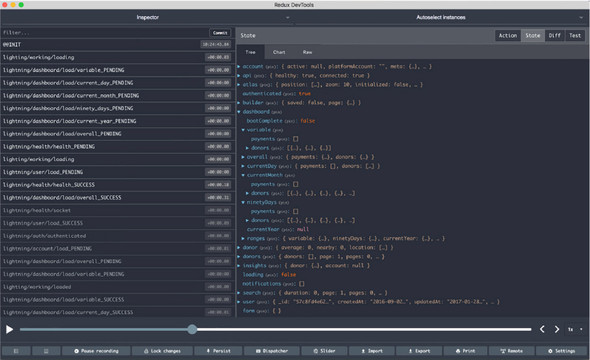
After installing the extension, you should see the new Dev Tools icon in your browser toolbar. As of the time of writing, it only appears colorized when it detects a Redux app instance in development mode, so if you visit the app or other sites that don’t have Redux set up, the extension won’t work yet. But once you configure the app, you’ll see the icon appear with color, and clicking it will open the tools.
Action creators won’t do anything by themselves to change your app state (they just return objects). You need to use the dispatcher provided by Redux in order for the action creators to have any effect. The dispatch function is provided by the Redux store itself and will be the way you send actions into Redux to be handled. You’ll set up the Redux store next so you can use its dispatch function with your actions.
Before you set up your store, you’ll need to create a root reducer file that will allow you to create a valid store; the reducer won’t do anything until later when you look at reducers and build them out. You’ll create a folder called reducers in src and inside it a file, root.js. In this file, you’ll use the combineReducers function provided by Redux to set up where your future reducers will go. This function does exactly what it sounds like it does: combines multiple reducers into one.
Without the ability to combine reducers, you’d run into issues with conflicts between multiple reducers and would have to find ways to merge reducers or route actions. This is one area where the benefits of Redux can be tangibly observed. There’s a bit more work in setting everything up, but once the work is done, Redux makes it easier to scale application state management. The next listing shows how to create the root reducer file.
Listing 10.4. Creating the root store (src/reducers/root.js)
import { combineReducers } from 'redux'; #1 const rootReducer = combineReducers({}); #2 export default rootReducer; #3 #1 Import the combineReducers tool from Redux. #2 Create the root reducer using combineReducers with empty object for now #3 Export the root reducer. !@%STYLE%@! {"css":"{\"css\": \"font-weight: bold;\"}","target":"[[{\"line\":0,\"ch\":46},{\"line\":0,\"ch\":48}],[{\"line\":4,\"ch\":0},{\"line\":4,\"ch\":2}],[{\"line\":1,\"ch\":46},{\"line\":1,\"ch\":48}],[{\"line\":5,\"ch\":0},{\"line\":5,\"ch\":2}],[{\"line\":2,\"ch\":46},{\"line\":2,\"ch\":48}],[{\"line\":6,\"ch\":0},{\"line\":6,\"ch\":2}]]"} !@%STYLE%@!Now that you have a reducer set up for Redux to use, you’ll configure and set up the store. Create a folder called store and create several files inside it: store.js, stores/store.prod.js, and stores/store.dev.js. These files are responsible for exporting a function that creates your store for you and, if you’re in development mode, integrates the developer tools. Listing 10.5 shows creating the store-related files side by side in the same listing. You’re using different files for each environment here because you might want to include different middleware and other libraries for development and production environments. This just a convention—there’s nothing about Redux that requires you to put functions in many files or one.
Listing 10.5. Creating the Redux store
// src/store/configureStore.js import { __PRODUCTION__ } from 'environs'; #1 import prodStore from './configureStore.prod'; import devStore from './configureStore.dev'; export default __PRODUCTION__ ? prodStore : devStore; #1 // src/store/configureStore.prod.js import { createStore } from 'redux'; import rootReducer from '../reducers/root'; let store; export default function configureStore(initialState) { #2 if (store) { return store; } store = createStore(rootReducer, initialState); #3 return store; } // src/store/configureStore.dev.js import thunk from 'redux-thunk'; import { createStore, compose} from 'redux'; #4 import rootReducer from '../reducers/root'; let store; export default initialState => { if (store) { #5 return store; } const createdStore = createStore( rootReducer, initialState, compose(window.devToolsExtension()) #6 ); store = createdStore; return store; }; #1 This file makes it easier to use the store in your app without having to determine if you want the development or production store. #2 Pass in initial state to your configuration for Redux to use #3 Use Redux createStore method to create your store #4 Import compose utility from Redux, which will let you combine middleware #5 Make sure you’re accessing the same store consistently—this ensures you return the same store if another file accesses an already-created store. #6 If dev tools extension is installed, this will hook into it !@%STYLE%@! {"css":"{\"css\": \"font-weight: bold;\"}","target":"[[{\"line\":0,\"ch\":0},{\"line\":0,\"ch\":30}],[{\"line\":1,\"ch\":59},{\"line\":1,\"ch\":61}],[{\"line\":4,\"ch\":59},{\"line\":4,\"ch\":61}],[{\"line\":38,\"ch\":0},{\"line\":38,\"ch\":2}],[{\"line\":1,\"ch\":59},{\"line\":1,\"ch\":61}],[{\"line\":4,\"ch\":59},{\"line\":4,\"ch\":61}],[{\"line\":38,\"ch\":0},{\"line\":38,\"ch\":2}],[{\"line\":6,\"ch\":0},{\"line\":6,\"ch\":35}],[{\"line\":11,\"ch\":59},{\"line\":11,\"ch\":61}],[{\"line\":39,\"ch\":0},{\"line\":39,\"ch\":2}],[{\"line\":15,\"ch\":59},{\"line\":15,\"ch\":61}],[{\"line\":40,\"ch\":0},{\"line\":40,\"ch\":2}],[{\"line\":19,\"ch\":0},{\"line\":19,\"ch\":34}],[{\"line\":21,\"ch\":59},{\"line\":21,\"ch\":61}],[{\"line\":41,\"ch\":0},{\"line\":41,\"ch\":2}],[{\"line\":26,\"ch\":59},{\"line\":26,\"ch\":61}],[{\"line\":42,\"ch\":0},{\"line\":42,\"ch\":2}],[{\"line\":32,\"ch\":59},{\"line\":32,\"ch\":61}],[{\"line\":43,\"ch\":0},{\"line\":43,\"ch\":2}]]"} !@%STYLE%@!
You have some actions created, but before you move on to reducers you can add some of your own middleware. Middleware is Redux’s way of letting you hook into the data flow process (actions dispatched to store, handled by reducer, state updated, listeners notified). Redux’s approach to middleware is similar to other tools like Express or Koa (web server frameworks for Node.js), although it solves a different problem. Figure 10.7 shows an example of a middleware-focused flow as it might appear in something like Express or Koa.
With those action creators done, you’ve created the initial functionality for creating posts and comments. You’re still missing one area, though: authentication for the user. In previous chapters, you were using Firebase helpers to check for the user’s authentication state and update the local component state with that. Do you need to do the same thing with authentication? That brings up another good question: what belongs in Redux and what doesn’t? Let’s look at this somewhat contentious question before moving on.
Opinions in the React/Redux community vary from “put whatever you want in the store” to “absolutely everything must go in the store.” There’s also a tendency for engineers who have only worked with React in a Redux context to see that as the only way to go and think of React and Redux as one and the same. People are often limited by their experience, but my hope is that we can take time to consider the facts and tradeoffs before forming an immovable opinion.
For one, it’s important to remember that although React and Redux fit well together, the technologies themselves aren’t intrinsically linked. You don’t need Redux to build React applications. I hope you’ve seen that in this book. Redux is just another tool available to engineers—it’s not the only way to build your React applications and is certainly not something that invalidates “normal” React concepts (local component state, for example). There are some cases where you might simply be adding overhead by bringing a component’s state into Redux.
What should you do? So far, Redux has proven to be a great way to give your application a robust architecture that has already helped you better organize code and functionality (and we haven’t even gotten to reducers yet!). Based on your experience so far, you may be tempted to quickly agree with the “absolutely everything should be in the Redux store” point of view. But I want to caution against this impulse and look at the tradeoffs instead.

This is an excerpt from Manning's book Redux in Action.
Listing 1. db.json
{ "tasks": [ { "id": 1, "title": "Learn Redux", "description": "The store, actions, and reducers, oh my!", "status": "Unstarted" }, { "id": 2, "title": "Peace on Earth", "description": "No big deal.", "status": "Unstarted" }, { "id": 3, "title": "Create Facebook for dogs", "description": "The hottest new social network", "status": "Completed" } ] }

This is one of the hottest topics for debate in the Redux community. For better or worse, the library offers no restrictions to how you organize data within the store. Redux provides the tools to store and update data and leaves it up to you to decide the shape of that data. The good news is that over time, and after no short period of trial and error, best practices started to emerge. One strategy emerged as a clear winner: normalization. It’s not a concept that’s unique to Redux, but you’ll look at how to normalize data in Parsnip and the benefits normalization provides.
The question of how and what to store in Redux surfaces regularly in the community. As usual, the answer varies, depending on whom you ask. Before you dig into the options, it’s worth remembering that Redux doesn’t necessarily care which strategy you decide on. If your data fits in an object, it can go in the Redux store. It’s up to you to decide how to maintain order within that object.

This is an excerpt from Manning's book React Quickly: Painless web apps with React, JSX, Redux, and GraphQL.
Data-model libraries and back ends—RefluxJS (https://github.com/reflux/refluxjs), Redux (http://redux.js.org), Meteor (https://www.meteor.com), and Flux (https://github.com/facebook/flux)
Personally, I find Flux confusing—and I’m not alone. There are many implementations of Flux, including Redux, Reflux, and other libraries. Early Manning Access Program readers of this book know that Reflux was included in the first version of the book, but I omitted it from this version. My anecdotal evidence, David Waller’s “React.js architecture - Flux vs. Reflux” at http://mng.bz/5GHx, and the hard data from numbers of npm downloads all indicate that Redux is more popular than Flux or Reflux. In this book, I use Redux, which some argue is a better alternative to Flux.