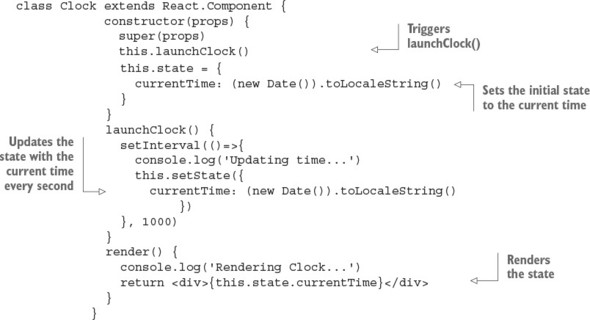
concept state in category react
This is an excerpt from Manning's book React Hooks in Action.
1.3 React hooks can add state to function components
As discussed in section 1.1.2, one of React’s core strengths is how it synchronizes application and component state with the User Interface. As the state changes, due to user interactions or data updates from the system or network, React intelligently and efficiently works out what changes should be made to the DOM in a browser or to the UI more generally in other environments.
The state could be local to a component, raised to a component higher in the tree and shared amongst siblings via properties, or global and accessed via React’s Context mechanism or higher order components (functions that take a component as an argument and return a new component that wraps the passed-in component but that has extra functionality). For a component to have state, it used to be that you’d use a class component with the JavaScript class extending from
React.Component. Now, with React hooks, you can add state to function components.
If you’re building React apps, then you’re expecting the data your app uses to change over time. Whether it’s fully server-rendered, a mobile app or all in a browser, your application’s user interface should represent the current data or state at the time of rendering. Sometimes multiple components throughout the app will use the data, and sometimes a component doesn’t need to share its secrets and can manage its own state without the help of mammoth, application-wide state-store behemoths. In this chapter, we’ll keep it personal and concentrate on components taking care of themselves, without regard for other components around them.
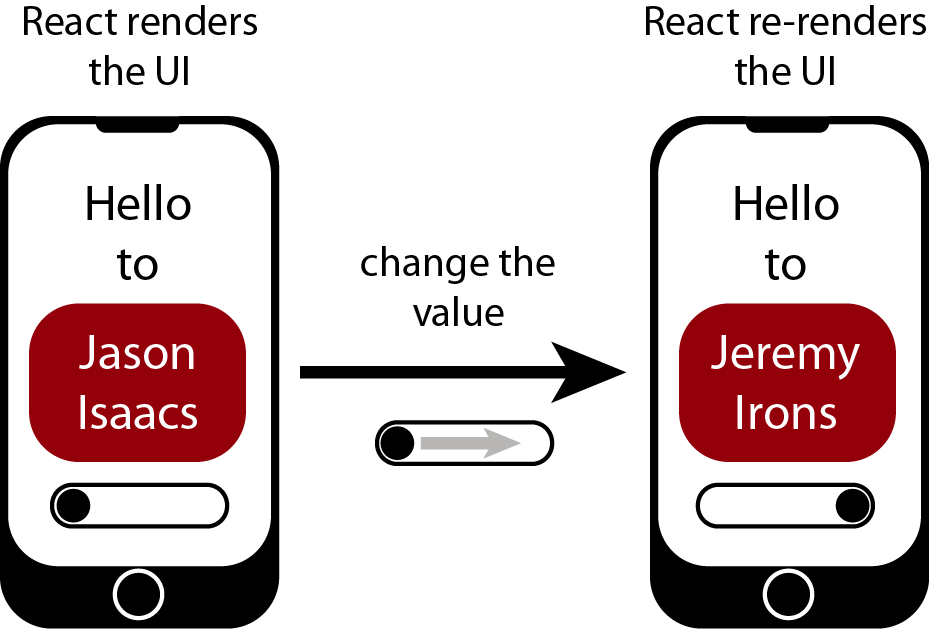
Figure 3.1 shows a very basic illustration of React’s job: it should use the current state to render the UI. If the state changes, React should re-render the UI. The illustration shows a name in a friendly message. When the name value changes, React updates the UI to show the new name in its message. We usually want the state and UI to always be in sync (although we might choose to delay synchronization during state transitions - when fetching the latest data, for example).
Figure 3.1 When you change a value in a component, React should update the UI.
React provides a small number of functions, or hooks, to enable it to track values in your components and keep the state and UI in sync. For single values it gives us the useState hook and that’s the hook we explore in this chapter. We look at how to call the hook, what it returns, and how we use it to update the state, triggering React to update the UI. Components often need more than one piece of state to do their jobs, so we see how we can call useState multiple times to handle multiple values. It’s not just a matter of documenting the useState API - you can go to the official React docs for that - we use the discussion of the useState hook to help us better understand what function components are and how they work. To that end, we finish the chapter with a review of the key concepts met as our code listings have evolved.
With classes, you would set up the state as an object in the constructor, (or as a static property on the class):
class BookablesList extends React.Component {
  constructor (props) {
    super(props);

    this.state = {
      bookableIndex: 1,
      group: "Rooms"
    };
  }
}
To update the state, in an event handler say, you would call
this.setState, passing an object with any changes you want to make:

This is an excerpt from Manning's book Isomorphic Web Applications: Universal Development with React.
Like React, Redux follows a single-direction flow of data. Redux holds the state of your app in its store, providing a single source of truth for your application. To update this store, actions (JavaScript objects that represent a discrete change of app state) are dispatched from the views. These actions, in turn, trigger reducers. Reducers are pure functions (a function with no side effects) that take in a change and return a new store after responding to the change. Figure 1.11 shows this flow.
Allowing your view to subscribe to the application state so it can update each time the state updates
Listing 6.4. Settings reducers—src/settings-state
import { UPDATE_REFRESH_DELAY } from './settings-action-creators'; #1 export default function settings(state = {}, action) { #2 switch (action.type) { #3 case UPDATE_REFRESH_DELAY: return { ...state, #4 refresh: action.time }) default: #5 return state } } #1 Include the string constant for the action. #2 Function definition—each reducer takes two parameters, the store state and action. If the state doesn’t exist, default it to empty object. #3 Use switch statement to declare your reducer logic—always determine which case to run based on value of action.type. #4 When the refresh value is updated, use the spread operator to copy and create new store to maintain immutability. #5 If no case matches, still return the store because this is a pure function. !@%STYLE%@! {"css":"{\"css\": \"font-weight: bold;\"}","target":"[[{\"line\":2,\"ch\":61},{\"line\":2,\"ch\":63}],[{\"line\":16,\"ch\":0},{\"line\":16,\"ch\":2}],[{\"line\":4,\"ch\":61},{\"line\":4,\"ch\":63}],[{\"line\":17,\"ch\":0},{\"line\":17,\"ch\":2}],[{\"line\":5,\"ch\":61},{\"line\":5,\"ch\":63}],[{\"line\":18,\"ch\":0},{\"line\":18,\"ch\":2}],[{\"line\":8,\"ch\":61},{\"line\":8,\"ch\":63}],[{\"line\":19,\"ch\":0},{\"line\":19,\"ch\":2}],[{\"line\":11,\"ch\":61},{\"line\":11,\"ch\":63}],[{\"line\":20,\"ch\":0},{\"line\":20,\"ch\":2}]]"} !@%STYLE%@!

This is an excerpt from Manning's book React in Action.
Components— Encapsulated units of functionality that are the primary unit in React. They utilize data (properties and state) to render your UI as output; we’ll explore how React components work with data later in chapter 2 onward. Certain types of React components also provide a set of lifecycle methods that you can hook into. The rendering process (outputting and updating a UI based on your data) is predictable in React, and your components can hook into it using React’s APIs.
Listing 3.3. Shallow merging with setState
import React from "react"; import { render } from "react-dom"; class ShallowMerge extends React.Component { constructor(props) { super(props); this.state = { user: { name: 'Mark', // #1 colors: { favorite: '', } } }; this.onButtonClick = this.onButtonClick.bind(this); } onButtonClick() { this.setState({ user: { // #2 colors: { favorite: 'blue' } } }); } render() { return ( <div> <h1>My favorite color is {this.state.user.colors.favorite} and my name is {this.state.user.name}</h1> <button onClick={this.onButtonClick}>show the color!</button> </div> ) } } render( <ShallowMerge />, document.getElementById('root') ); #1 name exists in the initial state under the user property... #2 ...but not in the state you’re setting—if it had been a level up, a shallow merge wouldn’t have worked. !@%STYLE%@! {"css":"{\"css\": \"font-weight: bold;\"}","target":"[[{\"line\":7,\"ch\":35},{\"line\":7,\"ch\":37}],[{\"line\":40,\"ch\":0},{\"line\":40,\"ch\":2}],[{\"line\":17,\"ch\":35},{\"line\":17,\"ch\":37}],[{\"line\":41,\"ch\":0},{\"line\":41,\"ch\":2}]]"} !@%STYLE%@!Forgetting about shallow merges can be a common source of bugs when first learning React. In this example, when you click the button the name property nested within the user key of the initial state will be overwritten because it doesn’t exist in the new state. You wanted to keep both pieces of state, but one ended up overwriting the other.
Figure 3.4. Data flows one way in React. Props are passed from parent to child (from owner to ownee), and children can’t edit the state or props of a parent component. Each component that has a backing instance can modify its own state but can’t modify anything outside itself apart from setting the props of one of its children.

Unidirectional flow is especially helpful in building UIs because it tends to make it easier to think about the way data moves through an application. Thanks to the hierarchy of components and the way props and state are localized to components, it’s generally easier to predict how data moves through an application.
Let’s take a brief and simplified look at state so you can have a better understanding of it when we look at state in React. If you’ve never explicitly thought or heard about state in a program before, you’ve probably at least seen it before. Most of the programs you’ve written probably had some kind of state to them. If you’ve ever worked with a front-end framework like Vue, Angular, or Ember, you’ve almost certainly written UIs that had some aspect of state to them. React components can have state, too. But what exactly are we talking about when we say state? Try this definition:

This is an excerpt from Manning's book Redux in Action.
Figure 1.7. The store now completes the loop by providing the new state to our profile page. Notice that the post count has incremented, and the new post has been added to the activity feed. If your user adds another post, you’d follow the same exact flow. The view dispatches an action, reducers specify how to update state, and the store broadcasts the new state back to the view.

React components have the concept of local, or component, state. Within any given component, you can keep track of the value of an input field or whether a button has been toggled, for example. Local state makes easy work of managing a single component’s behavior. However, today’s single-page applications often require synchronizing a complex web of state. Nested levels of components may render a different user experience based on the pages a user has already visited, the status of an AJAX request, or whether a user is logged in.
Let’s consider a use case involving the authentication status of a user. Your product manager tells you that when a user is logged into an ecommerce store, the navigation bar should display the user’s avatar image, the store should display items nearest to the user’s zip code first, and the newsletter signup form should be hidden. Within a vanilla React architecture, your options are limited for syncing state across each of the components. In the end, you’ll likely end up passing the authentication status and additional user data from one top-level component down to each of these nested components.
This architecture has several disadvantages. Along the way, data may filter through components that have no use for it other than to pass the data on to their children. In a large application, this can result in tons of data moving through unrelated components, passed down via props or passed up using callbacks. It’s likely that a small number of components at the top of the application end up with an awareness of most of the state used throughout the entire application. At a certain scale, maintaining and testing this code becomes untenable. Because React wasn’t intended to solve the same breadth of problems that other MVC frameworks attempted to address, an opportunity existed to bridge those gaps.
Listing 2.6. The store API in action
import { createStore } from 'redux'; function counterReducer(state = 0, action) { #1 if (action.type === 'INCREMENT') { return state + 1; } return state; } const store = createStore(counterReducer); #2 console.log(store.getState()); #3 store.subscribe(() => { #4 console.log('current state: ', store.getState()); }); store.dispatch({ type: 'INCREMENT' }); #5 #1 The store requires at least one reducer function (counterReducer). #2 Creates a store with the reducer #3 Reads the current state of the store #4 Does something after the store has updated #5 Sends a new action to the reducers to update the store !@%STYLE%@! {"css":"{\"css\": \"font-weight: bold;\"}","target":"[[{\"line\":2,\"ch\":57},{\"line\":2,\"ch\":59}],[{\"line\":19,\"ch\":0},{\"line\":19,\"ch\":2}],[{\"line\":9,\"ch\":57},{\"line\":9,\"ch\":59}],[{\"line\":20,\"ch\":0},{\"line\":20,\"ch\":2}],[{\"line\":11,\"ch\":57},{\"line\":11,\"ch\":59}],[{\"line\":21,\"ch\":0},{\"line\":21,\"ch\":2}],[{\"line\":13,\"ch\":57},{\"line\":13,\"ch\":59}],[{\"line\":22,\"ch\":0},{\"line\":22,\"ch\":2}],[{\"line\":17,\"ch\":57},{\"line\":17,\"ch\":59}],[{\"line\":23,\"ch\":0},{\"line\":23,\"ch\":2}]]"} !@%STYLE%@!

This is an excerpt from Manning's book React Quickly: Painless web apps with React, JSX, Redux, and GraphQL.
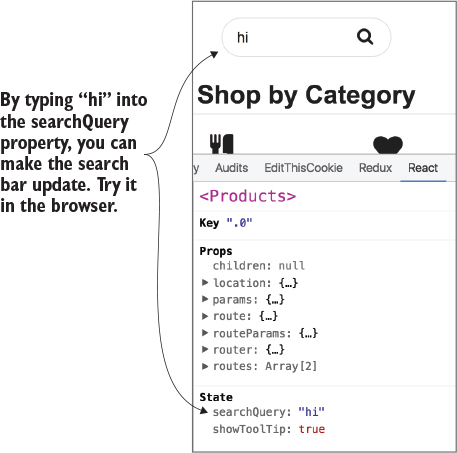
The convenience of React’s declarative style fully shines when you need to make changes to the view. Those are called changes of the internal state. When the state changes, React updates the view accordingly.
With React component states, you can build meaningful, interactive React applications. State is the core concept that lets you build React components that can store data and automagically augment views based on data changes.