concept analyzer in category search

This is an excerpt from Manning's book Relevant Search: With applications for Solr and Elasticsearch.
Despite our intuitive notion of how a document should be decomposed into terms, the mechanics of analysis often surprise us. It’s a process you’ll need to debug often. You already know how these terms are extracted: through index-time analysis. Analyzers are the entities that define the analysis process. They contain the components discussed in chapter 2: character filters, a tokenizer, and token filters. In Elasticsearch, the analyzer used can be specified at many levels, including for the index (all of TMDB), a node (a running instance of Elasticsearch), a type (all movies), a field, or even at query time for a particular query. You have yet to specify an analyzer, so the default standard analyzer is used. You can use this knowledge along with Elasticsearch’s useful analyze endpoint to view how text from your documents was transformed into the tokens that will form the inverted index.
This matching problem luckily has a straightforward fix. We’ve teased Elasticsearch for not knowing much about English. In actuality, Elasticsearch has an analyzer that handles English text fairly well. It strings together character filters, a tokenizer, and token filters to normalize English to standard word forms. It can stem English terms to root forms (running -> run), and remove noise terms such as the, known as stop words. Lucky for us, with is one such stop word. Removing it from the index could solve our problem.

This is an excerpt from Manning's book Lucene in Action, Second Edition.
Lucene includes a number of interesting Directory implementations, covered in section 2.10. IndexWriter can’t index text unless it’s first been broken into separate words, using an analyzer.
Analysis, in Lucene, is the process of converting field text into its most fundamental indexed representation, terms. These terms are used to determine what documents match a query during searching. For example, if you indexed this sentence in a field the terms might start with for and example, and so on, as separate terms in sequence. An analyzer is an encapsulation of the analysis process. An analyzer tokenizes text by performing any number of operations on it, which could include extracting words, discarding punctuation, removing accents from characters, lowercasing (also called normalizing), removing common words, reducing words to a root form (stemming), or changing words into the basic form (lemmatization). This process is also called tokenization, and the chunks of text pulled from a stream of text are called tokens. Tokens, combined with their associated field name, are terms.
Analyzer analyzer = new StandardAnalyzer(Version.LUCENE_30);
IndexWriter writer = new IndexWriter(directory, analyzer,
                        IndexWriter.MaxFieldLength.UNLIMITED);
Figure 4.1. Analysis process during indexing. Fields 1 and 2 are analyzed, producing a sequence of tokens; Field 3 is unanalyzed, causing its entire value to be indexed as a single token.

Each analyzed field of every document indexed with the IndexWriter instance uses the analyzer specified by default. But if an individual document has special analysis needs, the analyzer may be specified on a per-document basis: both the addDocument and updateDocument methods in IndexWriter optionally accept an analyzer to be used for that one document.
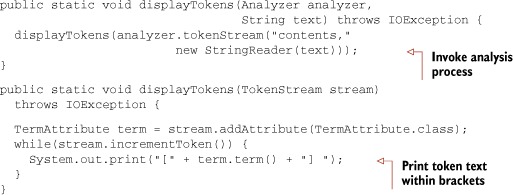
The real fun happens in AnalyzerUtils (listing 4.2), where the analyzer is applied to the text and the tokens are extracted. AnalyzerUtils passes text to an analyzer without indexing it and pulls the results in a manner similar to what happens during the indexing process under the covers of IndexWriter.
Generally you wouldn’t invoke the analyzer’s tokenStream method explicitly except for this type of diagnostic or informational purpose. Note that the field name contents is arbitrary in the displayTokens() method. We recommend keeping a utility like this handy to see what tokens emit from your analyzers of choice. In fact, rather than write this yourself, you can use our AnalyzerUtils or the AnalyzerDemo code for experimentation. The AnalyzerDemo application lets you specify one or more strings from the command line to be analyzed instead of the embedded example ones: