concept document in category search

This is an excerpt from Manning's book AI-Powered Search.
Domain-aware: understanding the entities, terminology, categories, and attributes of each specific use case and corpus of documents, not just leveraging generic statitistics on strings of text.
Instead of using a value of
1for each existing term, we can try to correct for this notion of "how well" a document matches by using the term frequency, which is a measure of the number of times a term occurs within each document. The idea here is that the more frequently a term occurs within a specific document, the greater the liklihood that the document is more related to the query.If we replace the feature weights in our vector with a count of the number of times each term occurs within the document or query, then we get the vectors in Listing 3.3
Figure 3.3. Term Frequency Calculation.
trepresents a term anddrepresents a document. TF equals the square root of the number of times the term appears in the current document, divided by the number of terms in the document. The numerator dampens the additional relevance contribution of each additional occurrence of a term, while the denominator normalized that dampened frequency to the document length so that longer documents with more terms are comparable to shorter documents with less terms.
Listing 3.10. Creating a collection. A collection contains a specific schema and configuration for holding a group of documents, and is the unit upon which we will add documents, search, rank, and retrieve search results.
import sys
sys.path.append('..')
from aips import *

collection = "cat_in_the_hat"
create_collection(collection)

#Ensure the fields we need are available
upsert_text_field(collection, "title")
upsert_text_field(collection, "description")

This is an excerpt from Manning's book Deep Learning for Search.
If, as a user, you want to find documents that contain the word “search,” how would the search engine return such documents? A not-so-smart way of doing that could be to go over each document’s content from the beginning and scan it until the search engine finds a match. But it would be very expensive to perform such text scans for each query, especially with many large documents:
Listing 2.2. Adding documents to the Lucene index
IndexWriterConfig config = new IndexWriterConfig(analyzer);             #1
IndexWriter writer = new IndexWriter(directory,
   config);                                                             #2

Document dl4s = new Document();                                         #3
dl4s.add(new TextField("title", "DL for search",
   Field.Store.YES));                                                   #4
dl4s.add(new TextField("page", "Living in the information age ...",
   Field.Store.YES));

Document rs = new Document();
rs.add(new TextField("title", "Relevant search", Field.Store.YES));
rs.add(new TextField("page", "Getting a search engine to behave ...",
   Field.Store.YES));

writer.addDocument(dl4s);                                               #5
writer.addDocument(rs);
How is this helpful for the user? Think about reading your favorite book in your native language, as opposed to reading it in a language that you studied at school. Even though you may be able to understand the content of the foreign-language version of the book, it may take you extra time and effort, and you may miss some subtle or especially difficult parts. The same applies to documents on the web. The Wikipedia entry for “artificial neural network,” for example, exists in many different languages, making it more easily understood by more users. Imagine a search engine that not only shows the English entry (which matches a query written in English), but also highlights the entry written in the native language of the user who entered the query. This search engine better serves the needs of more users.
Previous chapters used word embeddings (dense vectors representing words’ semantics), in particular the word2vec model, both to generate synonyms to enrich the text of documents to be indexed, and to define a ranking function that better captures the relevance of search results. In chapter 6, you saw a paragraph vector algorithm that learns dense vectors of sequences of text (entire documents or portions of them, such as paragraphs or sentences), and you used it to recommend similar content and create another (yet more powerful) ranking function. Now you’ll see each of those neural network algorithms applied to the task of translating text.

This is an excerpt from Manning's book Relevant Search: With applications for Solr and Elasticsearch.
We’re easily tricked into seeing search as a single problem. In reality, search applications differ greatly from one another. It’s true that a typical search application lets the user enter text, filter through documents, and interact with a list of ranked results. But don’t be fooled by superficial appearances. Each application has dramatically different relevance expectations. Let’s look at some common classes of search applications to appreciate that your application likely has its own unique definition of relevance.
In search applications, the notion of a document is central, because documents are items being stored, searched, and returned. Documents are what search is all about! When you issue a query to a search engine, you’re searching a collection of documents. These may be literal documents such as text files on a server. Or, more generally, documents may correspond to content such as:
At the core of a search engine is a data structure called the inverted index, analogous to the physical index at the back of this book. An inverted index is composed of two main pieces: a term dictionary and a postings list. The term dictionary is a sorted list of all terms that occur in a given field across a set of documents. For each term in the dictionary, there’s a corresponding list of documents that contain that term. This list of documents is referred to as the postings for a particular term. To understand this more clearly, let’s look at an example. Consider the set of documents shown in the following listing.
Listing 2.1. Documents
0. One shoe, two shoe, the red shoe, the blue shoe. 1. The blue dress shoe is the best shoe. 2. The best dress is the one red dress.The term dictionary and postings list for this simple set of documents are presented in the following two listings, respectively.
Because we know that we’re dealing with a search engine, we can be more specific about the steps in search’s ETL process. As illustrated in figure 2.5, these steps are extraction, enrichment, analysis, and indexing. Here, extraction is the process of retrieving the documents from their sources. The optional step of enrichment adds information to the documents useful for relevance. Analysis, as you saw earlier in this chapter, converts document text or data into tokens that enable matching. And finally, indexing is the process of placing data into those data structures.
We cover extraction and enrichment rather generically. Many times, the details of these steps depend entirely on how your source data is stored. Indexing concerns us only as it pertains to enabling/disabling features for enabling relevance. Analysis, however, has overriding importance to search relevance and is expounded on here. It’s also discussed at several points throughout the book. Recall, analysis transforms raw text and data from the documents into tokens. These tokens represent the document’s features. Engineering these to match features from a user’s query is critical to satisfy the user’s information need.

Crafting documents that can be easily retrieved can be just as important to relevance as manipulating the innards of the search engine. You’ll see in particular later in this book that content curation (chapter 10) and careful field construction (chapters 4–7) often dictate whether a relevance solution is easy or hard. The basis for this work lies in controlling the extraction and enrichment process, which we outline in the following two sections.
Where do your search documents come from? Data has many possible sources. If you’re fortunate, documents can be easily retrieved from a database or external data repository. In this case, extraction may be as simple as crafting a simple query to dump the necessary data. If you’re less fortunate, you might have to look for your documents—for instance, by crawling web pages or filesystems. And if you’re less fortunate still, you might find that your data is locked away behind files that require complex additional processing (such as MS Word documents, PDFs, or, worst of all, images of scanned text). But no matter the case, the end result of extraction is a set of documents to be sent to the search engine. Here, a document may be exactly like the document described in section 2.1.1, a collection of typed fields that contain various values. Or, for search engines such as Elasticsearch, these can be complex hierarchical documents represented as JSON.
The main takeaway is to own your extraction process. Extensive strategies, projects, plugins, and products exist for transforming data from a primary data source to a search engine. The permutations are so numerous that they’d fill dozens of books. We don’t cover these options. But you should understand how your extraction process works so that you can control the structure of your documents. Simply living with the structure of data as plopped into the search engine from your source systems can limit your options. In this book’s examples, we take control of this process by rolling our own code to extract documents from an external system and build search documents directly.

This is an excerpt from Manning's book Lucene in Action, Second Edition.
Once you have the raw content that needs to be indexed, you must translate the content into the units (usually called documents) used by the search engine. The document typically consists of several separately named fields with values, such as title, body, abstract, author, and url. You’ll have to carefully design how to divide the raw content into documents and fields as well as how to compute the value for each of those fields. Often the approach is obvious: one email message becomes one document, or one PDF file or web page is one document. But sometimes it’s less clear: how should you handle attachments on an email message? Should you glom together all text extracted from the attachments into a single document, or make separate documents, somehow linked back to the original email message, for each attachment?
Once you’ve worked out this design, you’ll need to extract text from the original raw content for each document. If your content is already textual in nature, with a known standard encoding, your job is simple. But more often these days documents are binary in nature (PDF, Microsoft Office, Open Office, Adobe Flash, streaming video and audio multimedia files) or contain substantial markups that you must remove before indexing (RDF, XML, HTML). You’ll need to run document filters to extract text from such content before creating the search engine document.
Interesting business logic may also apply during this step to create additional fields. For example, if you have a large “body text” field, you might run semantic analyzers to pull out proper names, places, dates, times, locations, and so forth into separate fields in the document. Or perhaps you tie in content available in a separate store (such as a database) and merge this for a single document to the search engine.
Another common part of building the document is to inject boosts to individual documents and fields that are deemed more or less important. Perhaps you’d like your press releases to come out ahead of all other documents, all things being equal? Perhaps recently modified documents are more important than older documents? Boosting may be done statically (per document and field) at indexing time, which we cover in detail in section 2.5, or dynamically during searching, which we cover in section 5.7. Nearly all search engines, including Lucene, automatically statically boost fields that are shorter over fields that are longer. Intuitively this makes sense: if you match a word or two in a very long document, it’s quite a bit less relevant than matching the same words in a document that’s, say, three or four words long.
Lucene provides an API for building fields and documents, but it doesn’t provide any logic to build a document because that’s entirely application specific. It also doesn’t provide any document filters, although Lucene has a sister project at Apache, Tika, which handles document filtering very well (see chapter 7). If your content resides in a database, projects like DBSight, Hibernate Search, LuSQL, Compass, and Oracle/Lucene integration make indexing and searching your tables simple by handling the Acquire Content and Build Document steps seamlessly.
The textual fields in a document can’t be indexed by the search engine just yet. In order to do that, the text must first be analyzed.
A document is Lucene’s atomic unit of indexing and searching. It’s a container that holds one or more fields, which in turn contain the “real” content. Each field has a name to identify it, a text or binary value, and a series of detailed options that describe what Lucene should do with the field’s value when you add the document to the index. To index your raw content sources, you must first translate it into Lucene’s documents and fields. Then, at search time, it’s the field values that are searched; for example, users could search for “title:lucene” to find all documents whose title field value contains the term lucene.
Suppose your documents have an author field, but sometimes there’s more than one author for a document. One way to handle this would be to loop through all the authors, appending them into a single String, which you could then use to create a Lucene field. Another, perhaps more elegant way is to keep adding the same Field with different value, like this:
Document doc = new Document();
for (String author : authors) {
  doc.add(new Field("author", author,
                    Field.Store.YES,
                    Field.Index.ANALYZED));
}
This is perfectly acceptable and encouraged, as it’s a natural way to represent a field that legitimately has multiple values. Internally, whenever multiple fields with the same name appear in one document, both the inverted index and term vectors will logically append the tokens of the field to one another, in the order the fields were added. You can use advanced options during analysis that control certain important details of this appending, notably how to prevent searches from matching across two different field values; see section 4.7.1 for details. But, unlike indexing, when the fields are stored they’re stored separately in order in the document, so that when you retrieve the document at search time you’ll see multiple Field instances.
Let’s look at how to create a new index and add documents to it. There are two methods for adding documents:
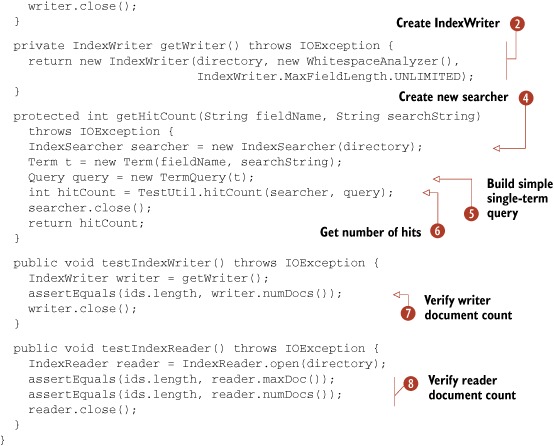
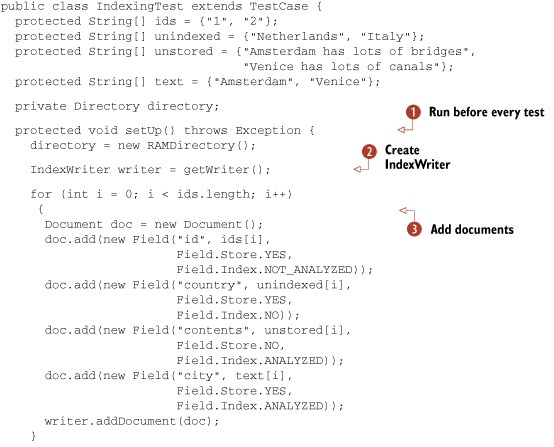
addDocument(Document)—Adds the document using the default analyzer, which you specified when creating the IndexWriter, for tokenization. addDocument(Document, Analyzer)—Adds the document using the provided analyzer for tokenization. But be careful! In order for searches to work correctly, you need the analyzer used at search time to “match” the tokens produced by the analyzers at indexing time. See section 4.1.2 for more details. Listing 2.1 shows all the steps necessary to create a new index and add two tiny documents. In this example, the content for the documents is contained entirely in the source code as Strings, but in the real world the content for your documents would typically come from an external source. The setUp() method is called by the JUnit framework before every test.