concept match in category search

This is an excerpt from Manning's book Relevant Search: With applications for Solr and Elasticsearch.
A clause of type MUST has to have a match inside a document; otherwise, the document isn’t considered a match. A clause of type SHOULD might or might not have a match in a given document, but documents that do have SHOULD clause matches are ranked higher than those that don’t. Any document that contains a match for a MUST_NOT clause won’t be considered a match for the search results even if it does match a MUST or a SHOULD clause. A BooleanQuery can have any number of SHOULD, MUST, and MUST_NOT clauses. But if a query doesn’t have a MUST clause, a document is considered a match only if one or more of the SHOULD clauses match.
against the inverted index snippet from the token stream for Fire with Fire, you see exactly where the match occurs:
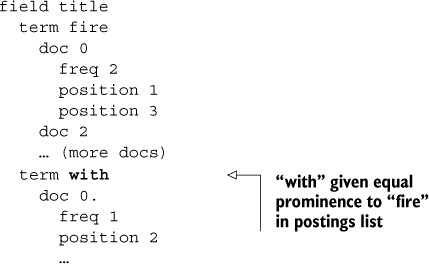
The clause title:with pulls in doc 0, Fire with Fire, from the inverted index. Recalling how term matches work, you can start to understand the mechanics here. Our document is listed under with in the index. Therefore, it’s included in the search results along with other matches for with. As we discussed in the previous chapter, this is an entirely mechanical process. Of course, to English speakers, a match on with isn’t helpful and will leave them scratching their heads about why such a noisy word was considered important in matching.
What you’re left with is a set of operations on the matches themselves. Internally, these operations reflect queries that wrap other queries. These wrapping queries are known as compound queries. Compound queries allow us to express how different features represented by the underlying term-match scores relate to each other mathematically. They reflect the query strategy you’ve already seen:
((title:basketbal title:cartoon title:aliens)^10.0) |
 (overview:basketbal overview:cartoon overview:aliens)
After combining the matches, they in turn can be combined at arbitrary depth by other compound queries to create even more-complex query scoring and matching. A great deal of relevance engineering is learning how a Query DSL query maps to a set of compound queries.
If you pull back the veil and examine inside a match, you see a different sort of calculation happening. The scoring begins to look more cryptic, filled with deeper search-engine jargon. At this point, you’re seeing a more fundamental reflection of the information retrieval intelligence built into the search engine. At this level, you begin to see information about match statistics for a field. These matches are the basic building blocks of the scoring calculation—hopefully, accurately reflecting the strength of a particular latent feature in the text.
0.03975798, weight(overview:alien in 1289) [PerFieldSimilarity], result of:
  0.03975798, score(doc=1289,freq=1.0 = termFreq=1.0
), product of:
  0.03382846, queryWeight, product of:
    4.701128, idf(docFreq=70, maxDocs=2875)
    0.0071958173, queryNorm
  1.175282, fieldWeight in 1289, product of:
    1.0, tf(freq=1.0), with freq of:
      1.0, termFreq=1.0
    4.701128, idf(docFreq=70, maxDocs=2875)
    0.25, fieldNorm(doc=1289)
Again, you might be terrified! Don’t fret. We cover a theoretical backing for these numbers next, and after that, you’ll be able to compare matches with ease. You’ll be able to determine why some field matches seem to convey more strength than others.

This is an excerpt from Manning's book Lucene in Action, Second Edition.
Don’t underestimate the importance of result presentation. Simple details, like failing to highlight matches in the titles and excerpts, or using a small font and cramming too much text into the results, can quickly kill a user’s search experience. Be sure the sort order is clearly called out and defaults to an appropriate starting point (usually relevance). Be fully transparent: if your search application is doing something “interesting,” such as expanding the search to include synonyms, using boosts to influence sort order, or automatically correcting spelling, say so clearly at the top of the search results and make it easy for the user to turn it off.
public void testGrouping() throws Exception {
  Query query = new QueryParser(
      Version.LUCENE_30,
      "subject",
      analyzer).parse("(agile OR extreme) AND methodology");
  TopDocs matches = searcher.search(query, 10);

  assertTrue(TestUtil.hitsIncludeTitle(searcher, matches,
                                       "Extreme Programming Explained"));
  assertTrue(TestUtil.hitsIncludeTitle(searcher,
                                       matches,
                                       "The Pragmatic Programmer"));
}
While searching, span queries track more than the documents that match: the individual spans, perhaps more than one per field, are also tracked. Contrasting with TermQuery, which simply matches documents, SpanTermQuery matches exactly the same documents but also keeps track of the positions of every term occurrence that matches. Generally this is more compute-intensive. For example, when TermQuery finds a document containing its term, it records that document as a match and immediately moves on, whereas SpanTermQuery must enumerate all the occurrences of that term within the document.
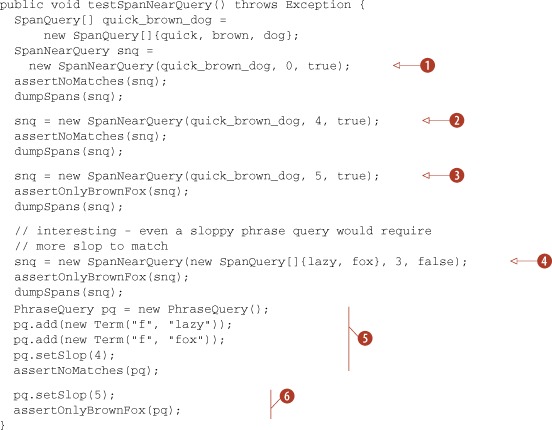


The SpanNotQuery excludes matches where one SpanQuery overlaps another. The following code demonstrates: