concept text in category search

This is an excerpt from Manning's book AI-Powered Search.
Domain-aware: understanding the entities, terminology, categories, and attributes of each specific use case and corpus of documents, not just leveraging generic statitistics on strings of text.
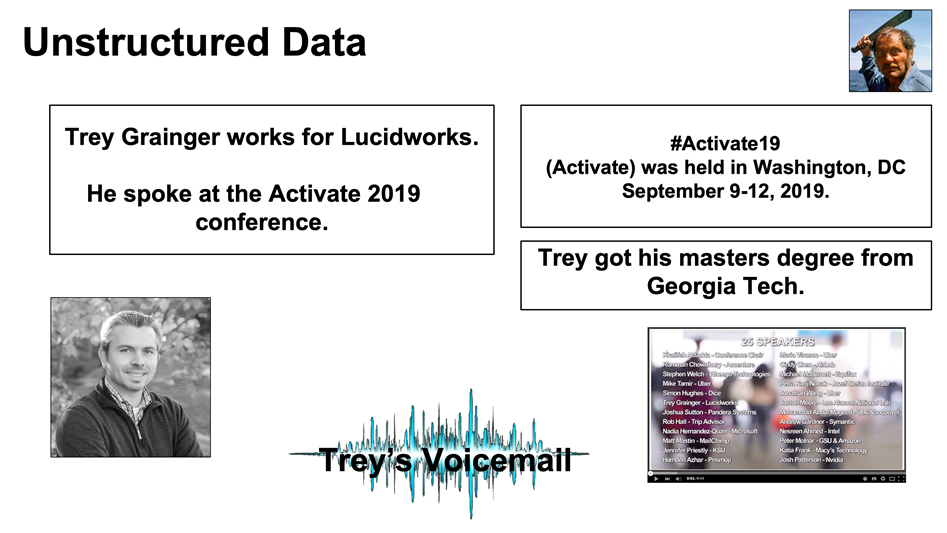
Figure 2.2. Multiple types of unstructured data. In addition to the text from the last example, we now see images, audio, and video, which Are other forms of unstructured data.

This is an excerpt from Manning's book Deep Learning for Search.
Humans generally have a hard time remembering all the words contained in a book, although we can easily tell a book’s topic by reading a few paragraphs from the book or even from looking at the preface or foreword. Computers tend to behave the opposite way. They can easily store large amounts of text and “remember” all the words contained in millions of pages so that they can be used while searching; on the other hand, they aren’t so good at extracting information that’s implicit, scattered, or not directly formulated in a given piece of text, such as which category a book belongs to. For example, a book about neural networks may never mention “artificial intelligence” (although it would probably refer to ML). But it would still belong to the broad category of “books about artificial intelligence.”
Let’s first look at the task computers can do well already: extracting and storing text fragments (also known as terms) from streams of text. You can think of this process, called text analysis, as breaking down the text of a book into all of its constituent words. Imagine having a tape on which the contents of a book are written in a stream, and a machine (the text analysis algorithm) into which you insert such tape as input. You receive many pieces of such tape as output, and each of those output pieces contains a word or a sentence or a noun phrase (for example, “artificial intelligence”); you may realize that some of the words written on the input tape have been eaten by the machine and not outputted in any form.
In chapter 1, you saw how a user can express an information need as a variety of slightly different versions, and how even small changes in the way a query is written can influence which documents are returned first. So when training a neural network to generate output queries from input queries, it’s useful to go beyond just the words in a query, apart from their context. The aim is to generate text queries that are semantically similar to the input query; doing so enables the search engine to return search results based on different ways of expressing the same fundamental need (via the query). You can use an RNN to generate text in natural language and then integrate that generated text into a search engine. The rest of this chapter will teach you how RNNs work, how to tune them to generate alternative queries, and how an RNN-backed search engine offers improved effectiveness in returning relevant results for end users.
Put yourself in the shoes of someone looking at both the queries and the results: as the user types a query, if you saw the user entering “movie Zemeckis future,” you could immediately tell they should have typed a query like “back to the future” instead. That’s exactly the type of training example you can pass to a neural network, composed of an input (“movie Zemeckis future”) and a target output (“back to the future”). You can preprocess the search log so that the target alternative query to be generated by the neural network is the query that would return the best result. Doing so will likely help reduce the number of queries with zero results, because the hints in the alternative queries don’t come from the user-generated queries but rather from the text of relevant documents. To build training examples, you associate a query with the titles of the top two or three relevant documents from the search log, as in figure 3.3.
You may wonder, why not use the search engine instead of a neural network to generate alternative queries? That approach would constrain the set of alternative queries for a certain input text to what the search engine can already do in terms of matching. For example, “movie Zemeckis future” will always give the same set of alternative queries if you use the search engine to generate them. In the case of the example query, that would work—but what if the user typed “movie spielberg future” (confusing the movie’s producer with its director)? There’s no match in the search engine with the term “spielberg.” So the search engine might return a lot of movies Steven Spielberg has directed that involve the term “future,” but it wouldn’t return Back to the Future. The key takeaway is that you aren’t limited to using queries to train the neural network, as long as the target output is correlated with the input in a way that’s useful for representing an alternative query.
Also consider the hidden structures in text. Text from Shakespearean comedies usually has the following pattern: CHARACTERNAME : SOMETEXT PUNCTUATION CR, whereas queries are just sequences of words followed by a carriage return. Queries can contain both formal and informal sentences, with words like “myspaceeee” that can confuse the RNN. So whereas the Shakespearean text needed only one hidden layer to give okay results, the LSTM needed at least two hidden layers to perform in a useful way.
> q: documenti per entrare negli Stati Uniti                              #1
> detected language 'ita' for query                                       #2
> found 1 translation
> t: documents to enter in the US                                         #3
> 'documenti per entrare negli ...' parsed as:                            #4
 '(text:documenti text:per text:entrare text:negli text:Stati text:Uniti)'
 OR
 '(text:documents text:to text:enter text:in text:the text:US)'

This is an excerpt from Manning's book Relevant Search: With applications for Solr and Elasticsearch.
We’re easily tricked into seeing search as a single problem. In reality, search applications differ greatly from one another. It’s true that a typical search application lets the user enter text, filter through documents, and interact with a list of ranked results. But don’t be fooled by superficial appearances. Each application has dramatically different relevance expectations. Let’s look at some common classes of search applications to appreciate that your application likely has its own unique definition of relevance.
GET example/_analyze?analyzer=standard_with_acronyms
     &text=I.B.M. versus IBM versus ibm

[ibm] [versus] [ibm] [versus] [ibm]
Geo search uses a similar strategy, except that the tokens encode 2D information rather than linear 1D information. It may seem surprising that a search engine can encode 2D information. After all, the wheelhouse of search is text, and text is linear in nature. But besides the process of creating tokens, nothing is changed; the inverted index and the search algorithms work just the same as always.
How exactly does relevance ranking sidestep the precision/recall trade-off? Analysis not only controls matching, but also manipulates TF × IDF relevance ranking to more accurately reflect the strength of a given feature in text (or any other form of tokenizable data).

This is an excerpt from Manning's book Lucene in Action, Second Edition.
Suppose you need to search a large number of files, and you want to find files that contain a certain word or a phrase. How would you go about writing a program to do this? A naïve approach would be to sequentially scan each file for the given word or phrase. Although this approach would work, it has a number of flaws, the most obvious of which is that it doesn’t scale to larger file sets or cases where files are very large. Here’s where indexing comes in: to search large amounts of text quickly, you must first index that text and convert it into a format that will let you search it rapidly, eliminating the slow sequential scanning process. This conversion process is called indexing, and its output is called an index.

One of the more mundane yet vital steps when building a search application is extracting text from the documents you need to index. You might be lucky to have an application whose content is already in textual format or whose documents are always the same format, such as XML files or regular rows in a database. If you’re unlucky, you must instead accept the surprisingly wide plethora of document formats that are popular today, such as Outlook, Word, Excel, PowerPoint, Visio, Flash, PDF, Open Office, Rich Text Format (RTF), and even archive file formats like TAR, ZIP, and BZIP2. Seemingly textual formats, like XML or HTML, present challenges because you must take care not to accidentally include any tags or JavaScript sources. The plain text format might seem simplest of all, yet determining its character set may not be easy.
In the past it was necessary to “go it alone”: track down your own document filters, one by one, and interact with their unique and interesting APIs in order to extract the text you need. You’d also need to detect the document type and character encoding yourself. Fortunately, there’s now an open source framework called Tika, under the Apache Lucene top-level project, that handles most of this work for you.
Tika has a simple-to-use API for providing a document source and then retrieving the text filtered from it. In this chapter we’ll start with an overview of Tika, then delve into its logical design, API, and tools. After showing you how to install Tika, we’ll discuss useful tools that let you filter a document without writing any Java code. Next we’ll explore a class that extracts text programmatically and produces a corresponding Lucene document. After that, we’ll examine two approaches for extracting fields from XML content, and then we’ll wrap up by considering some of Tika’s limitations and visiting a few alternative document filtering options.
If your document’s text could be very large in size, consider using the Tika.parse utility method (described in the next section) instead. As you can see, it’s quite simple using Tika’s programmatic APIs to extract text and build a Lucene document. In our example, we used the parse API from AutoDetectParser, but Tika also provides utility APIs that might be a useful alternate path for your application.
<FilteredQuery>
  <Query>
    <UserQuery fieldName="text">"Swimming pool"</UserQuery>
  </Query>
  <Filter>
    <TermsFilter fieldName="dayOfWeek">monday friday</TermsFilter>
  </Filter>
</FilteredQuery>