concept project in category software development
This is an excerpt from Manning's book Writing Great Specifications: Using Specification by Example and Gherkin.
A popular first instinct meant to defend a project against ambiguity and insufficient planning is to try to design and plan as much as we can up front. I call that over--specification.
An executable specification evolves throughout a project’s life cycle. As the project progresses, executable specifications become more precise. The later the life cycle’s phase, the greater the need for detail.

This is an excerpt from Manning's book Agile Metrics in Action: How to measure and improve team performance.
One of the strengths of agile development methods is the idea that you are delivering a living product, not completing a project. A project is a defined set of time within which something is developed and tracked; a product is a living thing that continues to change to meet the needs of the consumer. This is shown in figure 1.2.
A good example of a project would be building a bridge. It gets designed, built to spec, and then it stands likely unchanged for a long time. Before you start the project you design exactly what you need so you can understand the total cost, and then you track the progress against the plan to make sure you stay on schedule and budget. This process is the art of project management.
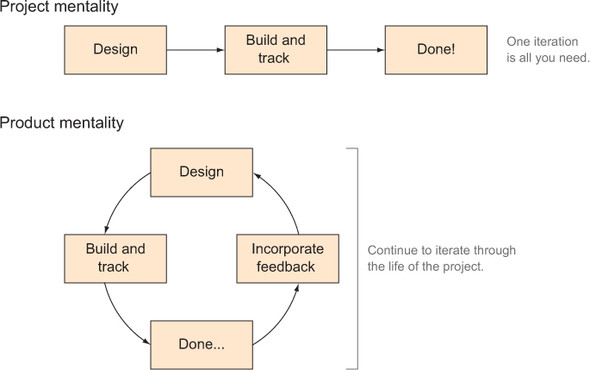
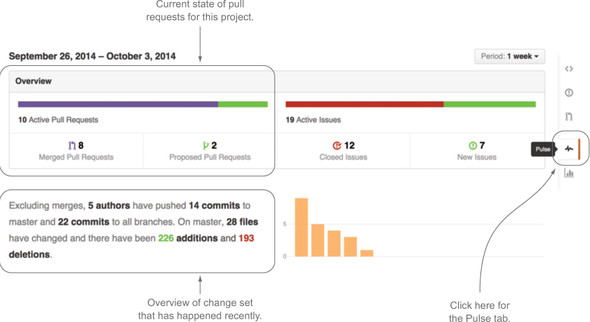
Figure 4.10 shows the GitHub Pulse tab, which gives you an overview of the current state of the project. The most valuable section here is the pull request overview on the left side of the page.
Figure 4.10. The Pulse page on GitHub gives you info on pull requests, issues, and amount of change. This is from the GoCD repo (github.com/gocd/gocd/pulse/weekly).
The Pulse tab is pretty cool, but just like checking your own pulse, it only tells you if the project you’re looking at is alive or not. In the context of GitHub, where open source projects tend to live, it’s important to know if a project is alive or dead so potential consumers can decide if they want to use it. To get data that’s more relevant for your purposes, check out the Graphs section. It has the typical breakdowns of CLOC and LOC that you’d expect to see from your source control project. Let’s start with contribution over time, shown in figure 4.11.

This is an excerpt from Manning's book Agile ALM: Lightweight tools and Agile strategies.
Lack of transparent processes— If you analyze how the workflows in companies and projects are implemented with tools—how the processes are implemented—you’ll see that there are many proprietary scripts that drive and configure each tool, but that those individual tools are connected in clumsy and often proprietary ways. Single scripts can be versioned, but the whole integration itself can’t be versioned or managed explicitly. This is suboptimal, because the companies’ processes are part of their core assets, and you can’t improve anything that you can’t identify, describe, and measure.
Validate— Validate that the project is correct and all necessary information is available Compile— Compile the source code of the project
[WARNING] Rule 0: org.apache.maven.plugins.enforcer.RequireJavaVersion _
     failed with message:
Project needs to be compiled with Java 6
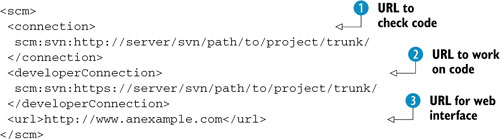
Before you can use the Release plug-in for branch creation, you must configure your source control management (which is named SCM in Maven) settings inside the project’s pom.xml file. See the following listing.

This is an excerpt from Manning's book Specification by Example: How Successful Teams Deliver the Right Software.
At BNP Paribas, the Sierra project is another great example of how Specification by Example leads to high-quality products. Sierra is a data repository for bonds that consolidates information from several internal systems, rating agencies, and other external sources and distributes it to various systems inside the bank. Various systems and organizations used the same terms with different meanings, which caused a lot of misunderstanding. The first two attempts to implement the system failed, according to Channing Walton, one of the developers on the team that helped make the third attempt a success. The third effort succeeded partially because Specification by Example enabled the team to tackle complexity and ensure a shared understanding. Product quality of the end result was impressive. The project has been live since 2005 “with no major incidents in production,” according to Andrew Jackman, a consultant developer on the Sierra project. Most people currently working on the Sierra project were not there when the project started, but the level of quality is still very high.


This is an excerpt from Manning's book Continuous Integration in .NET.
Figure 1.12. You should start with a blank solution. Doing so will give you the ability to name it differently than the project inside and to place the projects where you want them. Don’t take a shortcut by creating a project first and letting Visual Studio create the solution file for you. You’ll end up with the Solution Explorer window shown.
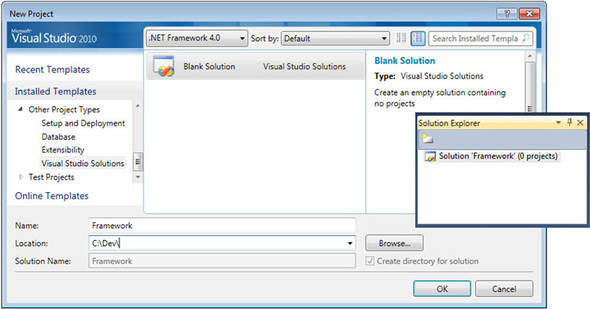
Consider organizing your project directory a little better than the Visual Studio defaults. If you create a project, you’ll get a solution file named after the project. Visual Studio will also create a directory under the solution file, again named after the project, and place the project file inside. That may be all right for a quick shot, but you should consider taking this structure under your control.
First, if you plan to have more than one project in a solution, consider naming the solution differently than any of the projects. Second, remember the golden rule of CI: keep everything you need to integrate inside the repository. To meet this rule, you’ll need a directory to keep all your stuff in. You can name it lib or tools. And you can go even further, as you can see in figure 1.11.
CCNet lets you define multiple projects. In CCNet nomenclature, a project is a separate unit of works that CCNet performs. Define a project for the financial calculator Framework project as shown here.
1. TeamCity needs to know how you’ll refer to the project (see figure 4.15). This doesn’t have to be the same name as the Visual Studio project. In fact, you probably want to make the name something more understandable, because it’ll be used in the feedback mechanism we’ll discuss in chapter 5. Enter the name and description for the project, and click Create.

This is an excerpt from Manning's book Becoming Agile ...in an imperfect world.
Working software is the primary measure of progress. If you recall, the customer is primarily interested in working software. So why would you measure progress in terms of anything else? Today, the progress of most software development efforts is measured in terms of their plan. When requirements are complete, the managers say the project is 30 percent complete. In a plan-driven world, this may be correct; but in a value-driven world, where the value is the working software, the project is 30 percent complete when 30 percent of the required functionality is coded, integrated, tested, and deployed. This is a fundamental difference between the agile value-driven world and the traditional plan-driven world. Agile processes promote sustainable development. The sponsors, developers, and users should be able to maintain a constant pace indefinitely. In traditional development, the team often has to work late toward the end of a project, although at the beginning of the project they may have taken 2-hour lunch breaks. This is primarily due to the way project activities are distributed across the project’s lifecycle. There isn’t much for developers to do at the beginning of the project, but at the end everything is put on their shoulders because of tight delivery schedules. With agile development, you deliver every two weeks or so, and development begins with the first iteration. Efforts are distributed more consistently throughout the project lifecycle, which leads to a constant development pace for the team.
Discovered a problem deep into a project, and had a team member tell you they knew about the issue all along
In our experience, there is usually time to refine feature information after an idea makes it through the feasibility gateway. On occasion, you may have a project that must go directly from feasibility to planning; this may be due to project urgency, or a project may be so small that refinement can occur during the Planning phase.

This is an excerpt from Manning's book Test Driven: Practical TDD and Acceptance TDD for Java Developers.
Proceeding test-first in tiny steps makes sure that we will hardly ever need to touch the debugger. We know exactly which couple of lines we added that made the test break and are able to drill down into the source of the problem in no time, avoiding those long debugging sessions we often hear about in fellow programmers’ war stories. We’re able to fix our defects sooner, reducing the business’s cost to the project. With each missed defect costing anywhere from several hundred to several thousand dollars,[4] it’s big bucks we’re talking here. Not having to spend hours and hours looking at the debugger allows for more time to be spent on other useful activities.
Building software in increments and, especially, in increments dictated by the perceived cost and benefit of business functionality, is not something you can do with the traditional “design everything up front, considering every possible twist, so that the architecture is rock solid and supports all the features the product will have” approach to design. We can’t build the complete, perfect architecture for the envisioned end product in a single run. Only the simplest or most thoroughly understood project makes it possible to get the architecture right early on. We need to iterate, adding to our design a small step at a time.