concept software in category software development

This is an excerpt from Manning's book Seriously Good Software: Code that works, survives, and wins.
The core idea of this book is to convey the mindset of an experienced developer by comparing and contrasting different code qualities (aka nonfunctional requirements). Most of these qualities—like performance or readability—are universal, in the sense that they’re relevant to any piece of software. To emphasize this fact, you’ll revisit the same recurring example in each chapter: a simple class representing a system of water containers.
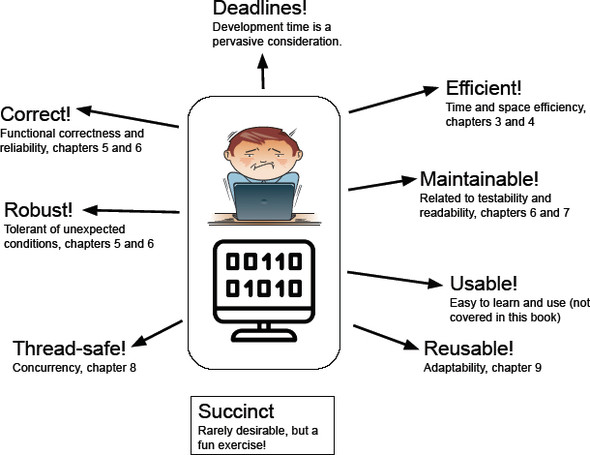
The general solution can support future evolutions of your product. You should handle this motivation with care. As I mentioned before, programmers and designers are inclined to overengineer and overgeneralize software. The extreme-programming YAGNI motto—You aren’t gonna need it—recognizes and challenges this tendency.
This is an excerpt from Manning's book Writing Great Specifications: Using Specification by Example and Gherkin.
To execute any tests, you first need to make sure you have a test runner on board and that your programming environment is configured to make the tests pass. A test runner—in this case, Cucumber—is a type of software written to automatically test other software. In this section, you’ll install Cucumber and do the basic configuration required to execute any specifications.
Delivery teams are naturally competent in delivering software the right way. As an industry, we’ve developed tools, standards, and methodologies that make our designs beautiful and usable—and our code performant, secure, and easy to maintain. We keep getting better at refining and reinventing our best practices.
The benefits of SBE and Gherkin go far beyond reducing rework. You’ll get better insight into your business domain and reduce friction caused by inevitable translation costs that come up when a business requirement becomes working software. People made these tools and processes because they wanted to guarantee that the software they help build will make sense to customers. They wanted to make software that matters.

This is an excerpt from Manning's book Agile ALM: Lightweight tools and Agile strategies.
Running an unreliable, fragmented development process doesn’t empower a team to track and improve their work continuously. This is where software configuration management (SCM) can help. SCM helps improve the development process by tracking and controlling changes in the software. These processes are commonly implemented using version-control systems (VCS). SCM makes changes in the VCS visible, and it adds meta-information to the system to track why the change was made. Above all, baselines (identifying a specific version of the code suitable for release) and change-sets (linked to artifacts or work items) provide traceability to the development process and accelerate release management.
If Agile ALM is about creating and tracking software, in which phases do you create the software? Using functional release management, you set up a guideline for how and when you’ll provide releases and how you’ll assign content to them. Together, functional release management and technical release management support and enable the development.
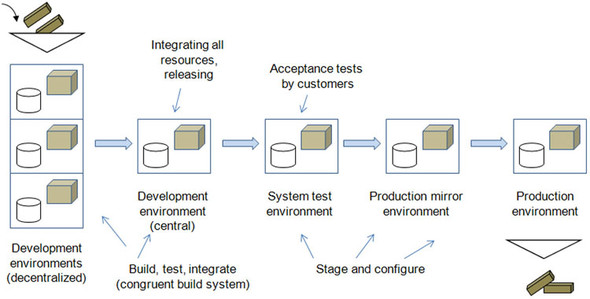
Staging software is the process of completely and consistently transferring a release with all its configuration items from one environment to another. The process of staging releases consists of deploying software to different staging levels, especially different test environments. Staging also involves configuring the software for various environments without needing to recompile or rebuild the software. Staging is necessary to transport the software to production systems in high quality.
It’s not always necessary to put a release that won’t be shipped to the customer into the complete releasing process, including promoting it on higher staging environments. But like other processes, the releasing process should be done automatically and continuously. If you skip deploying the software on higher staging environments, you’ll miss an important synchronization point. You’re done with delivering the release only after you have put the software onto the target machine with all its facets (including, for example, creating a technical user account that’s used by the system) and verified that it runs successfully. Many Agile projects try to optimize the cycle time between development software and the point when the end user is able to use the software in production. But having a software release available on a test environment can be of much value, especially if you don’t need or don’t want to put every single release into production.
Only a deployed and available software release illustrates the current status. No substitute exists for that—not any working software in a workspace, and surely no specification or other document in Microsoft Word. Often, and particularly for those projects in the biggest chaos, a complete deployment on a real machine is the only thing that demonstrates the quality of the software and what set of features is implemented and available.
Figure 3.6. Staging software: requirements will be implemented in the developers’ workspaces. The central development environment integrates all respective configuration items and is the base for releasing. Software is staged over different environments by configuration, without rebuilding. All changes go through the entire staging process.

This is an excerpt from Manning's book Specification by Example: How Successful Teams Deliver the Right Software.
In the last decade, the software development community has strived to build software the “right” way, focusing on technical practices and ideas to ensure high-quality results. But building the product right and building the right product are two different things. We need to do both in order to succeed.
Specification by Example is a set of process patterns that facilitate change in software products to ensure the right product is delivered effectively. The key patterns that are commonly shared by the most successful teams that I interviewed in researching this book, along with their relationships, are shown in figure 2.1. Most of the teams implemented new process ideas by trial and error during their search for ways to build and maintain software more efficiently. By revealing the patterns in their processes, I hope to help others implement these ideas deliberately.

This is an excerpt from Manning's book Continuous Integration in .NET.
To better understand the CI process, you should have a simple but real-world example of software that you can put under source control in the next chapter and eventually integrate continuously. At this early point, you’ll only create a Visual Studio solution and the project files. You’ll add the code in later chapters.
You want a sample application that isn’t trivial but is as easy as possible for demonstration purposes. How about a leasing/credit calculator? It may not be a tool that’ll prevent the next worldwide financial crisis, but it’s a piece of software that’ll provide a straightforward answer to a simple question: how much will you pay monthly for your dream car or house?
Various tests ensure that the software works as designed. This is important. But these tests say little about how maintainable the software is. Will it be easy to extend with new features? Is the code readable to others besides the developer who wrote it? Is it properly commented and understandable? Does it follow the rules? To answer all these questions, you may consider doing the static code analysis automatically and integrating it into the CI process. This is the topic of the next chapter, “Analyzing the code”
When you know what you’re testing, and your tests are based on the actual code, you’re doing white-box testing. If the inner workings of a piece of software you’re testing are unknown to you, that’s black-box testing. Unit testing is most definitely a white-box test methodology. Regardless of whether you do test-driven development (TDD), you know the implementation details of what you’re testing. We’ll focus in this chapter on black-box testing. Usually, black-box tests are functional tests—they don’t care how the software works as long it meets the requirements.
The test process that begins with unit testing usually continues with integration tests (see figure 7.1). Integration tests usually involve testing the interoperability between a few modules. The modules are usually thoroughly covered with unit tests, and integration testing lays the groundwork for the next step: system testing. System tests are roughly equivalent to the functional tests we mentioned earlier. They occur in fully integrated software, preferably in the deployment environment, and ensure that the software works as designed and meets all the requirements.


This is an excerpt from Manning's book Becoming Agile ...in an imperfect world.
We are uncovering better ways of developing software by doing it and helping others do it. Through this work we have come to value:
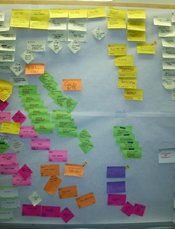
Figure 8.1. You need to document your current methodology before you try to tailor it. You may have existing documentation, but there is a good chance it’s out of date and doesn’t represent how you develop software today. You can use cards of various colors to differentiate your practices and improvement ideas.
The answers to these questions lead to the conclusion that agile level 2 must reflect an evolutionary approach to development and represent the agile value of delivering software early and continuously. This decision is based on the fact that most agile software practices depend on development being conducted in an evolutionary manner, rather than following the big-bang approach.

This is an excerpt from Manning's book Test Driven: Practical TDD and Acceptance TDD for Java Developers.
Figure 1.1. TDD is a technique for improving the software’s internal quality, whereas acceptance TDD helps us keep our product’s external quality on track by giving it the correct features and functionality.
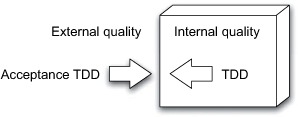
As we can see from figure 1.1, these two distinct levels on which we test-drive the software collectively improve both the product’s internal quality and the external, or perceived, quality. In the following sections, we’ll discover how TDD and acceptance TDD accomplish these improvements. Before we dig deeper into the techniques, let’s first concentrate on how these techniques help us overcome the challenge of being able to deliver.
The design of software is not just about structure. It’s also about the suitability of the software for the current needs. Software that knows how to boil water, cook rice, deep-fry vegetables, and marinate a chicken is not the perfect match for someone who’s only interested in getting a cup of tea. While it probably doesn’t bother you that your car’s engine has two extra valves on stand-by for those occasions when extra acceleration is needed, it certainly would bother you if you needed to change all the valves from your engine. That’s the cost of over-engineering software.
You’re spending money on developing stuff that’s not really needed, and you’re spending money on having to deal with the added complexity while working on that over-engineered piece of code. You aren’t going to need it yet, so why put it in? Instead, put those extras on a list somewhere so you don’t forget them. It might be that many of them never end up in the software—and for a good reason.
Contrary to popular belief, testing does not need to be a burden.[9] However, it’s true that manual testing can be slow and error-prone, which is what turns developers off about testing in general. Experience has shown that developers (and dedicated testers as well for that matter) tend to skip some aspects of manual tests, relying on their intuition that those tests could not have been broken by whatever change it is they’re testing. Luckily, we’re in the business of automating stuff with software so we’re best positioned to help ourselves by making the computer turn testing into something that’s fast and automated!