concept field in category solr

This is an excerpt from Manning's book Relevant Search: With applications for Solr and Elasticsearch.
In a short time, you experienced the product of many thousands of hours of engineering effort. You engaged with the culmination of an even larger body of academic research that goes back a century in the field of information retrieval. Standing on the shoulders of giants, you sifted through millions of pieces of information—the entire human collection of information on the topic—and found the best reviewed and most popular TV in mere minutes.
The previous chapter introduced you to signals and multifield search. Signals measure criteria such as “Is the search an exact title match?” or “Does the search mention a specific actor or director?” These sorts of signals depend on your ability to control querying and construct fields to model users’ intent. We called this process signal modeling. Once fields correspond cleanly to signals, only then can you begin to balance them in a multifield search strategy.
The previous chapters focused heavily on fields as the central unit of relevance. But users don’t think in terms of fields. Users think of their search terms as the central component to search. Users aren’t mired in the details of your database or application. They’ve given you a few brief moments to satisfy them, and they expect you to meet them at their simpler understanding of search. Thus, term-centric search differs from other forms of multifield search by placing the search terms—not the structure of the content—front and center.
Term-centric search comes at search from a different point of view. Figure 6.2 illustrates the differences in this approach. Instead of searching every field with the full search string, term-centric search acts on the search string like a term-by-term matchmaker, finding each search term’s ideal match. As each search term might find its ideal match in a different field, the final relevance score is the blended result of several field matches. A search for “basketball cartoon” might match basketball in a document’s title field, and cartoon in the document’s body field, yielding a blended term-by-term score of fields. This way, term-centric search focuses more on criteria specified by users and less on the specific fields. Users don’t need fields; they just want their search terms to match something! Anything! After all, if every search term finds its ideal match, won’t we reach search relevance nirvana?
Figure 6.2. Term-centric search applies each search term to a combination of fields, ultimately generating a score that picks a blended, term-by-term score of fields in the document.
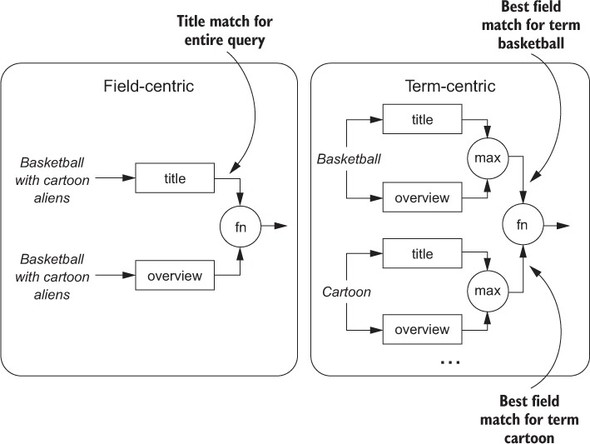
If only it were that simple! In reality, the promise of term-centric search carries a bit of a lie. Users think they don’t care about fields, yet they still care about intelligently matching the various attributes associated with documents—people, locations, tags, and ideas. Users don’t think about it, but they still need many parts of field-centric search. Term-centric and field-centric methods form an important yin and yang to search. As you’ll see in this chapter, each has its limits and capabilities. The art of relevance is often applying a bit of both.
In this section, we examine one strategy for combining field-centric and term-centric effects: grouping similar, or like, fields together with a term-centric effect. These groupings are themselves combined with an outer field-centric search. Artfully grouping fields can be a way to sidestep field-centric search problems with just enough of a term-centric effect to prioritize more matches within the fields prone to albino elephant and signal discordance problems.
Note that if a user’s search term can match only a single field, then the problems of field-centric search go away. You can’t have albino elephant or signal discordance if search terms always find their ideal field. For example, a match for “Star Trek Patrick Stewart William Shatner” would be fine with field-centric search if you could guarantee that star trek matched in exactly one field (let’s call it text), while name-related terms such as patrick stewart and william shatner matched only in a field about people.
We call these groupings like fields. As we’ve discussed, your source data model doesn’t come with these straightforward groupings. It’s your job when signal modeling to group fields in such a way that albino elephant and signal discordance have little effect on the final solution. Your job too is to map signals to users’ general search expectations. By grouping like fields, you more closely approximate the higher-level signals users care about.
One way that a user is likely to think about ranking Star Trek matches, for example, is in groupings of like fields indicating that the ideal document

This is an excerpt from Manning's book Solr in Action.
Until now, we’ve talked about data, but in reality, search engines work with documents. In a search engine, a document is a self-contained collection of fields, in which each field only holds data and doesn’t contain nested fields. In other words, a document in a search engine like Solr has a flat structure and doesn’t depend on other documents. The flat concept is slightly relaxed in Solr, in that a field can have multiple values, but fields don’t contain subfields. You can store multiple values in a single field, but you can’t nest fields inside of other fields.
Many languages present challenges to text searching—some contain various forms of the same word that should all return in a search, some (such as French and Spanish) contain special accents, some (German and Dutch, for example) contain compound words made up of subwords, and some (such as Chinese, Japanese, and Korean) may have no whitespace between words to distinguish them from one another. Linguistic analysis can help overcome these complexities within your text by performing analysis using language-specific rules associated with the language(s) represented within your documents. Although Solr provides many preconfigured field types in its example schema.xml, these examples are designed to be used with only one language at a time. This chapter will cover the available language libraries in Solr and will also show how you can use them to create a powerful multilingual search experience that can even handle mixed-language content within a single document or field.
The MultiTextFieldLanguageIdentifierUpdateProcessor extends the LangDetect-LanguageIdentifierUpdateProcessor and adds the language prefixes into the content of the fields for which it’s detecting languages. The following listing shows how you would configure this update processor using the accompanying MultiText-Field-LanguageIdentifierUpdateProcessorFactory (not shown, but in the downloadable chapter code).
Listing 14.16. Configuring the MultiText language identifier in solrconfig.xml
<requestHandler name="/update" class="solr.UpdateRequestHandler">
  <lst name="invariants">
    <str name="update.chain">multi-langid</str>
  </lst>
</requestHandler>

<updateRequestProcessorChain name="multi-langid">
  <processor class=
      "sia.ch14.MultiTextFieldLanguageIdentifierUpdateProcessorFactory">
    <lst name="invariants">
      <str name="langid.fl">title,content</str>
      <str name="langid.langField">language</str>
      <str name="langid.whitelist">en,es,fr</str>
      <str name="langid.fallback">en</str>
    </lst>
    <lst name="defaults">
      <str name="mtf-langid.prependFields">content</str>
      <str name="mtf-langid.prependGranularity">fieldValue</str>
      <str name="mtf-langid.hidePrependedLangs">false</str>
    </lst>
  </processor>
  <processor class="solr.LogUpdateProcessorFactory" />
  <processor class="solr.RunUpdateProcessorFactory" />
</updateRequestProcessorChain>
The new supported settings include the ability to specify the list of fields which should have detected languages prepended automatically (mtf-langid.prependFields); the ability to specify whether language detection should happen per document, per field, or per field value (for multivalued fields) by setting the mtf-langid.prepend-Granularity equal to document, field, or fieldValue; and the ability to prevent the prepended languages from appearing in the stored version of your field. The following listing demonstrates how you would index example documents into Solr using the configuration from listing 14.16.
When you send documents and queries to Solr, the content for each field is analyzed based upon the field type defined for the field. This field type can contain a single analyzer per mode: index mode versus query mode versus multiTerm mode (for wildcard queries). In the case of multilingual content, however, it would be useful if you could specify multiple analyzers (one per language) for your content, because you sometimes want a fully separate analysis chain for each language (with separate CharFilter, Tokenizer, and TokenFilter configurations).